
# Let your board look before you publish — MijnEvent

  [Home](https://mijnevent.nl/en) / [Blog](https://mijnevent.nl/en/blog) / Let your board look before you publish   draft collaboration publishing event page 

# Let your board look before you publish

 A draft event used to be visible only to people with a management account. With a preview link you send the real page to your board or your client, with a clear banner and nothing on sale.

 [Jasper Koers](https://mijnevent.nl/en/author/jasper-koers) · 14 September 2026 · 4 min read 

  ![](https://regify-mijnevent.s3.eu-central-1.amazonaws.com/blog/covers/share-a-preview-before-publishing.webp)  Photo: [airfocus](https://unsplash.com/@airfocus?utm_source=MijnEvent&utm_medium=referral) / [Unsplash](https://unsplash.com/?utm_source=MijnEvent&utm_medium=referral)     In short

- Every draft event has a 'Share preview' button that produces a link with which somebody without an account can view the real event page.
- The recipient sees an amber banner reading 'Preview — not published yet', a disabled buy button and otherwise exactly what your audience will see.
- The preview page is not indexed by search engines, is left out of your visitor statistics, and ordering is blocked on the server as well.
- You can refresh the link (every earlier link stops working) or revoke it entirely; after publishing, the link simply forwards to the real page.

# "Can I show it to someone first?"

That is how it goes at most clubs: you set up the event, and before it goes live the chair wants a look. Or the treasurer, who wants to check the prices. Or the council, filling in a grant form and wanting to see what exactly is on offer.

Until now there was no decent answer to that. From the outside a draft event only shows "coming soon", so you fell back on screenshots — or worse, you published the event "just for a moment" to show it and took it down again.

Now every draft event has a button: **Share preview**.

# What the recipient sees

The button gives you a link. You forward it — by app, by email, in the group chat your board lives in. Whoever opens it sees the **real event page**: your text, your poster, your ticket types and prices, the date, the venue with its directions link. Exactly what your audience will see.

With two differences. At the top sits a clear amber banner: **"Preview — not published yet"**. It follows along in compact form while scrolling, so nobody forgets halfway down what they are looking at. And the buy button is switched off, with an explanation next to it.

No account is needed. The link carries an encrypted token; whoever has it may look.

# What does not happen

A preview link is deliberately a dead end for everything except looking:

- **Not findable.** The page carries `noindex`, so search engines leave it out. No social preview image is generated and no structured data is included — nothing can accidentally be found or shared that looks like a published event.
- **Nothing to buy.** The buy button is disabled, and the server refuses an order on an unpublished event regardless of what the page shows. Even the clever cannot get in early.
- **No noise in your numbers.** Visits through a preview link are left out of your visitor statistics. You start clean the moment you publish.

# Managing the link

The same dialog holds three things: the link itself (with a copy button), **Refresh link** and **Revoke link**.

- **Refresh** creates a new secret. Every previously shared link stops working immediately — useful when it travelled further than you intended.
- **Revoke** removes the preview link altogether; the page falls back to "coming soon".
- **Publishing** leaves the link alone: from that moment it forwards to the real page. Nobody needs a new link.
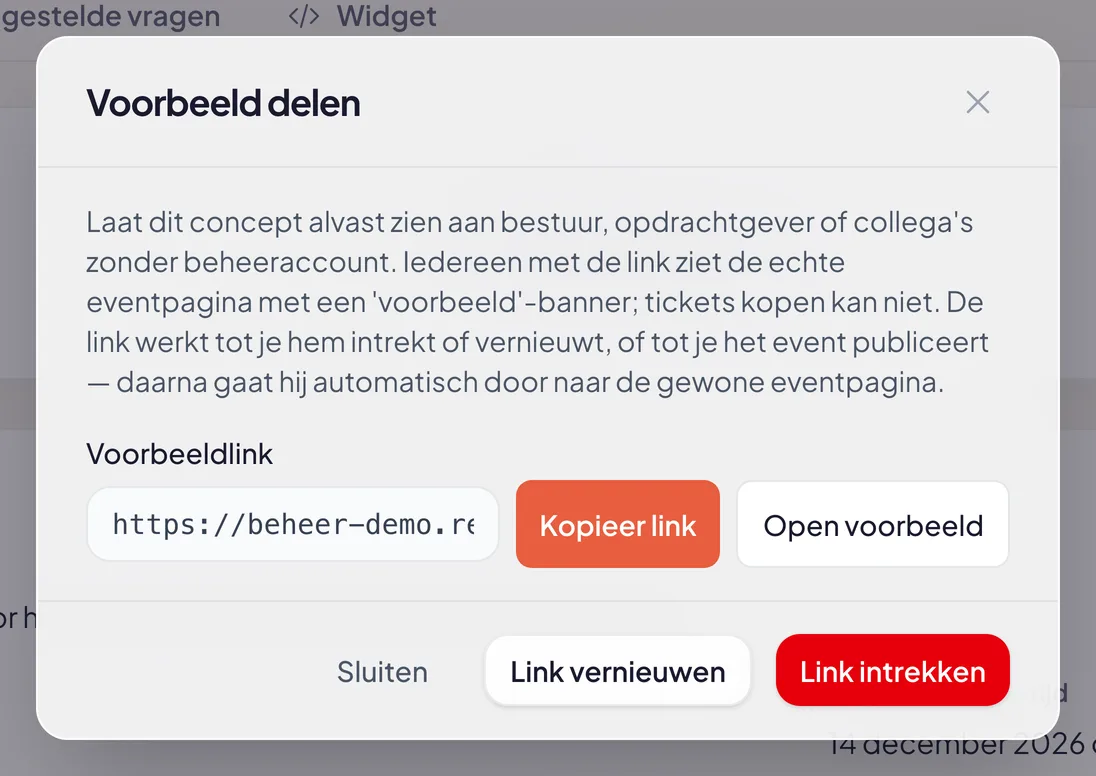
![The Share preview dialog with its explanation, the read-only field holding the preview link and buttons to copy, open, refresh and revoke it](https://regify-mijnevent.s3.eu-central-1.amazonaws.com/blog/inline/voorbeeld-delen-modal.webp)*Copy, open, refresh or revoke — it all sits in one dialog.*

All three actions land in your activity log, so you can see later who created, refreshed or revoked a preview link, and when.

# Handy for the widget too

Selling tickets through the widget on your own website? On the widget tab of a draft you now see that same preview link instead of a dead reference, so you can check the placement on your site in advance. The embed code carries a note that it will start working once the event is published.

# In short

- Every draft has a **Share preview** button with a link that works without an account.
- The recipient sees the real page with a clear banner and a disabled buy button.
- No indexing, no social preview, no orders, no statistics noise.
- Refresh, revoke or simply publish — the link adapts.

Send it round before the deadline next time. A typo in a ticket price is better heard from your treasurer than from your first ten buyers.


   Frequently asked questions

## Frequently asked questions

## Does the recipient need an account?

  No. The link carries an encrypted token; whoever has it sees the page. Nothing else is needed — no account, no password, no app.

## Can somebody buy tickets through the preview link?

  No. The buy button is disabled with an explanation, and ordering on an unpublished event is blocked server-side too. Nothing can slip through.

## Will my draft end up in Google this way?

  No. The preview page carries noindex, gets no social preview image and no structured data, and no visitor statistics are recorded.

## What happens to the link once I publish the event?

  It forwards to the real event page. You do not have to send anyone a new link.

  [    Back to blog ](https://mijnevent.nl/en/blog) 

  MijnEvent

## Read more

 [ ![](https://regify-mijnevent.s3.eu-central-1.amazonaws.com/blog/covers/event-poster-on-your-event-page.webp) poster 

 Jasper Koers · 14 September 2026 · 4 min read

## Putting your poster on your event page

The poster you already had designed belongs online too. Upload it once and it appears on your event page, on the overview card, in the widget and in the preview on social media.

 ](https://mijnevent.nl/en/blog/event-poster-on-your-event-page) [ ![](https://regify-mijnevent.s3.eu-central-1.amazonaws.com/blog/covers/waiting-list-for-a-sold-out-event.webp) waiting list 

 Jasper Koers · 14 September 2026 · 6 min read

## Who is on the waiting list? Now you can see

The waiting list already worked on its own: sold out, someone signs up, and the moment a ticket frees up the email goes out. You just could not look inside it. Now you can — with names, positions and a button to email them yourself.

 ](https://mijnevent.nl/en/blog/waiting-list-for-a-sold-out-event) [ ![](https://regify-mijnevent.s3.eu-central-1.amazonaws.com/blog/covers/change-the-email-address-on-an-order.webp) orders 

 Jasper Koers · 14 September 2026 · 4 min read

## A visitor gave the wrong email address — now what?

A typo in an email address used to mean a manual detour. You can now change the address on the order yourself, and the tickets go out again straight away with you in cc.

 ](https://mijnevent.nl/en/blog/change-the-email-address-on-an-order) 

   MijnEvent

## Ready to get started?

Create a free account and sell your first tickets today.

 [Start free](https://mijnevent.nl/registreer) [Pricing](https://mijnevent.nl/en/pricing)
