# Attendee mailings in practice: from audience to an email with QR codes — MijnEvent

  [Home](https://mijnevent.nl/en) / [Blog for event organizers](https://mijnevent.nl/en/blog) / Attendee mailings in practice: from audience to an email with QR codes   mailings organisers modules walkthrough 

# Attendee mailings in practice: from audience to an email with QR codes

A complete walkthrough with screenshots: the audience picker with a live count, the message with placeholders, the test email, and the email your visitor receives — with their own tickets inside.

 [Jasper Koers](https://mijnevent.nl/en/author/jasper-koers) · 23 July 2026 · 4 min read 

  ![](https://regify-mijnevent.s3.eu-central-1.amazonaws.com/blog/covers/attendee-mailings-walkthrough-in-practice.webp)  Photo: [Juja Han](https://unsplash.com/@juja_han?utm_source=MijnEvent&utm_medium=referral) / [Unsplash](https://unsplash.com/?utm_source=MijnEvent&utm_medium=referral)    In short

- The wizard counts live how many mailable recipients your selection has — past events immediately show 'no mailable recipients', because the mailing window closes one day after the end.
- Placeholders such as \[naam\] and \[event\] are filled in per recipient; the test email shows you exactly what will go out.
- Every recipient gets their own tickets with QR code at the bottom of the email, following your event settings — plus an unsubscribe link.
- The limit banner keeps you honest: at most three mailings per event with 24 hours in between.

  The announcement of Attendee mailings explains what the module does and which rules apply — the mailing window, the limits and the emergency announcement. This article shows what that looks like in practice, from the first click to the email in your visitor's inbox, with real screens from the module.

# The overview: the rules live where you need them

Open **Attendee mailings** in the dashboard menu and the top of the page immediately explains how it works: mailable until one day after the end, at most three mailings per event, the fees for webshop and city-card mailings and the emergency-announcement exception. No fine print afterwards — the explanation sits right where you need it, with a direct link to the newsletter integration for everything outside the window.
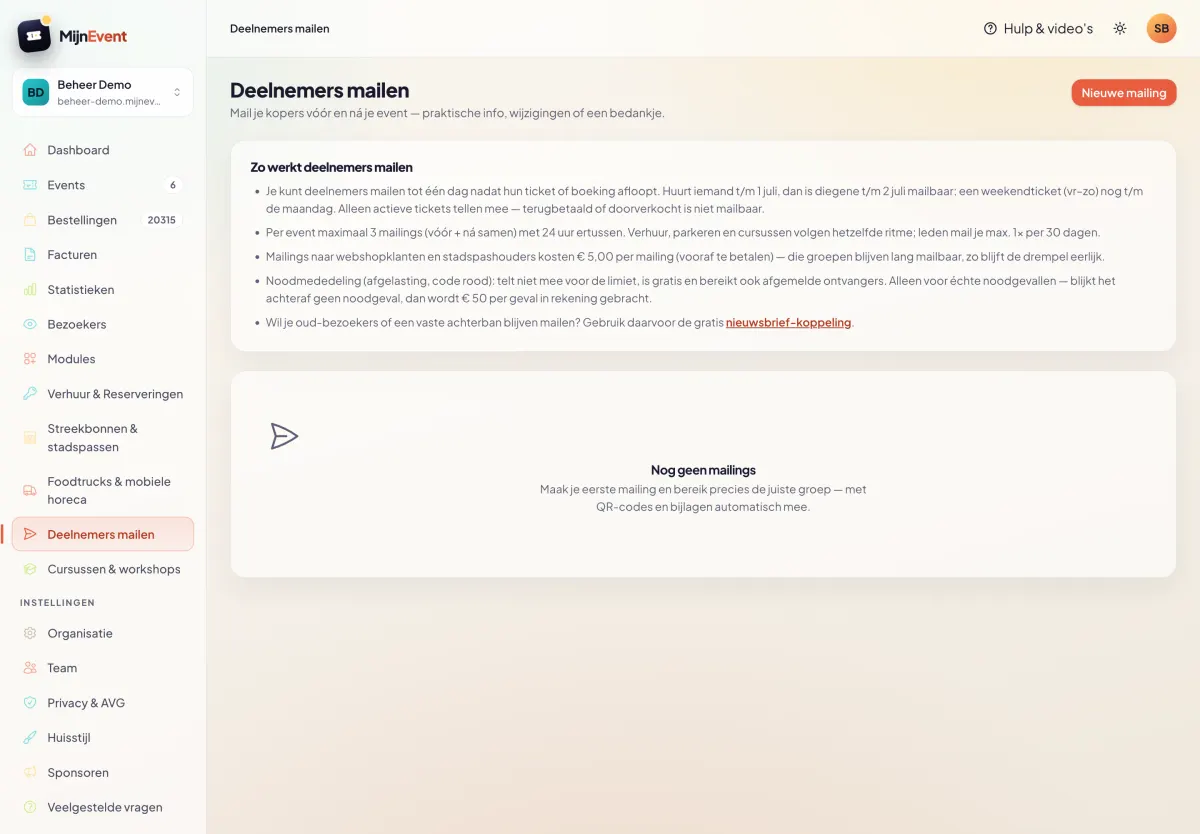
![The mailings overview with the explainer panel: window, limits, fees and the emergency exception](https://regify-mijnevent.s3.eu-central-1.amazonaws.com/blog/screenshots/deelnemers-mailen-overzicht.webp)

# Step 1: pick your audience and see live who you reach

Click *New mailing* and choose who to email: the ticket buyers of an event (optionally narrowed by ticket type), your renters, parkers, course participants, members, webshop customers or city-card holders — you only see audiences for modules that are active for you. Pick an event and the wizard counts along live: *"2,358 mailable recipients"*. An event from last month? Then it honestly says *"No mailable recipients"* — the window has closed. The limit banner below tells you how many mailings you have left for this audience.
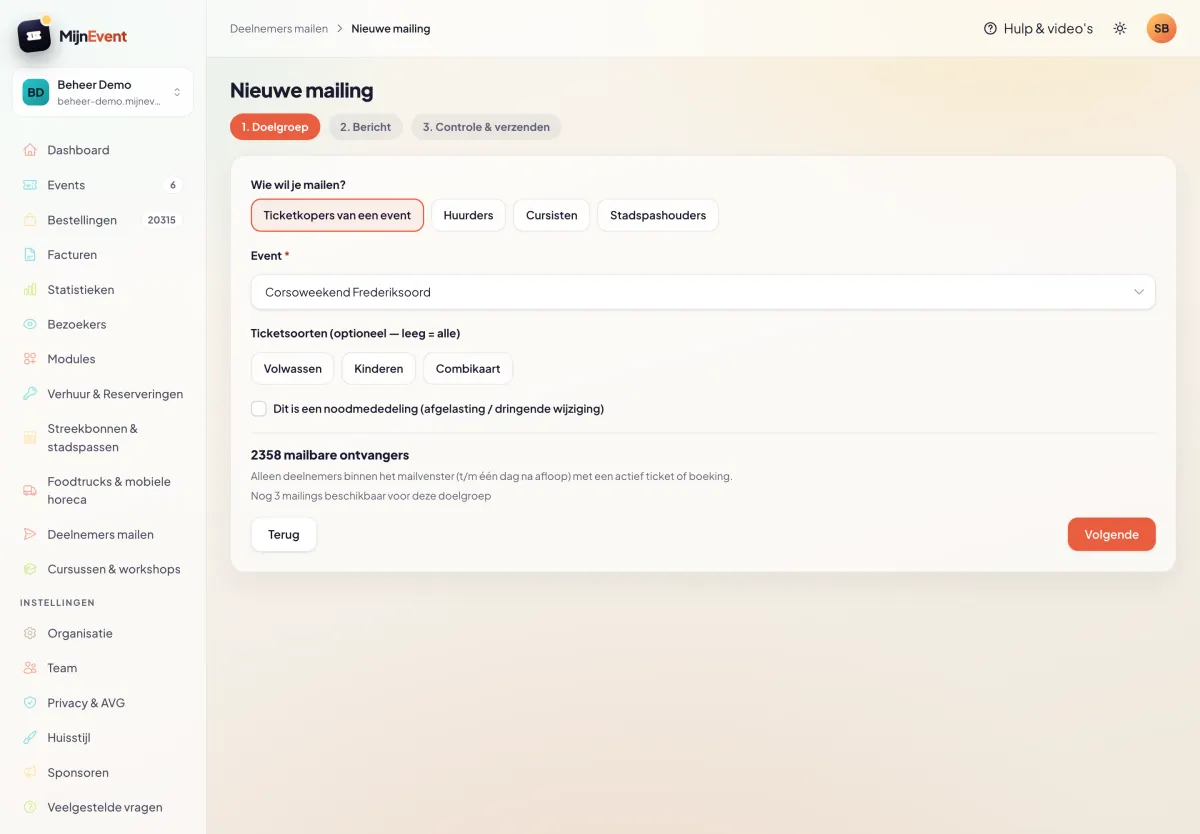
![Step 1 of the wizard: audience choice, event selection and the live count with limit banner](https://regify-mijnevent.s3.eu-central-1.amazonaws.com/blog/screenshots/deelnemers-mailen-wizard-doelgroep.webp)

# Step 2: write your message and test it on yourself first

You write the message with formatting, and with placeholders that are filled in per recipient: `[naam]`, `[event]` and `[organisatie]`. Below the editor sits the reminder that every recipient automatically gets their own QR codes and your confirmation-email attachments — nothing to configure. Ready? Click *Send test email to myself* and the email lands in your own inbox within seconds, with example values in place of the placeholders.
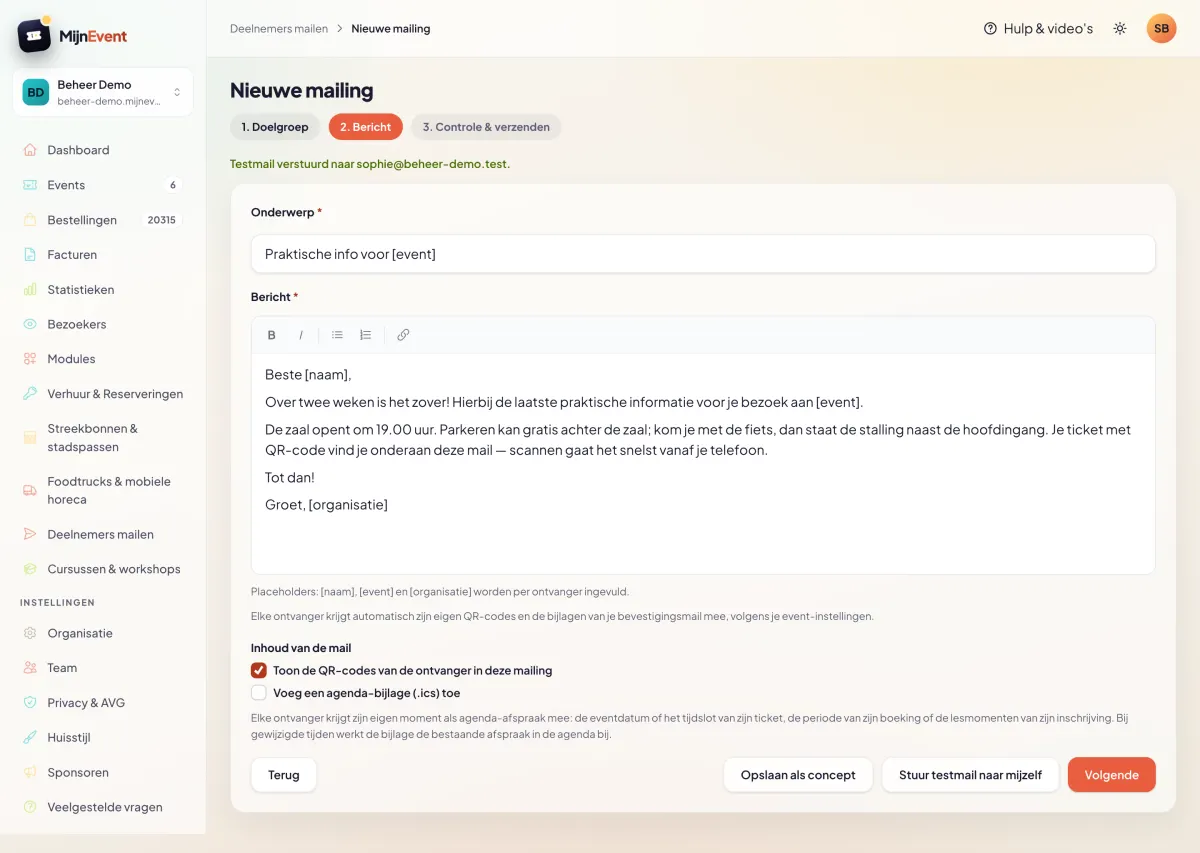
![Step 2: the message editor with placeholders and the confirmation that the test email was sent](https://regify-mijnevent.s3.eu-central-1.amazonaws.com/blog/screenshots/deelnemers-mailen-wizard-bericht.webp)

# Step 3: review and send

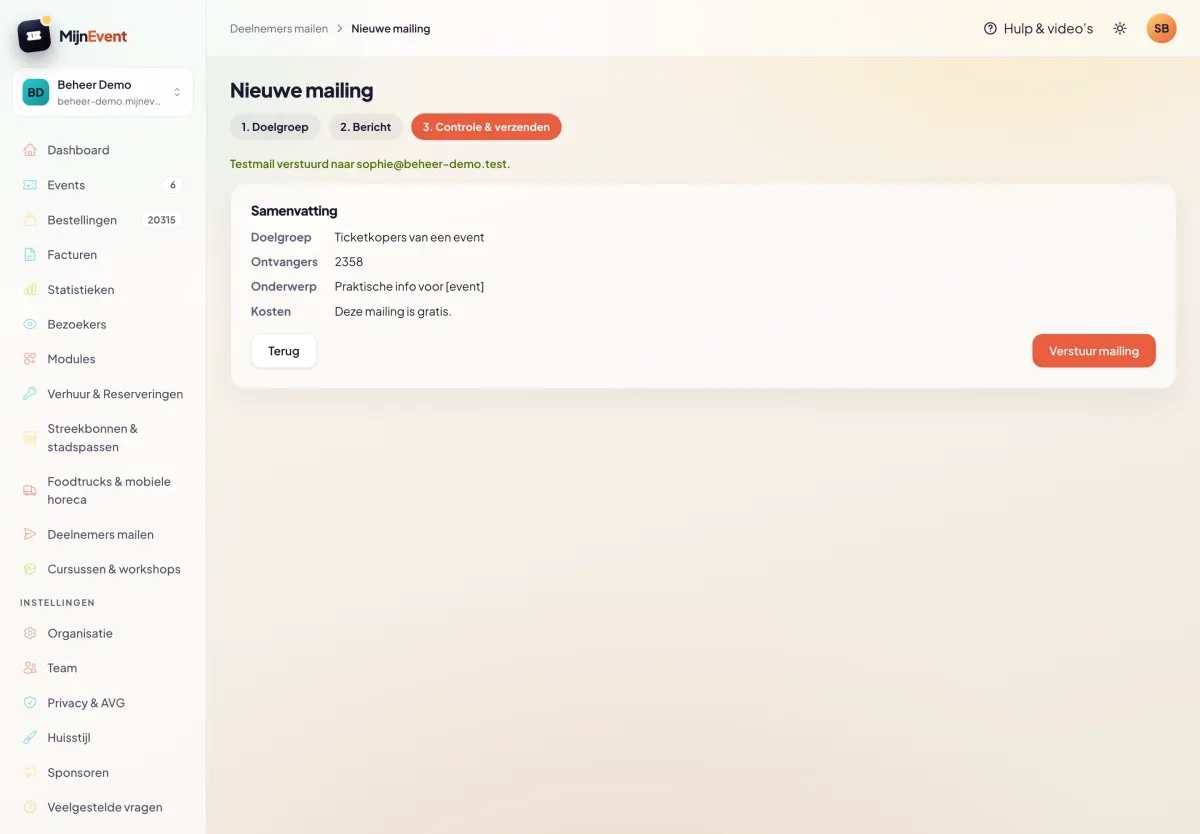
The final step sums everything up: audience, recipient count, subject and cost (free for event-like audiences; webshop and city-card mailings show the fee and the upfront payment here). Only after an explicit confirmation — *"You are about to email 2,358 recipients. This cannot be undone."* — does the mailing go out.

![Step 3: the summary with audience, recipient count and cost before the final confirmation](https://regify-mijnevent.s3.eu-central-1.amazonaws.com/blog/screenshots/deelnemers-mailen-wizard-controle.webp)

# What your visitor receives

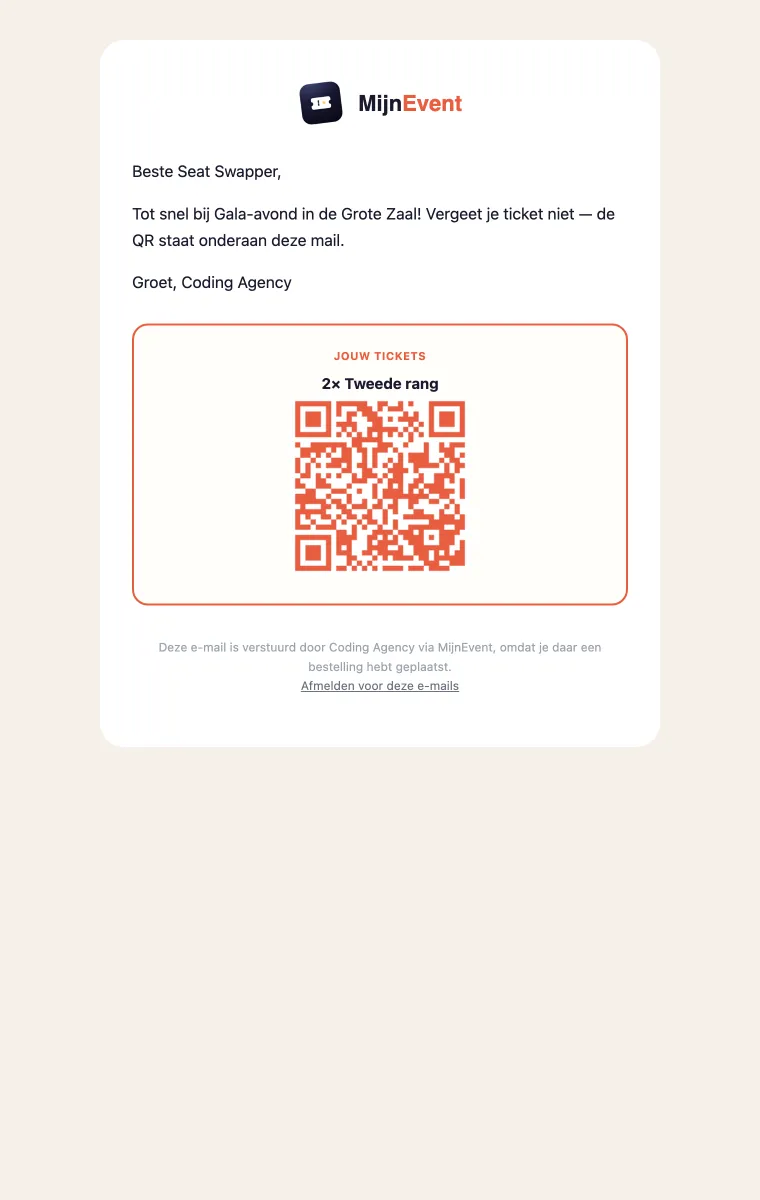
The email carries your message, and below it the personal block: *Your tickets*, with the ticket types and QR code of precisely this recipient — active tickets only, and only if your event settings allow the QR in emails. At the bottom it clearly states who the sender is, with an unsubscribe link supporting one-click unsubscribe. That way your visitor always finds their proof of entry in the most recent email.
![The received email: the organiser's message with the personal ticket block with QR code and the unsubscribe link below it](https://regify-mijnevent.s3.eu-central-1.amazonaws.com/blog/screenshots/deelnemers-mailen-mail.webp)

# After sending: who got what

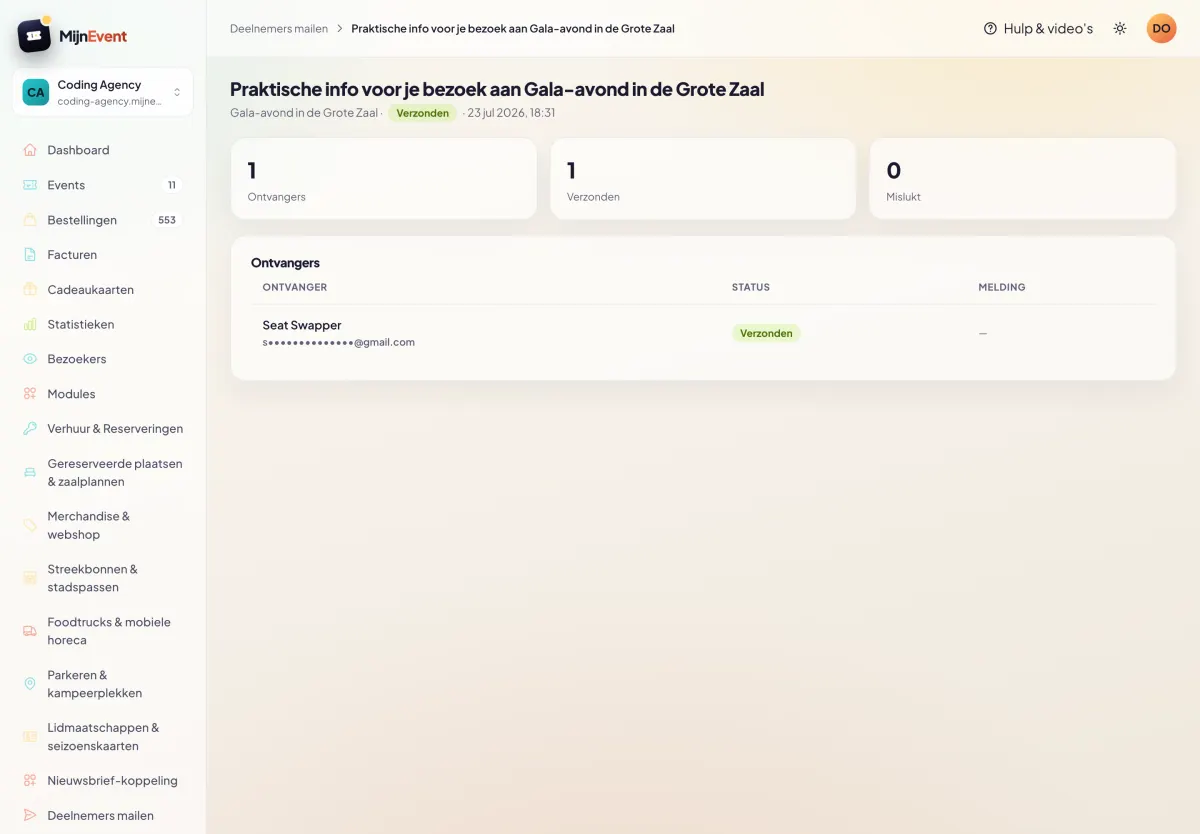
On the detail page you follow the send: how many recipients, how many delivered, how many failed. The recipient list shows names with **masked** email addresses — you see who was emailed without ever holding an address list. Exactly how the GDPR likes it.
![The detail page after sending: status, counters and the recipient list with masked email addresses](https://regify-mijnevent.s3.eu-central-1.amazonaws.com/blog/screenshots/deelnemers-mailen-detail.webp)

Everything here — from the count to the unsubscribe link — follows the rules from the announcement article. And for completeness: an emergency announcement (cancellation, code red) bypasses the limit and the unsubscribe list, but is strictly for real emergencies — otherwise €50 per occurrence is charged afterwards.


   Frequently asked questions

## Frequently asked questions

## How do I know who receives my mailing?

 The wizard shows the live number of mailable recipients for your selection, and after sending the detail page shows the status per recipient — with masked email addresses, because addresses stay inside the platform.

## Can I preview the email first?

 Yes — in step 2 you send a test email to yourself with one click, with example values in place of the placeholders. Only in step 3 do you actually send, after an explicit confirmation.

## Why does an old event say 'no mailable recipients'?

 The mailing window runs until one day after the ticket or booking ends. An event from last month therefore has no mailable recipients left — to reach those people, use the newsletter integration.

## Does every recipient get the same email?

 The text is the same, but the content is personal: the placeholders get the recipient's name, and the ticket block at the bottom shows their tickets with their QR codes — active tickets only, following your event settings.

  [    Back to blog ](https://mijnevent.nl/en/blog) 

  MijnEvent

## Read more

 [ ![](https://regify-mijnevent.s3.eu-central-1.amazonaws.com/blog/covers/automatic-membership-renewal-dutch-law.webp) memberships 

 Jasper Koers · 27 July 2026 · 6 min read

## Automatic membership renewal: collecting fees within Dutch renewal law

Automatic renewal saves your club a pile of chasing work, but the law has rules about cancelling. Here is how renewal works in MijnEvent, and how to keep it clean.

 ](https://mijnevent.nl/en/blog/automatic-membership-renewal-dutch-law) [ ![](https://regify-mijnevent.s3.eu-central-1.amazonaws.com/blog/covers/ontruimingsverslag-evenement-bewijsstuk.webp) safety 

 MijnEvent · 27 July 2026 · 5 min read

## The evacuation record: why the day after your event matters for the next permit

An evacuation — real or drilled — is only finished once it is on paper. What belongs in an evacuation record, why the municipality asks for it, and how to make the record write itself instead of reconstructing it afterwards?

 ](https://mijnevent.nl/en/blog/evacuation-record-event-evidence) [ ![](https://regify-mijnevent.s3.eu-central-1.amazonaws.com/blog/covers/knmi-weeralerts-veiligheidsplan.webp) safety 

 MijnEvent · 27 July 2026 · 3 min read

## Weather monitoring in your safety plan: how KNMI warnings land in your alerts and logbook automatically

Almost every safety-plan format has a 'weather monitoring' section — and almost nobody fills it in concretely. The Safety &amp; Permit module pulls the KNMI warning code for your event location every hour and turns it into a demonstrable process.

 ](https://mijnevent.nl/en/blog/knmi-weather-alerts-event-safety-plan) 

   MijnEvent

## Ready to get started?

Create a free account and sell your first tickets today.

 [Start free](https://mijnevent.nl/registreer) [Pricing](https://mijnevent.nl/en/pricing)