# A visitor gave the wrong email address — now what?

  [Home](https://mijnevent.nl/en) / [Blog](https://mijnevent.nl/en/blog) / A visitor gave the wrong email address — now what?   orders support email tickets 

# A visitor gave the wrong email address — now what?

 A typo in an email address used to mean a manual detour. You can now change the address on the order yourself, and the tickets go out again straight away with you in cc.

 [Jasper Koers](https://mijnevent.nl/en/author/jasper-koers) · 14 September 2026 · 4 min read 

  ![](https://regify-mijnevent.s3.eu-central-1.amazonaws.com/blog/covers/change-the-email-address-on-an-order.webp)  Photo: [Kelly Sikkema](https://unsplash.com/@kellysikkema?utm_source=MijnEvent&utm_medium=referral) / [Unsplash](https://unsplash.com/?utm_source=MijnEvent&utm_medium=referral)     In short

- The order page in the dashboard has a button to change the email address on that order; for a paid order the tickets are then resent to the new address straight away.
- Your organisation address is put in cc for that resend, so you can see the mail went out and the visitor can simply reply to you.
- Only this order moves to the new address — earlier orders from the same account are left untouched.
- The QR codes and any wallet passes already added stay valid; nothing about the ticket itself changes.

# The classic: `@gmial.com`

Somebody orders four tickets, mistypes their address and waits. Nothing arrives. Two days later they call you, mildly irritated, because they definitely paid.

That is not an edge case. A mistyped address, an old work address that no longer exists, the address of a colleague who has since left: it happens a few times at every event. And until recently there was little you could do about it as an organiser.

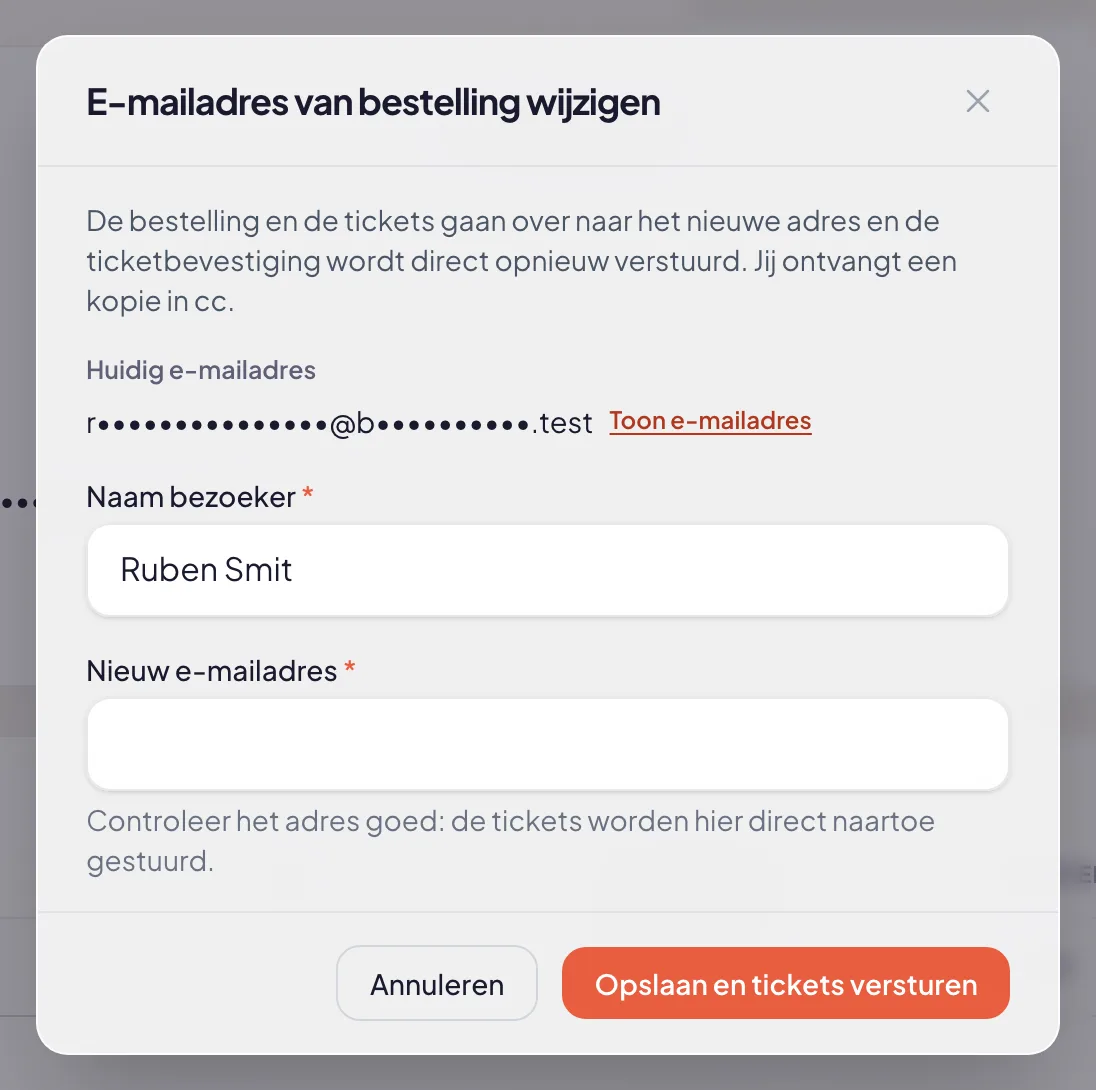
Now the order page in the dashboard carries a button in the visitor card: **Change email address**.

![The change email address dialog with the masked current address, fields for the name and the new address and a save and resend button](https://regify-mijnevent.s3.eu-central-1.amazonaws.com/blog/inline/bestelling-emailadres-wijzigen.webp)*The current address is masked on screen; revealing it is a separate click.*

# What happens when you save

You fill in the name and the new address and save. After that:

1. The order — and the tickets attached to it — moves to the new address.
2. If the order is paid, the confirmation email with the tickets goes out again immediately, to the new address.
3. **You are in cc.** Your organisation's reply address receives a copy, so you can see in your own inbox that it worked and the visitor can simply reply. That only happens for this resend; a regular confirmation email sends no copy.
4. You get a confirmation on screen: "Tickets have been resent to …".

If the order is still open (unpaid), the address moves without any email going out. There is nothing to send yet.

# What does not change

This matters for your peace of mind and for your stewards at the door:

- **The ticket codes stay the same.** Anyone who already had their ticket (on paper, in the email or as a wallet pass) still holds a valid ticket.
- **Wallet passes keep working.** They are attached to the ticket and the order, not to the email address.
- **Only this order moves.** If the same person also ordered last year, that older order stays with the old address. You move an order, not a whole account.

# When the address already exists

Sometimes somebody types the address of a person you already know: a partner, a colleague, the treasurer ordering for the whole club. You then get a warning with the name already attached to that address and a question whether you really want to link them. Confirm and the order goes to that existing account, which keeps its own name.

If it was only a misspelled surname on the same address, you simply correct the name.

# Door and telephone sales

If you sold at the door or took an order over the phone, the order often carries an internal placeholder address — there simply was no email address at the time. Enter the real address later and the visitor still receives their tickets by email. The internal placeholder account is cleaned up once nothing is attached to it any more.

# It lands in your log

An address change is a sensitive action: tickets move to a different mailbox. Every change is therefore recorded in the activity log, with who did it, on which order, and which address and name it was and became. [The activity log](/en/blog/the-activity-log-who-did-what) keeps that available — handy when somebody asks about it afterwards.

Who may use the button follows your team permissions: only people allowed to manage orders within the same events see it.

# In short

- A **Change email address** button in the visitor card on the order page.
- Paid order: tickets go out again immediately, with you in cc.
- Ticket codes and wallet passes stay valid; only this order moves.
- If the address already exists you get a warning first, and everything lands in the log.

In short: next time somebody calls to say nothing arrived, you are done within a minute.

   Frequently asked questions

## Frequently asked questions

## Do tickets that were already sent stay valid after an address change?

  Yes. The ticket codes do not change and a wallet pass already added to a phone keeps working. Only the delivery moves to the new address.

## What if the new address already belongs to another visitor?

  You first get a warning with the name attached to that address. Confirm and the order is linked to that existing account, which keeps its own name.

## Do all orders from that visitor move along?

  No. Only the order you have open moves, with the tickets attached to it. Other orders stay with the old address.

## Does this work for a door or telephone sale as well?

  Yes. Those often carry an internal placeholder address. As soon as you enter a real address, the visitor still receives their tickets by email.

  [    Back to blog ](https://mijnevent.nl/en/blog) 

  MijnEvent

## Read more

 [ ![](https://regify-mijnevent.s3.eu-central-1.amazonaws.com/blog/covers/event-poster-on-your-event-page.webp) poster 

 Jasper Koers · 14 September 2026 · 4 min read

## Putting your poster on your event page

The poster you already had designed belongs online too. Upload it once and it appears on your event page, on the overview card, in the widget and in the preview on social media.

 ](https://mijnevent.nl/en/blog/event-poster-on-your-event-page) [ ![](https://regify-mijnevent.s3.eu-central-1.amazonaws.com/blog/covers/waiting-list-for-a-sold-out-event.webp) waiting list 

 Jasper Koers · 14 September 2026 · 6 min read

## Who is on the waiting list? Now you can see

The waiting list already worked on its own: sold out, someone signs up, and the moment a ticket frees up the email goes out. You just could not look inside it. Now you can — with names, positions and a button to email them yourself.

 ](https://mijnevent.nl/en/blog/waiting-list-for-a-sold-out-event) [ ![](https://regify-mijnevent.s3.eu-central-1.amazonaws.com/blog/covers/share-a-preview-before-publishing.webp) draft 

 Jasper Koers · 14 September 2026 · 4 min read

## Let your board look before you publish

A draft event used to be visible only to people with a management account. With a preview link you send the real page to your board or your client, with a clear banner and nothing on sale.

 ](https://mijnevent.nl/en/blog/share-a-preview-before-publishing) 

   MijnEvent

## Ready to get started?

Create a free account and sell your first tickets today.

 [Start free](https://mijnevent.nl/registreer) [Pricing](https://mijnevent.nl/en/pricing)