
# A donation field at ticket checkout: let visitors chip in voluntarily — MijnEvent

  [Home](https://mijnevent.nl/en) / [Blog for event organizers](https://mijnevent.nl/en/blog) / A donation field at ticket checkout: let visitors chip in voluntarily   tickets donaties fundraising 

# A donation field at ticket checkout: let visitors chip in voluntarily

Switch on a voluntary donation field at checkout per event. Visitors donate on top of their tickets with their own amount, and MijnEvent charges no platform fee on donations — the full amount goes to you.

 [Jasper Koers](https://mijnevent.nl/en/author/jasper-koers) · 7 April 2026 · 3 min read 

  ![](https://regify-mijnevent.s3.eu-central-1.amazonaws.com/blog/covers/donatieveld-bij-de-ticketcheckout.webp)  Photo: [Kelly Sikkema](https://unsplash.com/@kellysikkema?utm_source=MijnEvent&utm_medium=referral) / [Unsplash](https://unsplash.com/?utm_source=MijnEvent&utm_medium=referral)    In short

- Enable an optional donation field at checkout per event, with your own label.
- Visitors donate on top of their tickets in the same payment; the donation appears as a separate line in the order summary.
- MijnEvent charges 0% platform fee on donations — the full amount reaches you via your own Mollie account.
- If a ticket is later refunded, the donation stays.

  Someone buys a ticket for your club night, your festival or your benefit concert — and would happily give a little extra, if only you asked. And you can ask at exactly the right moment: at checkout. With the **donation field in the ticket checkout**, a visitor donates voluntarily on top of their tickets, in the same payment, with no detour to a separate page.

*Note: the screenshot below shows the Dutch interface — the flow is identical in every language.*

# One toggle per event

You switch it on where you need it: per event. In the event settings you'll find **"Enable voluntary donation"**. Turn it on and the donation field appears in that event's checkout. You give it your own **label** — for example *"Support our festival"* or *"Chip in for the clubhouse"*. Leave it empty and it falls back to *"Voluntary donation"*. Other events aren't affected; they keep their own setting.

# How it appears at checkout

As soon as the visitor has picked tickets, a small block with your label and a short explanation appears below the order summary. The visitor types an amount themselves — free to choose — and sees the donation appear straight away as a **separate line** in the summary, added to the total. Not interested? One tap on **"No thanks"** and the donation is zero; the field never pushes itself. That keeps the price breakdown honest and itemised at all times: tickets, any service fee, and the donation named separately.
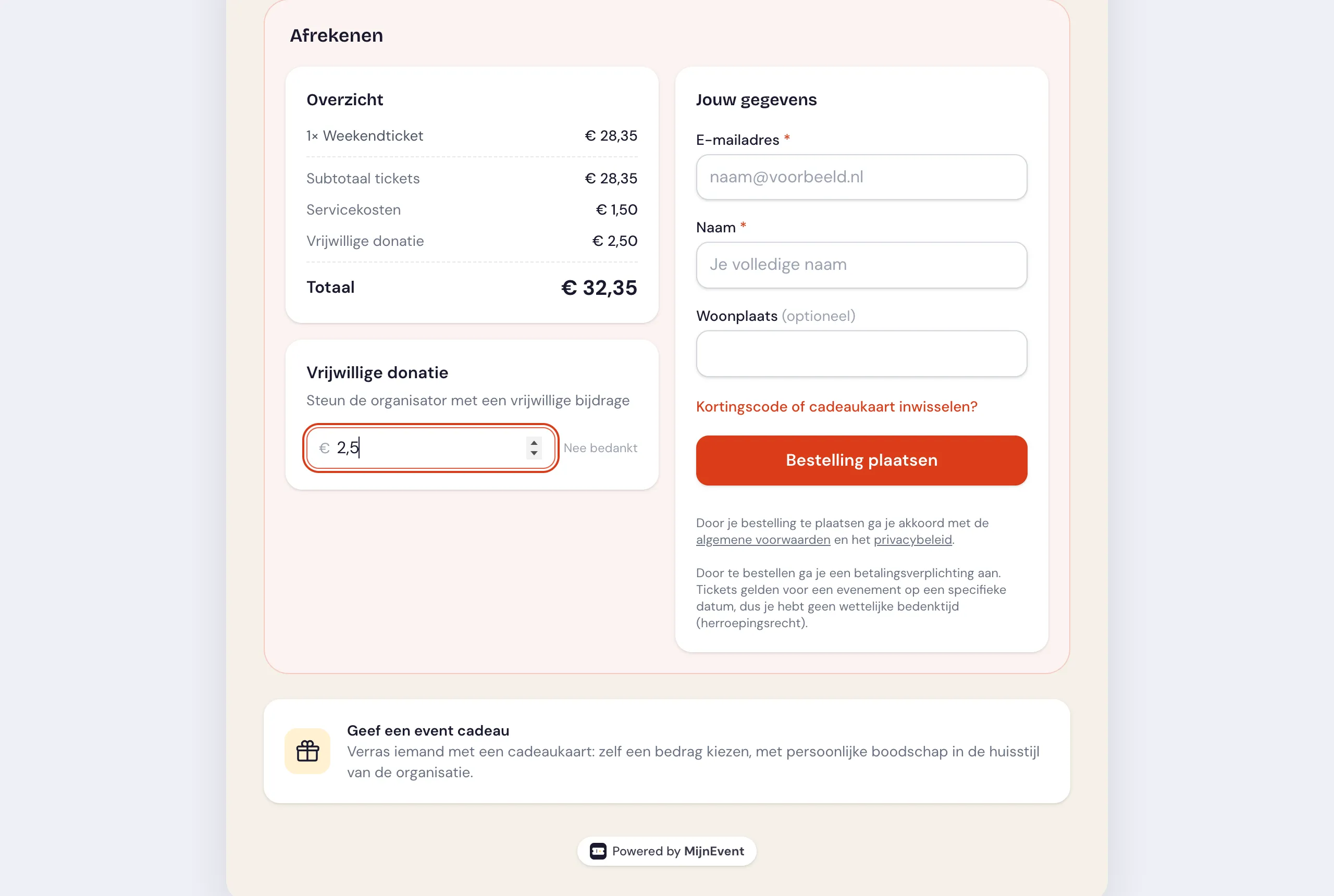
![The donation field in the ticket checkout with a custom label and a separate donation line](https://regify-mijnevent.s3.eu-central-1.amazonaws.com/blog/inline/donatieveld-checkout.webp)*The visitor picks an amount themselves; the donation appears as its own line in the order summary.*

# 100% to you — no platform fee on donations

This is the heart of it, and it's a deliberate choice: **MijnEvent charges its platform fee on tickets only, not on donations.** The application fee is driven by the number of paid tickets in the order; the donation sits apart from that and doesn't count. The donated amount simply rides along in the same payment via your own Mollie account, so it lands directly with you — we take nothing off it.

Another neat side effect: if a ticket is later resold and refunded, only the ticket price is refunded. A donation that was made stays put — exactly as a generous giver intended.

# The difference from the standalone donation page

The donation field lives *inside* ticket sales: it's the question "would you like to give a little extra at checkout?". If you also want to collect donations *without* ticket sales — a campaign with a goal, a progress counter and a collection QR for the door or the canteen — that's what [the donation page from the fundraising module](/en/modules/fundraising) is for. Same promise (0% fee on donations), different place: one belongs with your tickets, the other stands on its own.

# How to switch it on

1. Open your event in the **Dashboard** and go to its settings.
2. Switch on **"Enable voluntary donation"**.
3. Fill in your own **donation label** — or leave it empty for the default text — and save.
4. Walk through your event's checkout to see how the donation field appears to the visitor.

Thinking of dedicating your whole event to a good cause? Then read how to [combine tickets and donations for charity](/en/blog/tickets-and-donations-for-charities).

   Frequently asked questions

## Frequently asked questions

## Does MijnEvent take a fee on donations at checkout?

 No. The platform fee is charged on paid tickets only; the donation sits apart and does not count. The full donated amount reaches you via your own Mollie account.

## How does the donation appear to the visitor?

 After picking tickets, a small block with your label appears below the order summary. The visitor types their own amount, which shows as a separate line added to the total, or taps "No thanks" to skip it.

## What happens to a donation if a ticket is refunded?

 The donation stays. If a ticket is later resold and refunded, only the ticket price is refunded — the donation remains, exactly as the giver intended.

  [    Back to blog ](https://mijnevent.nl/en/blog) 

  MijnEvent

## Read more

 [ ![](https://regify-mijnevent.s3.eu-central-1.amazonaws.com/blog/covers/automatic-membership-renewal-dutch-law.webp) memberships 

 Jasper Koers · 27 July 2026 · 6 min read

## Automatic membership renewal: collecting fees within Dutch renewal law

Automatic renewal saves your club a pile of chasing work, but the law has rules about cancelling. Here is how renewal works in MijnEvent, and how to keep it clean.

 ](https://mijnevent.nl/en/blog/automatic-membership-renewal-dutch-law) [ ![](https://regify-mijnevent.s3.eu-central-1.amazonaws.com/blog/covers/ontruimingsverslag-evenement-bewijsstuk.webp) safety 

 MijnEvent · 27 July 2026 · 5 min read

## The evacuation record: why the day after your event matters for the next permit

An evacuation — real or drilled — is only finished once it is on paper. What belongs in an evacuation record, why the municipality asks for it, and how to make the record write itself instead of reconstructing it afterwards?

 ](https://mijnevent.nl/en/blog/evacuation-record-event-evidence) [ ![](https://regify-mijnevent.s3.eu-central-1.amazonaws.com/blog/covers/knmi-weeralerts-veiligheidsplan.webp) safety 

 MijnEvent · 27 July 2026 · 3 min read

## Weather monitoring in your safety plan: how KNMI warnings land in your alerts and logbook automatically

Almost every safety-plan format has a 'weather monitoring' section — and almost nobody fills it in concretely. The Safety &amp; Permit module pulls the KNMI warning code for your event location every hour and turns it into a demonstrable process.

 ](https://mijnevent.nl/en/blog/knmi-weather-alerts-event-safety-plan) 

   MijnEvent

## Ready to get started?

Create a free account and sell your first tickets today.

 [Start free](https://mijnevent.nl/registreer) [Pricing](https://mijnevent.nl/en/pricing)


