A village association in Drenthe asked us a simple question: "Can we set it so only people from our village can become members?" Until then they did it by hand. Someone signed up, the secretary looked at the surname, hesitated, sent an email, got an address back and copied it into a spreadsheet. At three sign-ups a month that works. At thirty it does not.
There is more to it than it looks. To know where someone lives you have to ask for their address — and that is exactly the kind of data you do not collect casually. Which is why this became two separate switches, not one.
Asking for the address is its own decision
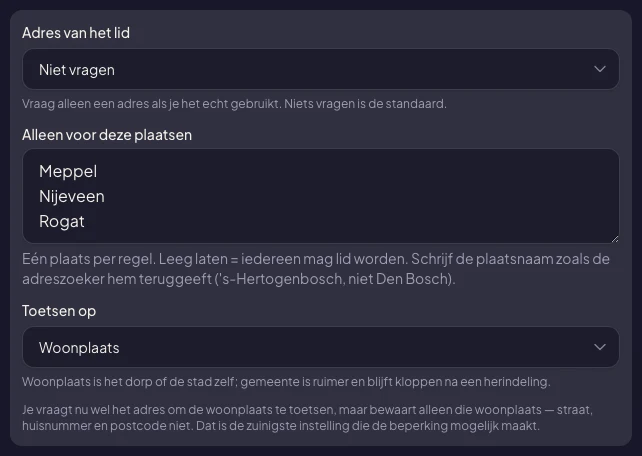
Every membership tier now has a setting called Member address with three positions: do not ask, ask but allow it to be left empty, or required. The default is do not ask.
That is a deliberate choice against habit. A membership administration grows an address field by itself, because surely it belongs there. But an association that sends no post and keeps no statutory member register with addresses does not need that address — and then it should not have it lying around either.
If you do switch it on, the system asks you for one thing in return: what do you use it for? Without that text the setting will not save. And it is not a formality that disappears into a processing register — the member reads it verbatim at the moment they fill in their address.
The list of towns
Below it sits For these towns only: one town per line. Leaving it empty means anyone can join, and that stays the default.
You choose whether the check runs against the town or the municipality. The town is the village itself — Rouveen, not the whole municipality of Staphorst. The municipality is wider and survives a local government reorganisation. A village association picks the first, a regional orchestra usually the second.
One practical note: write the town the way the address search returns it. So 's-Hertogenbosch, not Den Bosch. That sounds pedantic, but it is precisely why this can work at all: the address comes from the Dutch land registry, with normalised place names, and not from a text field where everyone types their own spelling.
What the member sees
The condition appears on the membership card, before choosing: "For residents of Meppel, Nijeveen and Rogat only." Nobody fills in a form first only to be told afterwards that it was never going to work.
The form itself carries the same address search you use for an event venue. Type, pick from the list, done — no six separate fields and no typos in the postcode.
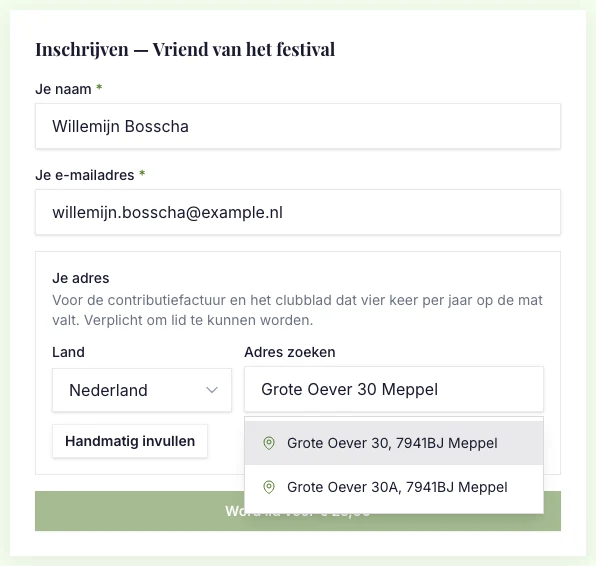
And look at the line above the field. For an association that only checks, it reads: "We use your address to check your town. We only keep that town, not the rest of your address." That is not a nice promise but a description of what happens: street, house number and postcode go after the check.
Refusing is not a dead end
If someone lives elsewhere, they do not get an error code but a sentence:
This membership is for residents of Meppel, Nijeveen and Rogat only. Do you live there after all? Contact the association and someone will look at it personally.
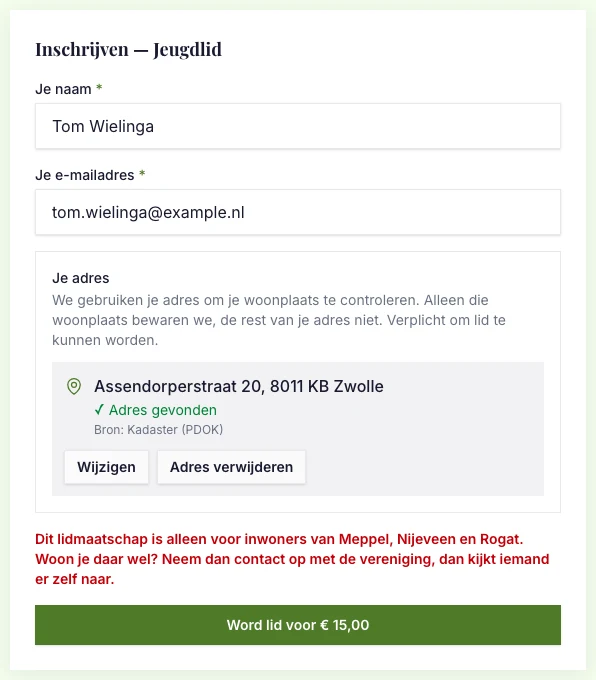
Two things are in there on purpose. The towns, so the person knows where they stand. And the invitation to get in touch, because a computer that refuses someone must not have the last word — that is what Article 22 of the GDPR calls human intervention, and it is simply decent as well.
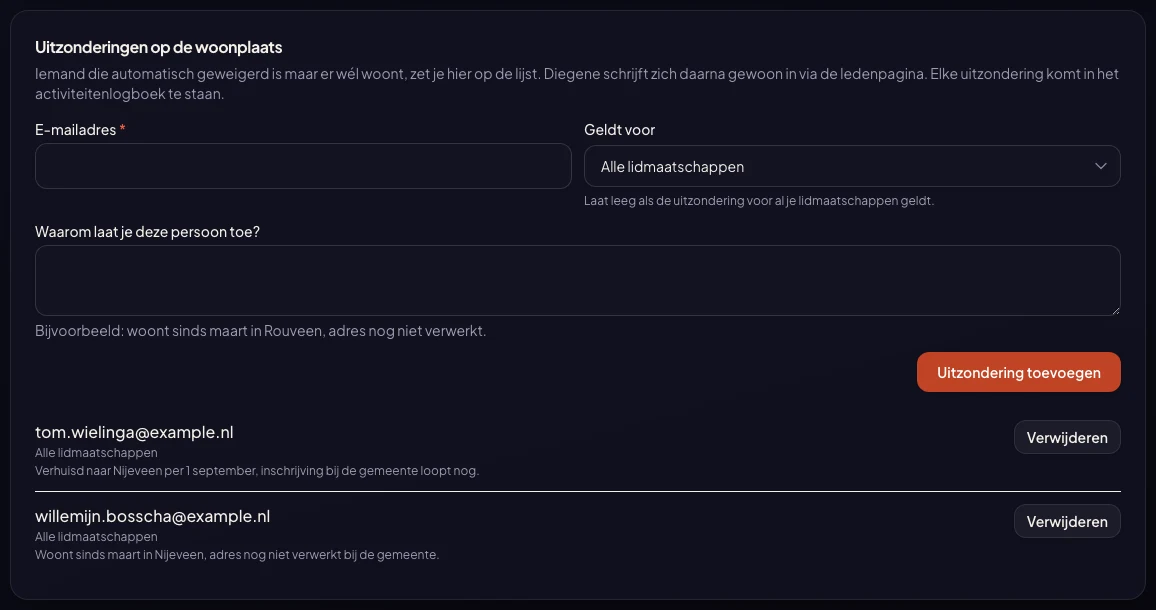
So that route had to genuinely exist, not only in the copy. The admin panel therefore holds a list called Exceptions to the town restriction. You add an email address with a short reason — "moved to Nijeveen on 1 September, registration with the municipality still pending" — and that person then simply signs up through the membership page. The normal route, with the normal payment. Your decision, with its reasoning, lands in the activity log, so it stays traceable who decided what.
There are two more cases where we never refuse automatically. A manually entered address, because the town name is not normalised then and a typo would decide the outcome. And an address outside the Netherlands, for the same reason. In both cases the sign-up goes through and you look at it yourself.
Where your members come from
Under the member list there is now a breakdown by town. Click a town and the list filters along; click again and the filter is gone.
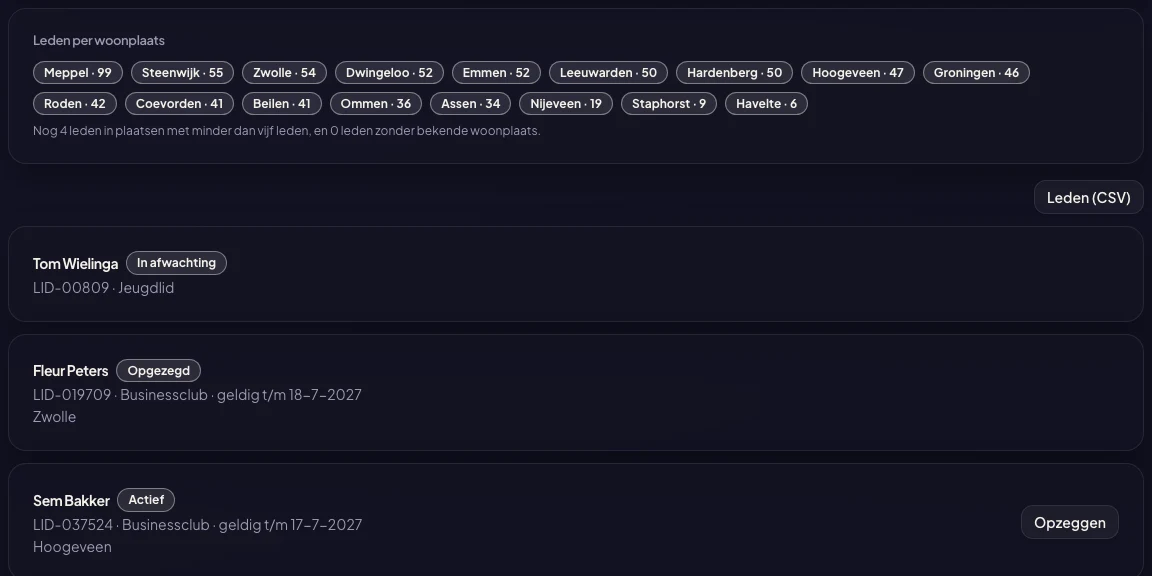
Towns with fewer than five members get no line of their own but end up in "another 4 members in towns with fewer than five members". In a membership base of a few hundred people, one member in a small village can be tied to a name, and a breakdown should not be an address list.
Alongside it there is a member export: the member list as a CSV, with the address columns for the tiers that keep addresses. It leaves the platform the same way as the other exports containing personal data — an AES-256 encrypted zip, the password separately by email, and the download recorded in your activity log with a reference that also appears inside the file. You confirm beforehand that from that moment on the file is your responsibility.
What changes for existing associations
Nothing, unless you switch it on yourself. The address question is off, the list of towns is empty, and running memberships stay as they are.
The module terms for Memberships have been updated with an article on addresses and towns. Among other things it records that you as the organiser are responsible for a legitimate reason underlying a town restriction — a statutory working area, a subsidy condition, or something comparable — and that the restriction must not discriminate on a ground the law forbids. You will be shown that text once on your next visit to the module.
Who this is for
Village associations, skating clubs, neighbourhood associations, community centres and small sports clubs whose articles name a working area. But also a museum receiving a municipal subsidy for a residents' pass, or a regional orchestra that thinks at municipality level.
And for anyone who needs their members' addresses for the membership invoice or the club magazine, and kept them in a separate spreadsheet until now.
Memberships & season passes costs a year licence of €175 plus €0.25 per collected billing period. Free memberships and failed collections stay fee-free. This extension is included.


