# Your parking pass in your wallet — with your license plate on the pass — MijnEvent

  [Home](https://mijnevent.nl/en) / [Blog for event organizers](https://mijnevent.nl/en/blog) / Your parking pass in your wallet — with your license plate on the pass   modules parking 

# Your parking pass in your wallet — with your license plate on the pass

A parking or camper booking is now a wallet pass: period, location and spot on the front, and if you entered your license plate when booking, it is right there too. At the gate the crew scans the QR — or simply your plate.

 [Jasper Koers](https://mijnevent.nl/en/author/jasper-koers) · 5 May 2026 · 4 min read 

  ![](https://regify-mijnevent.s3.eu-central-1.amazonaws.com/blog/covers/parking-pass-in-your-wallet-with-license-plate.webp)  Photo: [Nick Nice](https://unsplash.com/@nicknice?utm_source=MijnEvent&utm_medium=referral) / [Unsplash](https://unsplash.com/?utm_source=MijnEvent&utm_medium=referral)    In short

- A parking or camper booking becomes an Apple Wallet or Google Wallet pass via one tap in the confirmation email.
- If you entered your license plate when booking, that plate is printed on the pass; the scanner app can also read plates directly at the gate.
- The QR on the pass is the same booking token as in the email and PDF, and it works fully offline.
- The pass surfaces around the booking's start time and expires by itself one week after the booking ends.

  Anyone who books a parking or camper spot in advance through the [Parking &amp; camper spots](/en/modules/parking) module has always received a confirmation email with a QR code. But at the gate, with a queue of cars behind you, digging through your mailbox is exactly what you do not want. That is why a parking or camper booking is now also a **wallet pass**: one tap in the confirmation email and the parking pass sits in Apple Wallet or Google Wallet — next to your bank card, available offline, window down, scan, drive on.

*Note: the screenshot below shows the Dutch interface — the flow is identical in every language.*

# What is on the pass

The pass is an EventTicket pass, the same type as an admission ticket — which makes sense, because a parking spot is just as bound to a time and a place. The front shows:

- the **spot you booked** — day parking, camper field, weekend pitch;
- the **period**, with day-based spots neatly including the last day and without confusing times;
- the **location** of the grounds, short on the front and in full on the detail side;
- your **spot number** if you were assigned a specific one, and the name on the booking.

And then the field that makes this a proper parking pass: **your license plate**. If you entered the plate of your car or camper when booking — mandatory at many sites — that plate (or several, if you entered more) is printed right on the pass. One glance and both you and the traffic marshal see which vehicle is registered.

The detail side adds the full address of the grounds and your **booking reference** — handy if something needs looking up at reception after all. And the pass works fully offline: the QR sits *inside* the pass, not behind a link, so even in a field without reception the proof opens instantly.
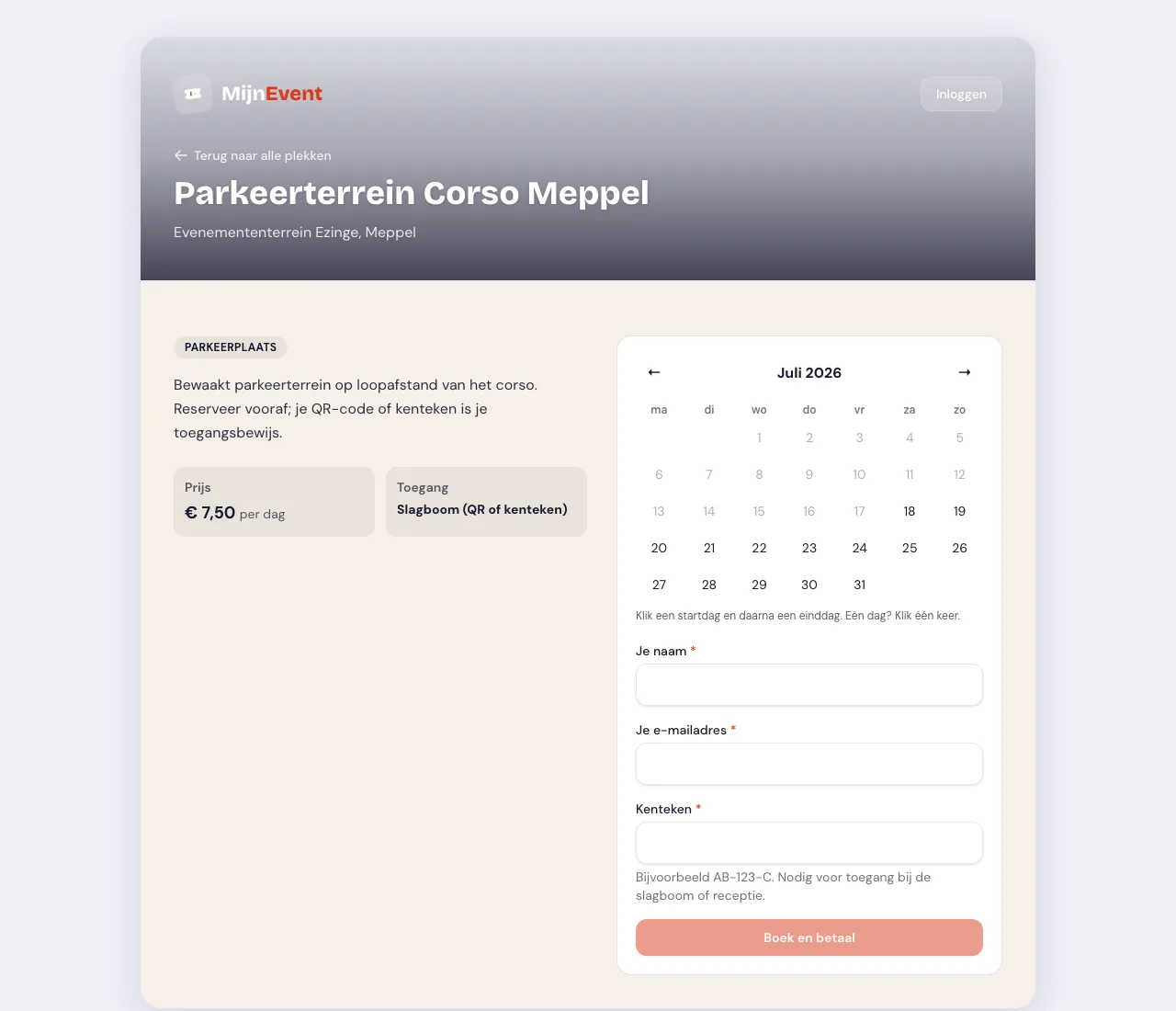
![The booking widget with the license plate field](https://regify-mijnevent.s3.eu-central-1.amazonaws.com/blog/inline/parkeren-boekingswidget-v2.webp)*The booking widget: pick a period, enter your plate — and that plate ends up on your wallet pass.*

# At the gate: scan the QR — or simply the plate

The QR code on the pass is **the same booking token** as in the email and on the PDF confirmation. The inspector at the gate scans the wallet pass like any other proof; the scanner app sees no difference.

But it gets smoother still, and it already could: the scanner app also reads **license plates**. Point the camera at the plate and the arrival is registered automatically — the visitor never even reaches for their phone. The wallet pass and the plate scan complement each other nicely: with the plate on the pass, the plate itself is effectively the second proof of entry. Broken QR, dead phone, or simply in a hurry? The plate is always attached to the car.

# The pass knows when it is done

Nobody needs last month's parking pass. So the pass cleans up after itself:

- Around the **start time of your booking** the pass becomes relevant: Apple and Google surface it at the right moment, so it is ready the second you arrive.
- **One week after the booking ends**, the pass expires by itself and greys out in your wallet. No pile of dead passes, no confusion about which booking is current.

# How it works for you as an organiser

Nothing to set up: with the [Parking &amp; camper spots](/en/modules/parking) module active, the wallet buttons appear automatically in every booking confirmation. The pass carries your own logo if you have set one, and the whole chain — booking, payment, pass, scanning by QR or plate — runs on the same booking engine you already know from the rentals module.

And it is not just parking: the same week, [the city card](/en/blog/city-card-in-apple-and-google-wallet) and the membership card earned their spot in Apple Wallet and Google Wallet too. Step by step, the phone becomes the only thing your visitors need to bring — and they were bringing it anyway.


   Frequently asked questions

## Frequently asked questions

## Does my license plate appear on the wallet pass?

 Yes. If you entered your car or camper plate when booking (mandatory at many sites), that plate is printed right on the pass, and any extra plates you entered appear too.

## Do I need my phone to get in at the gate?

 Not necessarily. The scanner app also reads license plates, so pointing the camera at your plate registers your arrival automatically — a handy backup for a broken QR or a dead phone.

## Do I have to set anything up as an organiser?

 No. With the Parking &amp; camper spots module active, the wallet buttons appear automatically in every booking confirmation, and the pass carries your own logo if you have set one.

  [    Back to blog ](https://mijnevent.nl/en/blog) 

  MijnEvent

## Read more

 [ ![](https://regify-mijnevent.s3.eu-central-1.amazonaws.com/blog/covers/automatic-membership-renewal-dutch-law.webp) memberships 

 Jasper Koers · 27 July 2026 · 6 min read

## Automatic membership renewal: collecting fees within Dutch renewal law

Automatic renewal saves your club a pile of chasing work, but the law has rules about cancelling. Here is how renewal works in MijnEvent, and how to keep it clean.

 ](https://mijnevent.nl/en/blog/automatic-membership-renewal-dutch-law) [ ![](https://regify-mijnevent.s3.eu-central-1.amazonaws.com/blog/covers/ontruimingsverslag-evenement-bewijsstuk.webp) safety 

 MijnEvent · 27 July 2026 · 5 min read

## The evacuation record: why the day after your event matters for the next permit

An evacuation — real or drilled — is only finished once it is on paper. What belongs in an evacuation record, why the municipality asks for it, and how to make the record write itself instead of reconstructing it afterwards?

 ](https://mijnevent.nl/en/blog/evacuation-record-event-evidence) [ ![](https://regify-mijnevent.s3.eu-central-1.amazonaws.com/blog/covers/knmi-weeralerts-veiligheidsplan.webp) safety 

 MijnEvent · 27 July 2026 · 3 min read

## Weather monitoring in your safety plan: how KNMI warnings land in your alerts and logbook automatically

Almost every safety-plan format has a 'weather monitoring' section — and almost nobody fills it in concretely. The Safety &amp; Permit module pulls the KNMI warning code for your event location every hour and turns it into a demonstrable process.

 ](https://mijnevent.nl/en/blog/knmi-weather-alerts-event-safety-plan) 

   MijnEvent

## Ready to get started?

Create a free account and sell your first tickets today.

 [Start free](https://mijnevent.nl/registreer) [Pricing](https://mijnevent.nl/en/pricing)
