Some events you do not sell per ticket, but per seat. A theatre production, a playhouse, a conference in a numbered hall, a grandstand at the flower parade — there your visitor wants to know where they are sitting, not just that they are allowed in. That is what the reserved-seating module is for: reserved seats with their own floor plan, linked to the events you already have.
And we built it the way we build everything: first make sure it is right, then make sure it also looks genuinely good.
Two ways to pick your seat — both first class
Most ticketing platforms give you one venue map and that is that. We give you two, and they are equals. The visitor decides.
The first is a graphical floor plan: on-brand, smoothly zoomable, with the price tiers in colour, the stage in view and the wheelchair spaces clearly marked. Taken seats grey out immediately. It is deliberately an attractive, good-looking map — because a slick view of the hall makes people buy more easily, and buy more.
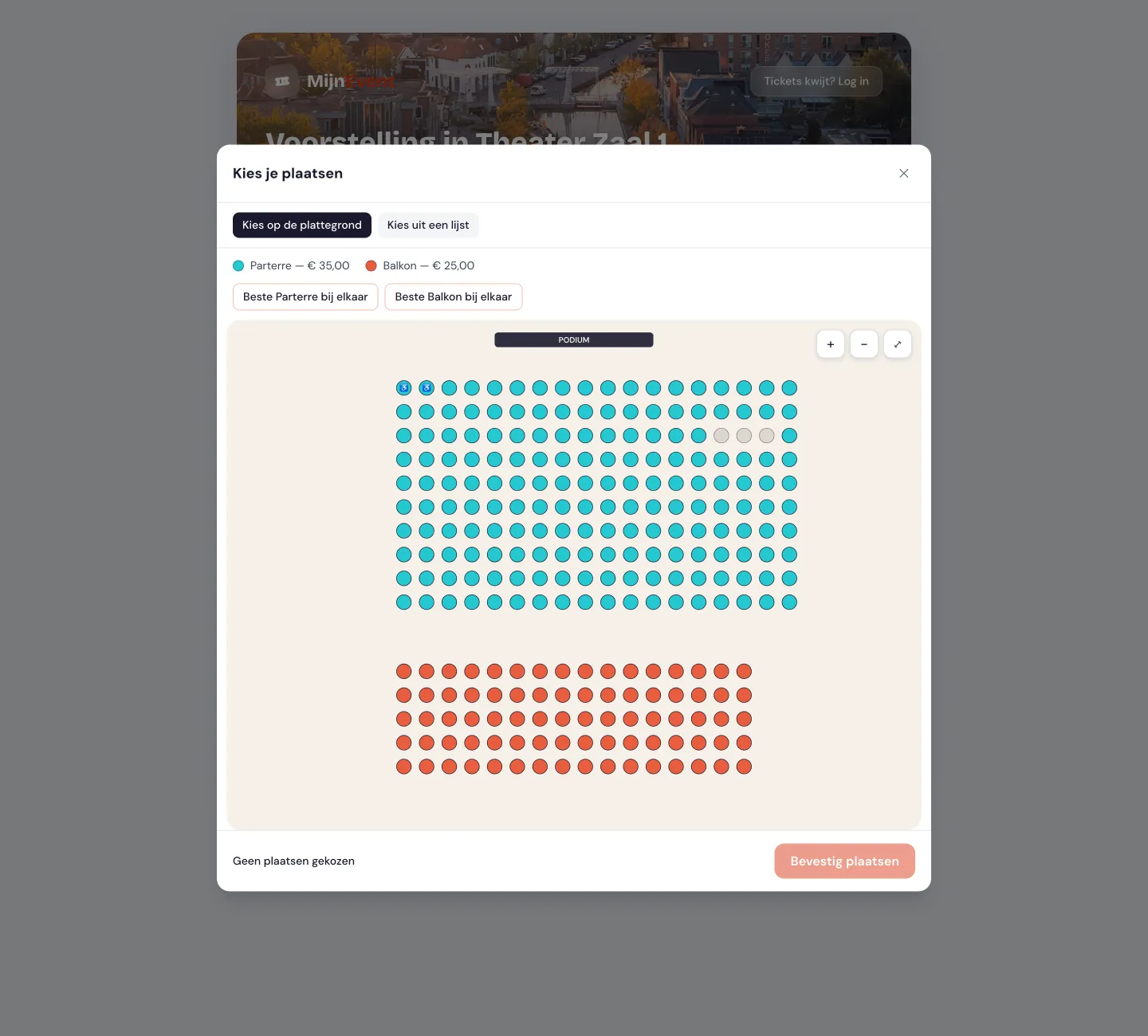 Pick on the floor plan: price tiers in colour, the stage at the top, wheelchair spaces set apart and taken seats greyed out.
The second is a full list: a button per seat for every row, with filters, entirely operable by keyboard and screen reader. That is not a second-rate alternative — for many people a list is simply faster, and for visitors who cannot use a mouse or pinch a touchscreen it is a fully fledged sales path. Accessibility is not a side issue for us but a starting point.
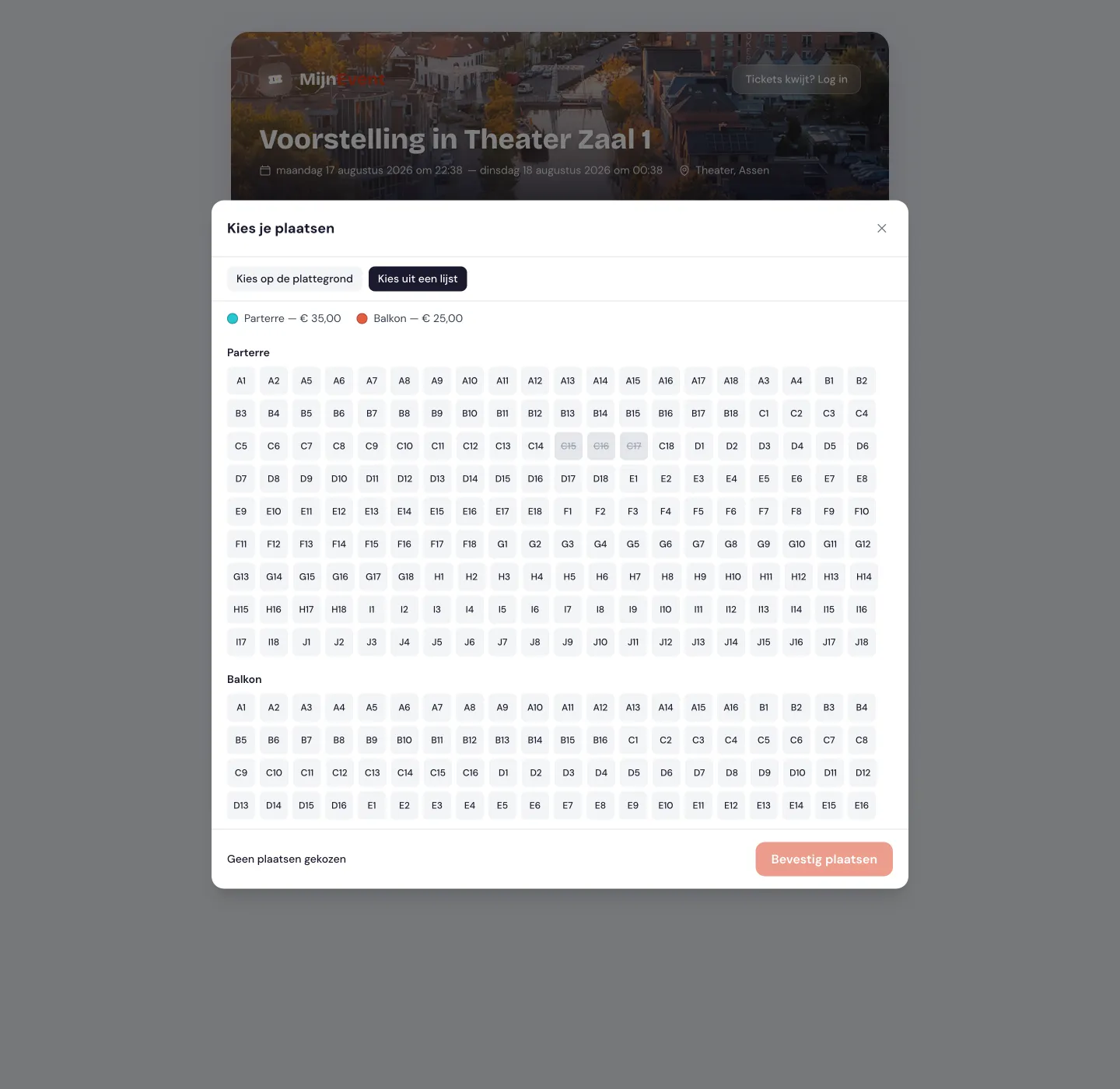 Pick from a list: the same seats, fully operable by keyboard and screen reader. Sold seats are struck through.
Anyone who does not fancy puzzling simply presses "best seats together": the system then looks within the chosen price tier for the highest-scoring block of adjacent seats, as close to the stage as possible. And if you accidentally strand a single seat between taken ones, you get a friendly warning — because nobody wants that one leftover seat.
Double-selling is technically impossible
With seated sales there is one thing that really must not happen: selling the same seat to two people. That is not something we "try to prevent" — with us it simply cannot happen. As soon as someone picks a seat it is briefly held for them, and at checkout the seat is recorded at database level with a hard limit: one active sale per seat, full stop.
Even when things get busy — a popular show, everybody going for the same row at once — only one buyer succeeds. The other is told clearly that the spot has just gone and picks another one. No double bookings, no arguments at the door.
Price tiers are simply your ticket types
You do not have to learn a new pricing system. A price tier — stalls, balcony, box, VIP — is simply an existing ticket type. You create a floor plan, link it to an event, and say: "this section is Stalls at €35, that one is Balcony at €25." Done. Prices, service fees, member rates and discount codes all keep working unchanged.
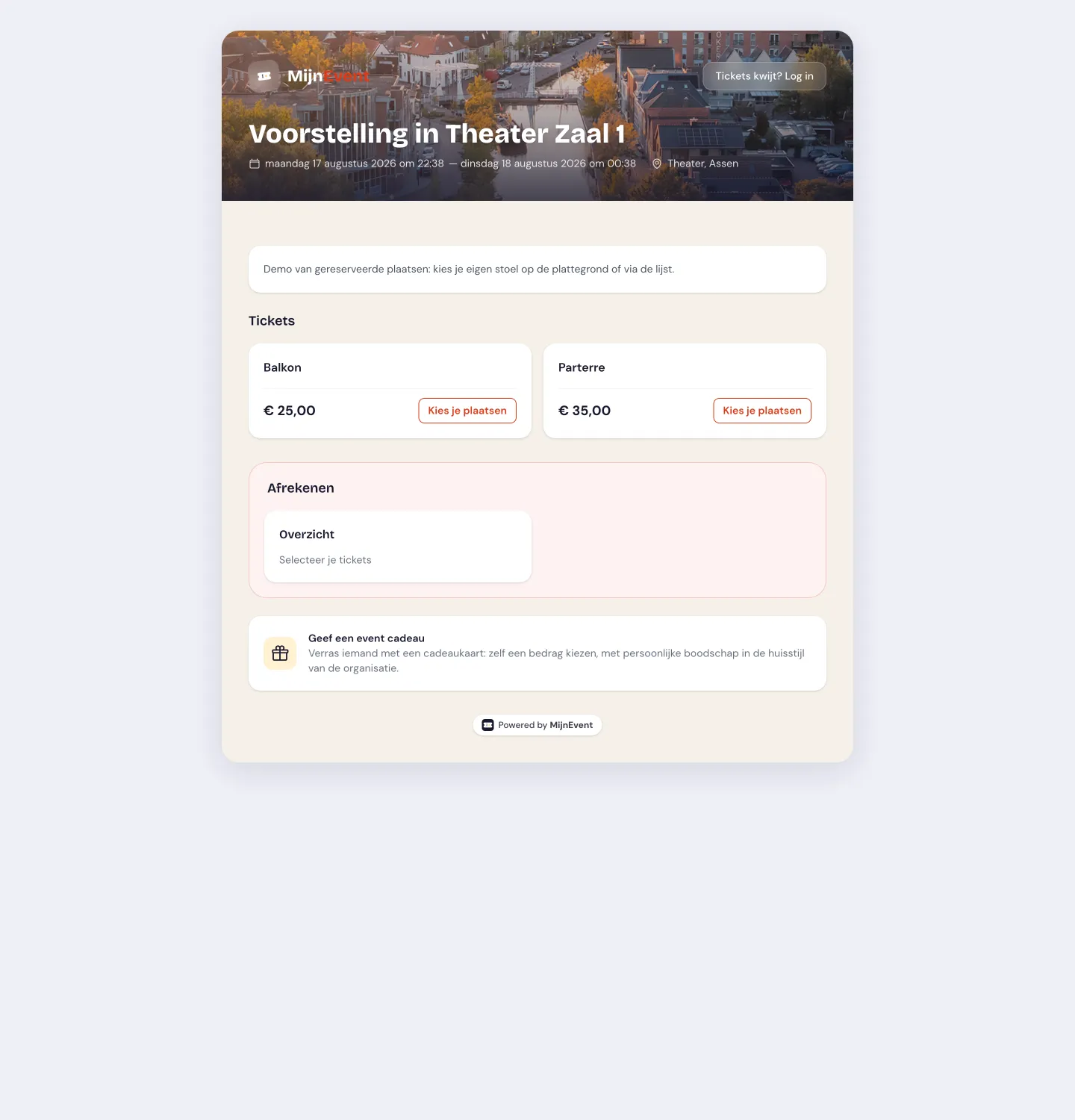 The event page shows a "Pick your seats" button per price tier; after that the checkout runs exactly as you are used to.
Real, curved halls too — balconies and all
A rectangular block of seats is easy. But a real playhouse has fan-shaped rows curving around the stage, several balconies, and price tiers that do not run neatly per block but sit as separate clusters right across the hall — a "star tier" in the middle of the stalls, first tier around it, second and third tier towards the edges and the back. Exactly that kind of hall.
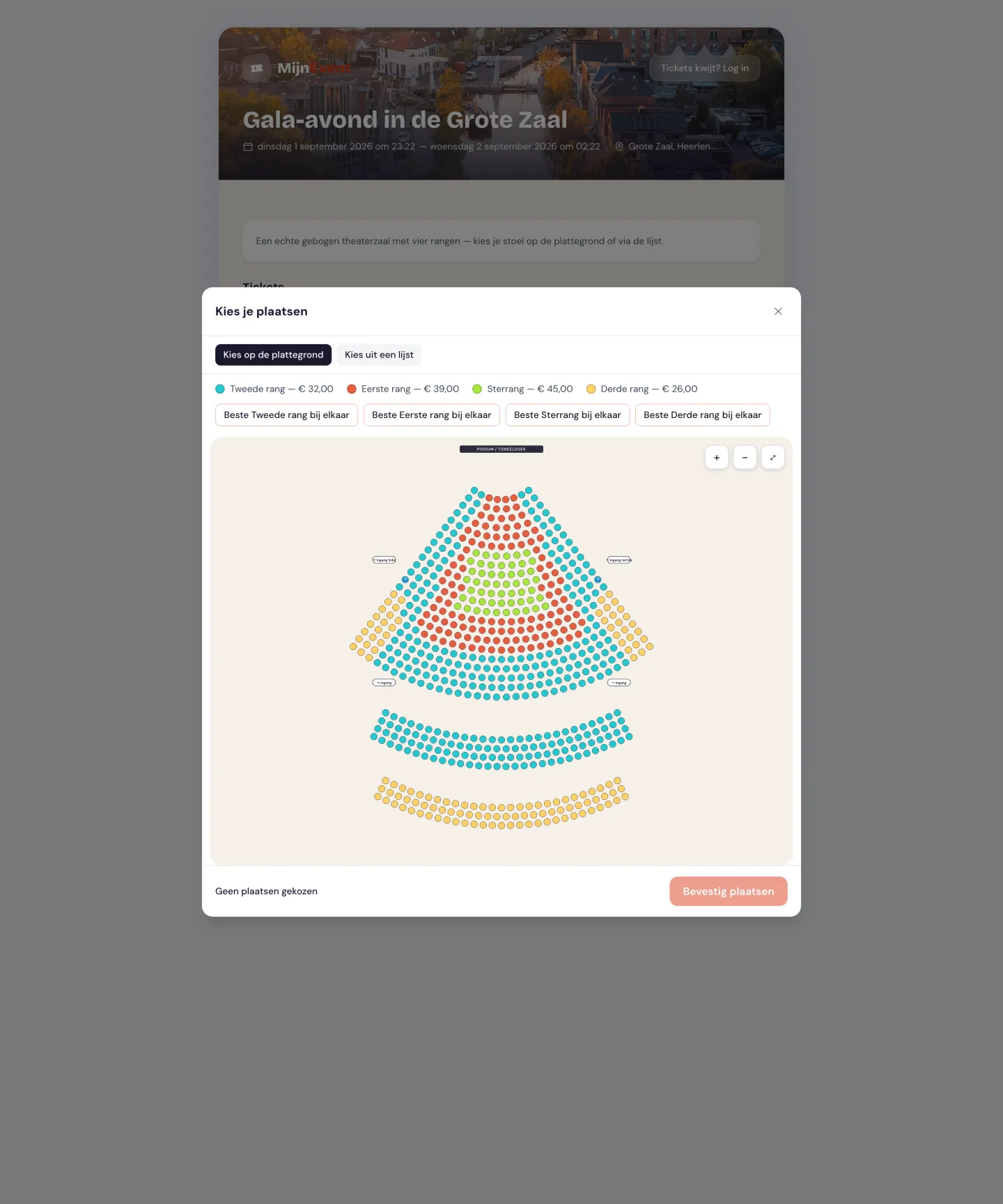 A real theatre hall: curved stalls, two balconies, four price tiers as per-seat clusters, plus the stage or screen and the entrances in their proper places.
Because every seat sits on its own coordinate, the floor plan can take any shape — straight, curved, round, with balconies above. The price tier is a property of the seat itself, so it is free to run right across rows and sections. And you add whatever a visitor needs to get their bearings: where the stage or screen is, and where the entrances are.
One honest note: at this stage we support halls of up to around 2,000 seats — comfortably enough for practically every theatre, playhouse and conference room. Even larger halls and stadiums (tens of thousands of seats, where you first pick a section and then zoom in) are on the roadmap for a next phase.
Comfortable on your phone
Most seat pickers are a disaster on mobile: minuscule dots you cannot hit with a thick thumb. With us you pinch to zoom — the seats become large and easy to tap — or you simply use the list or the "best seats" button, and then there is no fiddling at all.
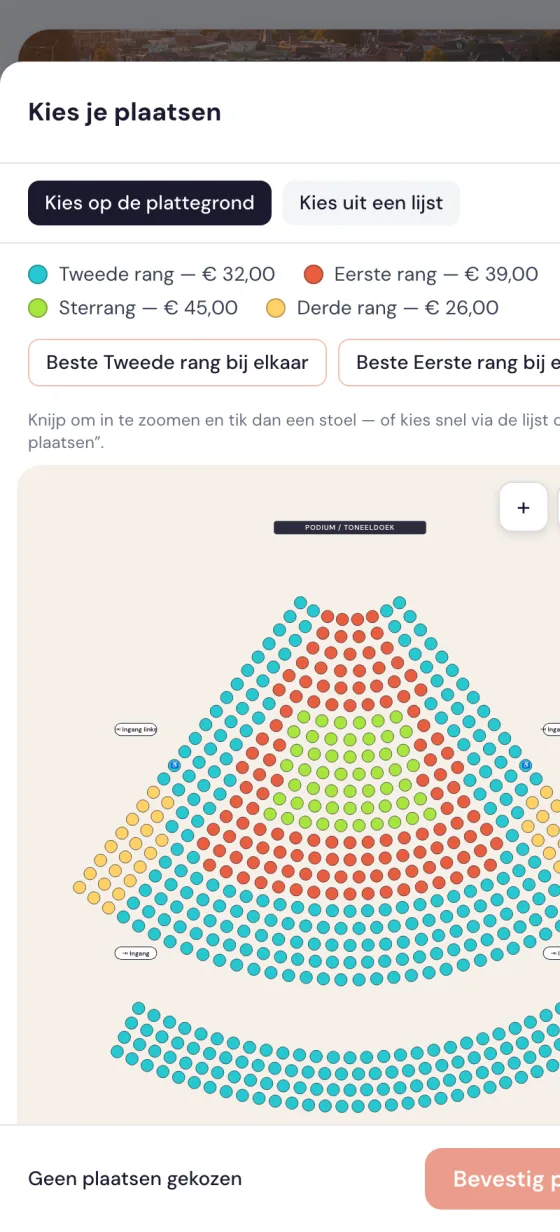 On mobile: pinch to zoom with large tap targets, or pick quickly via the list or "best seats".
Wheelchair spaces and companions
Wheelchair spaces are a category of their own on the floor plan, with a companion seat next to them that is logically selected along with it. On the map you recognise them by an icon (not by colour alone), and in the list you filter on accessible seats. That way someone who needs a wheelchair space buys the right seat without any hassle — and the seat next to it for whoever is coming along.
The seat travels everywhere
After the purchase the seat is not some loose fact sitting somewhere in a system. It ends up in every place the ticket appears: on the ticket itself, on the PDF, in the confirmation email, and in Apple Wallet as well as Google Wallet (in the real seat fields, so it is displayed properly). And at the door the inspector immediately sees it large on screen while scanning: "Stalls — Row B, seat 12". Seating people happens by itself that way.
How to get started
You have two options. You draw your hall yourself — place sections, generate rows, number and tag seats — or you send us your floor plan and we set up every hall for free. A floor plan is reusable as well: draw it once, then use it for every performance.
The module is free at the moment: no cost per seat, no extra fees. Only the usual platform fee per paid ticket applies as always, and free seats stay fee-free.
Fancy selling your hall with reserved seating? Get in touch — we will set it up for you and think along about your floor plans.


