# Reserved seating — numbered seats and floor plans — MijnEvent

 Module Available 

# Reserved seating &amp; floor plans

Let visitors pick their own seat on a slick, on-brand floor plan — or blazingly fast via an accessible list. Both equal, in the theatre and in the cinema screen alike.
 [Get in touch](https://mijnevent.nl/en/contact) [From order to gate ↓](#how-title) 

 Real, curved theatre halls — fan-shaped rows, multiple balconies and irregular floor plans like a real playhouse Cinema screens just as well: raked rows, the screen as the reference point, love seats and premium recliners as their own tier One floor plan per room, reusable for every performance or screening — you do not redraw it for the evening show 

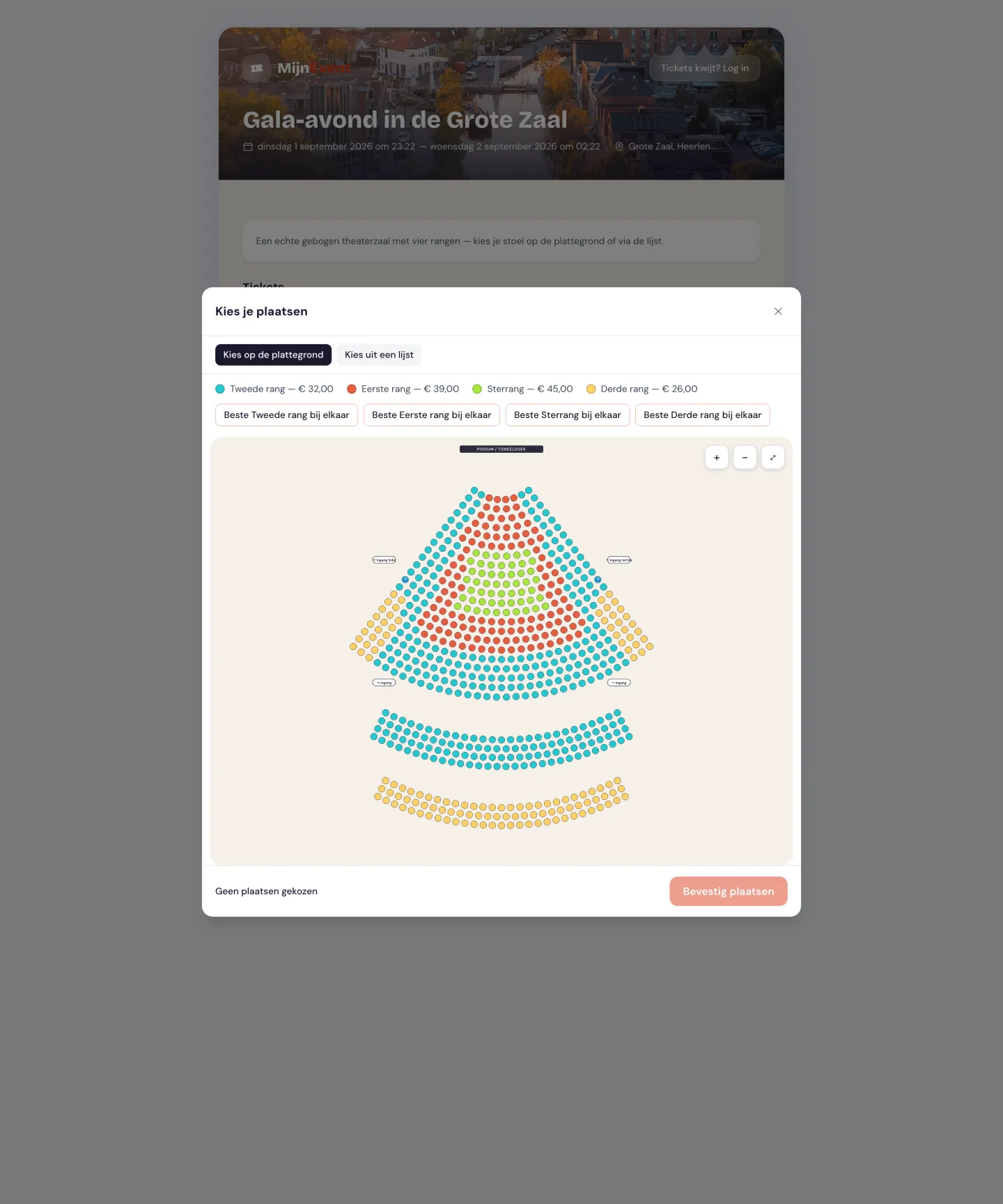
  A real curved theatre hall: fan-shaped stalls, two balconies, four tiers as per-seat clusters, stage/curtain and entrances 

 ![A real curved theatre hall: fan-shaped stalls, two balconies, four tiers as per-seat clusters, stage/curtain and entrances](https://regify-mijnevent.s3.eu-central-1.amazonaws.com/blog/screenshots/seating-gebogen.webp) 

  The reserved-seating module adds numbered seat sales to your events: theatres, concert halls, cinemas, arthouse screens, conference rooms and other indoor venues sell specific seats instead of loose tickets. You build a reusable floor plan yourself — sections (stalls, balcony, box, or simply one raked floor like a cinema screen), rows and seats — or send us your plan and we set up every hall for free. You draw that plan once and attach it to every performance or screening in that room, so a cinema with four screens and thirty showings a week sets up four floor plans and is done. You link price tiers to your existing ticket types, so prices, service fees and discount codes keep working unchanged. Visitors choose their spot in two equal ways: a graphically strong, smoothly zoomable floor plan, or a full, fully accessible list — they switch themselves. Wheelchair spaces with a companion seat, a warning about isolated empty seats and "give me the best seats together" are included by default. Double-selling is technically impossible: each seat can only be sold once, even during a spike of simultaneous buyers. The chosen seat appears on the ticket, the PDF, the confirmation email and in Apple/Google Wallet, and the inspector immediately sees "Stalls — Row B, seat 12" when scanning.

   How it works

## From order to gate

1. 1 Create a floor plan: draw sections (curved too), generate rows and seats, tag wheelchair spaces and place the stage or screen and the entrances
2. 2 Link the floor plan to an event, performance or screening and map each tier — per section, row or single seat — to a ticket type (= price)
3. 3 The visitor picks their seat on the plan or via the list and pays with iDEAL | Wero
4. 4 After payment the seat is on the ticket, in the wallet and in the scanner — double-selling is impossible
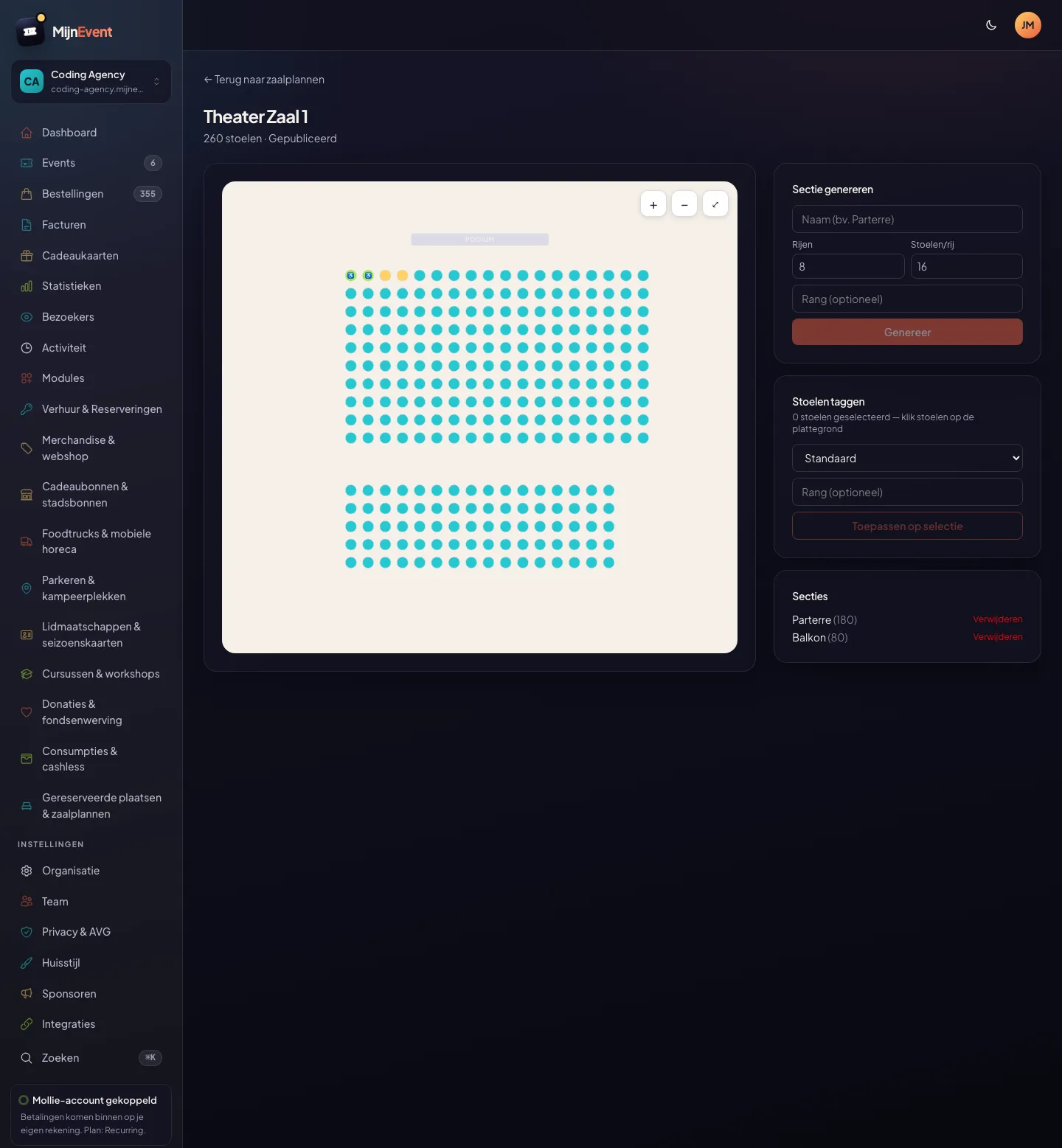
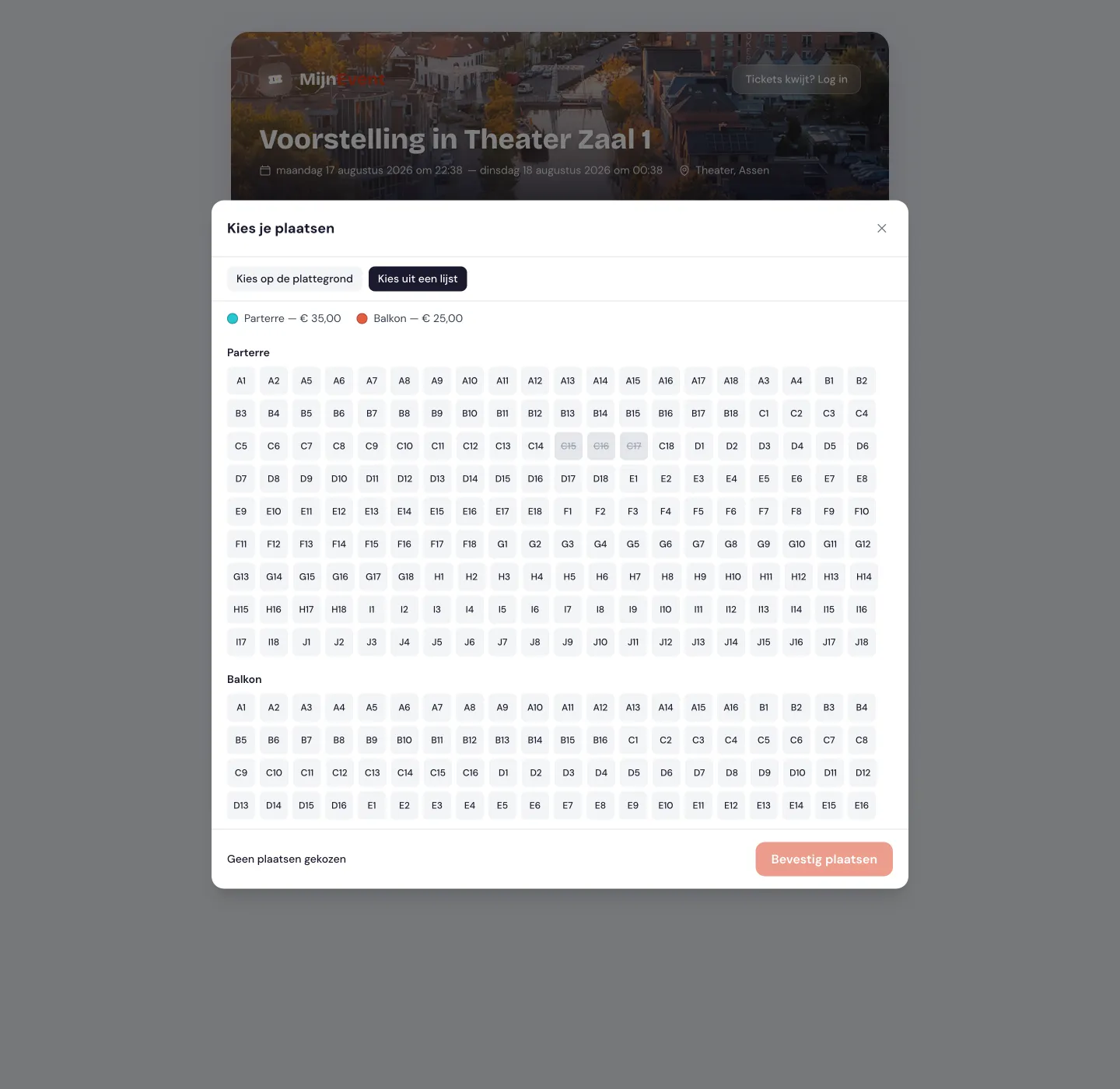
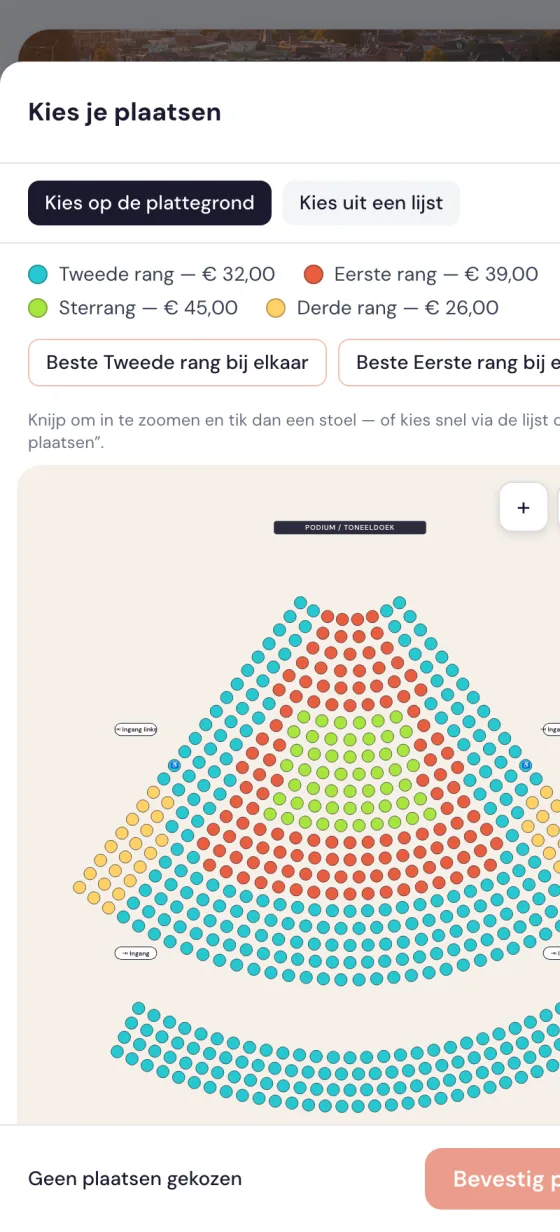
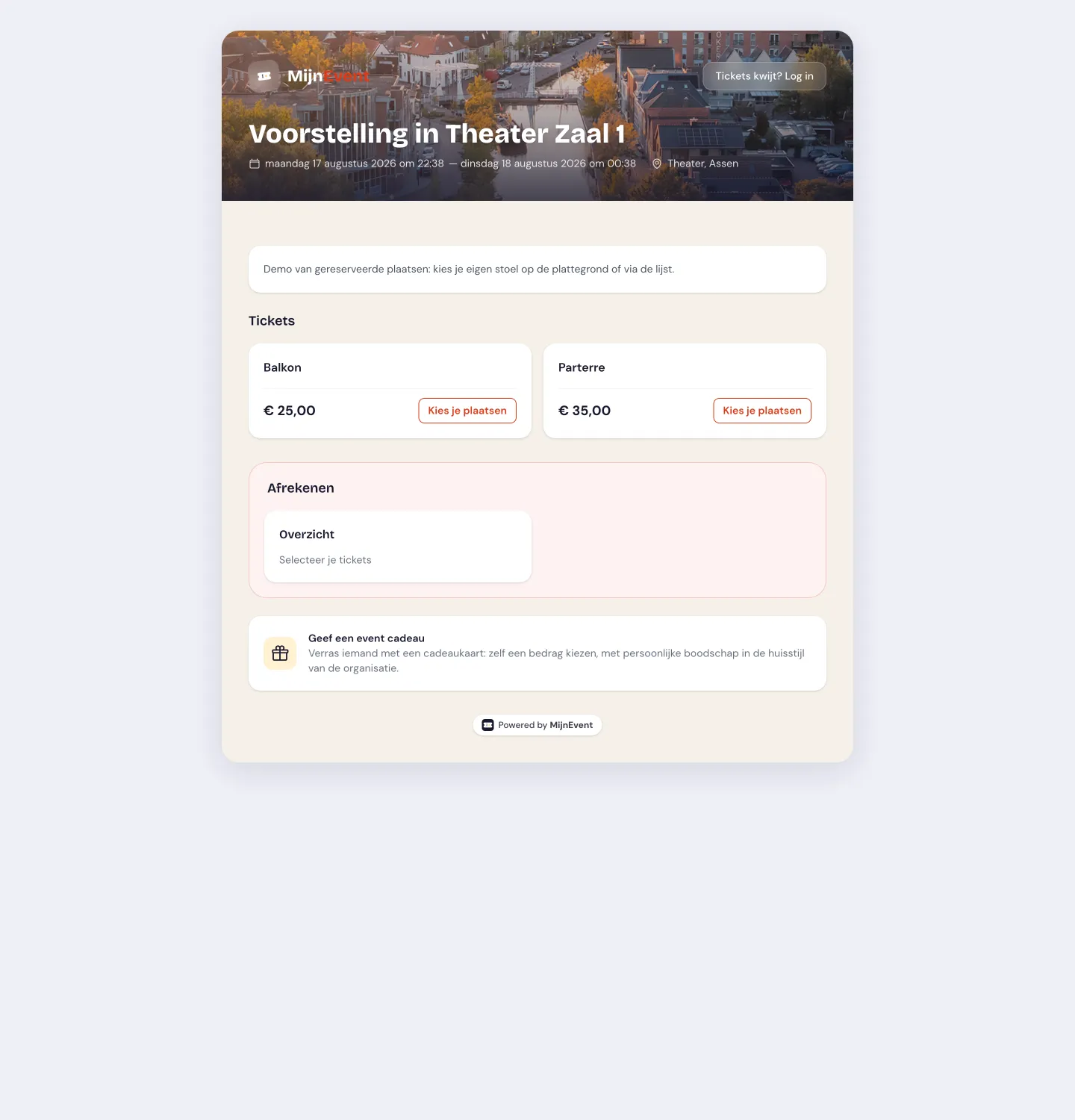
  ![A real curved theatre hall: fan-shaped stalls, two balconies, four tiers as per-seat clusters, stage/curtain and entrances](https://regify-mijnevent.s3.eu-central-1.amazonaws.com/blog/screenshots/seating-gebogen.webp) A real curved theatre hall: fan-shaped stalls, two balconies, four tiers as per-seat clusters, stage/curtain and entrances   ![The editor in the dashboard: generate sections with rows and seats, tag wheelchair spaces and tiers, and publish — or have your halls set up for free](https://regify-mijnevent.s3.eu-central-1.amazonaws.com/blog/screenshots/seating-editor.webp) The editor in the dashboard: generate sections with rows and seats, tag wheelchair spaces and tiers, and publish — or have your halls set up for free   ![The same choice via a full, accessible list — an equal sales path, not an afterthought](https://regify-mijnevent.s3.eu-central-1.amazonaws.com/blog/screenshots/seating-lijst.webp) The same choice via a full, accessible list — an equal sales path, not an afterthought   ![On mobile: pinch to zoom and tap a seat, or pick quickly via the list or "best seats"](https://regify-mijnevent.s3.eu-central-1.amazonaws.com/blog/screenshots/seating-mobiel.webp) On mobile: pinch to zoom and tap a seat, or pick quickly via the list or "best seats"   ![On the event page the visitor picks seats per tier; the rest of the checkout is unchanged](https://regify-mijnevent.s3.eu-central-1.amazonaws.com/blog/screenshots/seating-event.webp) On the event page the visitor picks seats per tier; the rest of the checkout is unchanged  

   What you get

## What is included

- Real, curved theatre halls — fan-shaped rows, multiple balconies and irregular floor plans like a real playhouse
- Cinema screens just as well: raked rows, the screen as the reference point, love seats and premium recliners as their own tier
- One floor plan per room, reusable for every performance or screening — you do not redraw it for the evening show
- Tiers as per-seat clusters that cross rows and sections (think a "star tier" in the middle of the hall)
- Two equal views: a slick graphical floor plan and a full, accessible list
- Mark the stage, the screen and the entrances on the plan so visitors orient themselves instantly
- Wheelchair spaces with a companion seat and a "show accessible seats" filter
- Smooth on mobile: pinch to zoom with large tap targets, or pick quickly via the list and "best seats"
- Price tiers linked to your existing ticket types — prices, service fees and discount codes work unchanged
- A warning about isolated empty seats and "best available seats together" in one click
- Double-selling technically impossible, even with simultaneous buyers; realtime grey-out when someone else picks
- The seat appears on the ticket, PDF, confirmation email and Apple/Google Wallet; the inspector sees it when scanning
- WCAG AA-first — the list is a full sales path, not an afterthought

   Pricing

## Low flat fees — never a percentage

 0%No per-seat fee and no extra cost. Only a one-time setup, which is currently €0. The usual platform fee per paid ticket applies unchanged; free seats are fee-free.

   Availability

## Available on request

This module is available. Interested? Get in touch and we will activate the module for your organisation.

   Same foundation

## Everything on one account and one dashboard

Every module runs on the same backbone as your ticket sales: payments through your own Mollie account with direct payouts, one customer base, one dashboard, passwordless login and WCAG AA accessibility. No separate tools to stitch together.

   Frequently asked questions

## Frequently asked questions

## Do you support real, curved theatre halls with multiple balconies?

 Yes. Seats live on free coordinates, so fan-shaped rows, multiple balconies and irregular floor plans — as a playhouse or theatre has them — just work. Tiers that run as separate clusters across rows and sections (a "star tier" in the middle of the hall) are included too. Place the stage or screen and the entrances so visitors orient themselves.

## Does this work for a cinema or arthouse too?

 Yes — to the module a cinema screen is simply a room: raked rows, the screen as the reference point instead of a stage, and love seats, comfort recliners or a premium row as their own tier with their own price. You draw one plan per screen and attach it to every showing, so you set up four screens once and then sell your whole weekly programme without ever redrawing.

## How large can a hall be?

 In this phase up to about 2,000 seats per hall — plenty for virtually all theatres, playhouses, cinema screens and conference halls. Even larger halls and stadiums (tens of thousands of seats, choosing at section level with zoom-in) are on the roadmap for a next phase.

## Does it work well on mobile?

 Yes, it is deliberately designed for it: pinch to zoom with large tap targets, or simply pick quickly via the accessible list and the "best seats" button — no fiddly precision.

## Can a visitor pick their own seat?

 Yes, in two equal ways: on a graphical floor plan with smooth zooming, or via a full, fully accessible list. The visitor switches between them at will.

## How do you prevent a seat being sold twice?

 Each seat is briefly held while being picked and can only be sold once at the database level. Even during a spike of simultaneous buyers, double-selling is technically impossible.

## Do my existing prices and discount codes work?

 Yes. A price tier is simply an existing ticket type; prices, service fees, member pricing and discount codes work unchanged.

## What does the reserved-seating module cost?

 Free for now: no per-seat fee and no extra cost, only a one-time setup that is currently €0. The usual platform fee per paid ticket applies unchanged.

# Other modules

 [        Rentals &amp; reservations ](https://mijnevent.nl/en/modules/rentals) [        Event feedback ](https://mijnevent.nl/en/modules/attendee-feedback) [        Merchandise &amp; web shop ](https://mijnevent.nl/en/modules/merchandise) [           Local vouchers &amp; city cards ](https://mijnevent.nl/en/modules/city-cards) [           Food trucks &amp; mobile catering ](https://mijnevent.nl/en/modules/food-trucks) [      Safety &amp; permit ](https://mijnevent.nl/en/modules/safety-permit) [          Parking &amp; camping pitches ](https://mijnevent.nl/en/modules/parking) [        Memberships &amp; season passes ](https://mijnevent.nl/en/modules/memberships) [         Newsletter integration ](https://mijnevent.nl/en/modules/newsletter-integration) [        Attendee mailings ](https://mijnevent.nl/en/modules/attendee-mailings) [         Courses &amp; workshops ](https://mijnevent.nl/en/modules/courses) [         Donations &amp; fundraising ](https://mijnevent.nl/en/modules/fundraising) [        Minty — AI chat assistant ](https://mijnevent.nl/en/modules/minty) [            Consumptions &amp; cashless ](https://mijnevent.nl/en/modules/cashless) 

# Interested in this module?

Get in touch — we will discuss what fits your organisation and activate the module together.

 [Get in touch](https://mijnevent.nl/en/contact) [View all modules](https://mijnevent.nl/en/modules)