# Attendee mailings — reach your visitors before and after your event — MijnEvent

 Module Available 

# Attendee mailings

Practical info beforehand, a thank-you afterwards: email exactly the right group, straight from your dashboard — no export lists.
 [Get in touch](https://mijnevent.nl/en/contact) [From order to gate ↓](#how-title) 

 Email per target group: event, ticket type, rentals, parking, course, membership, webshop or city card QR codes and attachments are included automatically, using your confirmation email settings Live recipient count and a test email to yourself before you send 

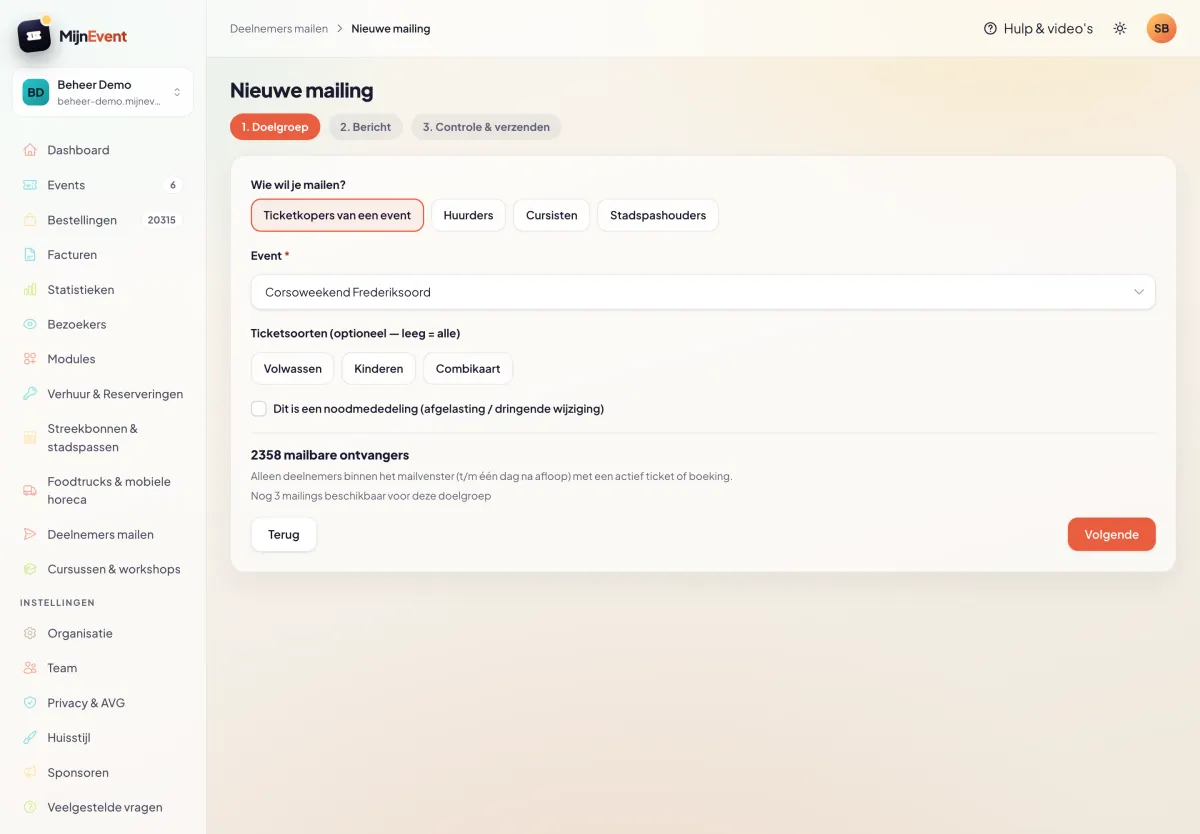
  The wizard with a live count: pick your audience and instantly see how many mailable recipients you reach 

 ![The wizard with a live count: pick your audience and instantly see how many mailable recipients you reach](https://regify-mijnevent.s3.eu-central-1.amazonaws.com/blog/screenshots/deelnemers-mailen-wizard-doelgroep.webp) 

  With Attendee mailings you reach everyone who ordered something from you, without exporting addresses to an external mail tool. You pick a target group — for example all ticket buyers of one event, one ticket type, your renters, course participants or members — write your message and send. Every email automatically includes the relevant QR codes and attachments, exactly like the confirmation email. To prevent misuse as a newsletter channel there is a fair boundary: you can email attendees until one day after their ticket or booking ends, and per event at most three times with at least 24 hours in between. Want to keep emailing a loyal following? That is what the free newsletter integration is for. For emergencies — a cancellation or code red — there is a separate emergency announcement that can always be sent immediately and free of charge.

   How it works

## From order to gate

1. 1 Pick your target group — for example all ticket buyers of your upcoming event
2. 2 Write your message with formatting and placeholders like \[naam\] and \[event\]
3. 3 Check the recipient count and send a test email to yourself first
4. 4 Send — every recipient gets the email with their own QR codes and attachments
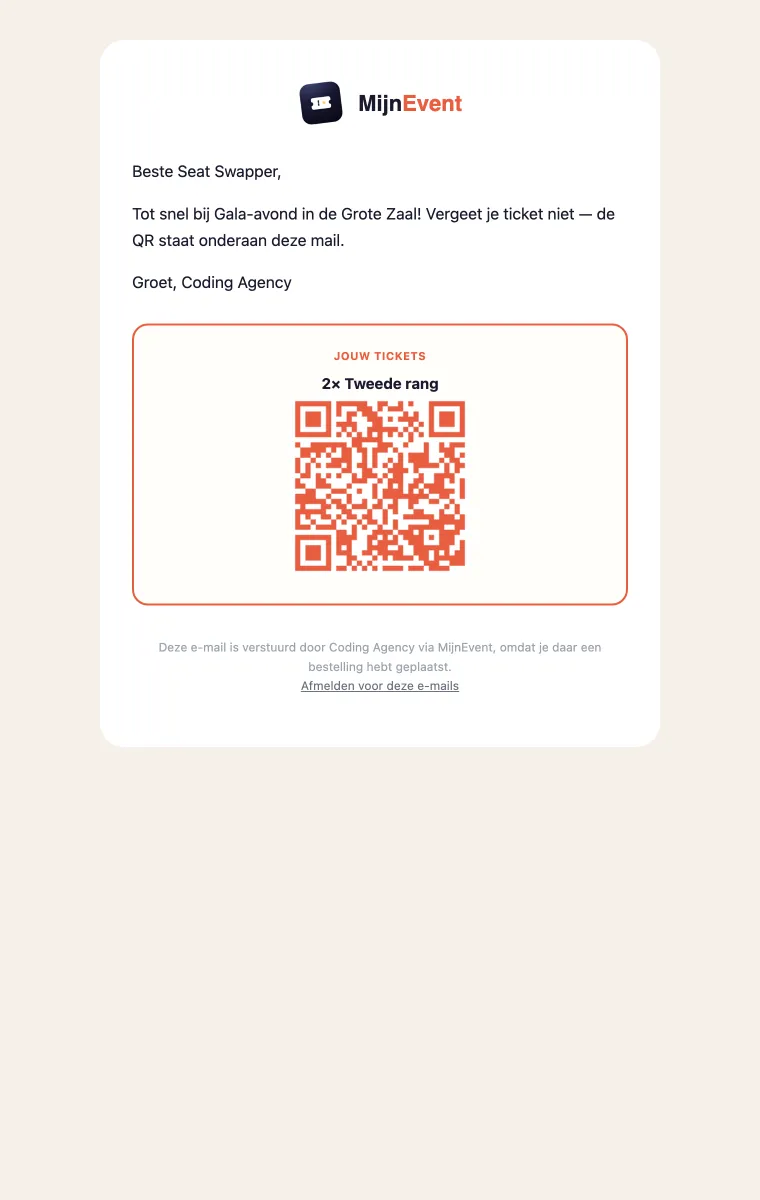
  ![The wizard with a live count: pick your audience and instantly see how many mailable recipients you reach](https://regify-mijnevent.s3.eu-central-1.amazonaws.com/blog/screenshots/deelnemers-mailen-wizard-doelgroep.webp) The wizard with a live count: pick your audience and instantly see how many mailable recipients you reach   ![The email your visitor receives: your message with their own tickets and QR code below it](https://regify-mijnevent.s3.eu-central-1.amazonaws.com/blog/screenshots/deelnemers-mailen-mail.webp) The email your visitor receives: your message with their own tickets and QR code below it  

   What you get

## What is included

- Email per target group: event, ticket type, rentals, parking, course, membership, webshop or city card
- QR codes and attachments are included automatically, using your confirmation email settings
- Live recipient count and a test email to yourself before you send
- Fair spam brake: mailable until one day after the end, max. three mailings per event with 24 hours in between
- Emergency announcement for cancellations: always immediate, always free
- Unsubscribe link and clean delivery via a separate mail stream — your confirmation emails stay out of it
- GDPR-proof: no export lists, addresses stay inside the platform

   Pricing

## Low flat fees — never a percentage

 0%Mailing attendees around your event, rental, course or membership is free. Only mailings to webshop customers and city-card holders cost €5 per mailing (adjustable per organisation, down to €0) — those groups stay mailable for a long time, so this keeps the threshold fair. Emergency announcements are always free.

   Availability

## Available on request

This module is available. Interested? Get in touch and we will activate the module for your organisation.

   Same foundation

## Everything on one account and one dashboard

Every module runs on the same backbone as your ticket sales: payments through your own Mollie account with direct payouts, one customer base, one dashboard, passwordless login and WCAG AA accessibility. No separate tools to stitch together.

   Frequently asked questions

## Frequently asked questions

## Who can I email, and for how long?

 Everyone with a paid order, until one day after the ticket or booking ends. If someone rents on 1 July you can email them through 2 July; a weekend ticket from Friday to Sunday is still mailable on Monday. After that it stops — to keep reaching a loyal following, use the free newsletter integration.

## How often can I send?

 Per event at most three mailings (before and after combined) with at least 24 hours in between. Rentals, parking and courses follow the same rhythm; members can be emailed at most once every 30 days. That way an email from you stays something visitors are happy to receive.

## What do attendee mailings cost?

 Mailings around your event, rental, course or membership are free. Only mailings to webshop customers and city-card holders cost €5 per mailing, paid upfront — those groups stay mailable for a long time, so this keeps the threshold fair. The amount is adjustable per organisation, down to €0. Emergency announcements are always free.

## What if my event is cancelled?

 Then you send an emergency announcement. It does not count towards the limit, is free and also reaches visitors who unsubscribed from regular mailings — with a cancellation or code red, everyone needs to know. Emergency announcements are strictly for real emergencies: if it turns out to be a regular or promotional message, €50 per occurrence is charged afterwards.

## Can recipients unsubscribe?

 Yes, every mailing contains an unsubscribe link (with one-click unsubscribe). An unsubscribe only applies to these mailings; confirmation and ticket emails keep arriving as usual.

# Other modules

 [        Rentals &amp; reservations ](https://mijnevent.nl/en/modules/rentals) [                   Reserved seating &amp; floor plans ](https://mijnevent.nl/en/modules/reserved-seating) [        Event feedback ](https://mijnevent.nl/en/modules/attendee-feedback) [        Merchandise &amp; web shop ](https://mijnevent.nl/en/modules/merchandise) [           Local vouchers &amp; city cards ](https://mijnevent.nl/en/modules/city-cards) [           Food trucks &amp; mobile catering ](https://mijnevent.nl/en/modules/food-trucks) [      Safety &amp; permit ](https://mijnevent.nl/en/modules/safety-permit) [          Parking &amp; camping pitches ](https://mijnevent.nl/en/modules/parking) [        Memberships &amp; season passes ](https://mijnevent.nl/en/modules/memberships) [         Newsletter integration ](https://mijnevent.nl/en/modules/newsletter-integration) [         Courses &amp; workshops ](https://mijnevent.nl/en/modules/courses) [         Donations &amp; fundraising ](https://mijnevent.nl/en/modules/fundraising) [        Minty — AI chat assistant ](https://mijnevent.nl/en/modules/minty) [            Consumptions &amp; cashless ](https://mijnevent.nl/en/modules/cashless) 

# Interested in this module?

Get in touch — we will discuss what fits your organisation and activate the module together.

 [Get in touch](https://mijnevent.nl/en/contact) [View all modules](https://mijnevent.nl/en/modules)
