# Local voucher module — one card, many local businesses

 Module Available 

# Local vouchers &amp; city cards

One local voucher for a town, village or region — redeemable from the bookshop to the theatre. Shops scan for themselves, you keep the payout overview.
 [Get in touch](https://mijnevent.nl/en/contact) [From gift card to payout ↓](#how-title) 

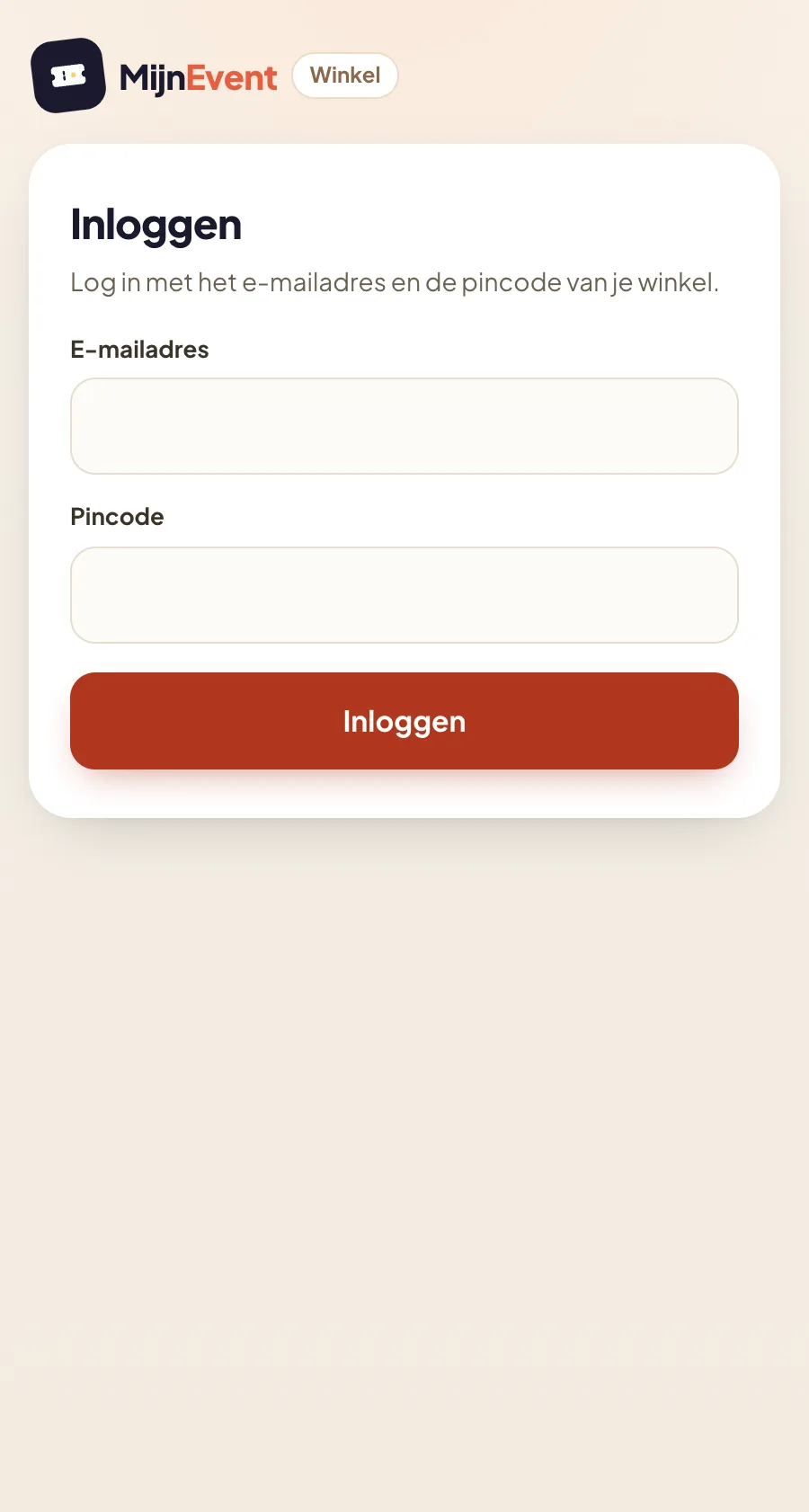
 One voucher, redeemable at every participating shop — under your own name, in your own community's branding Each shop gets its own login (email + PIN) and a scanning app Scan the QR or type the code, see the balance and redeem an amount — in parts if needed 

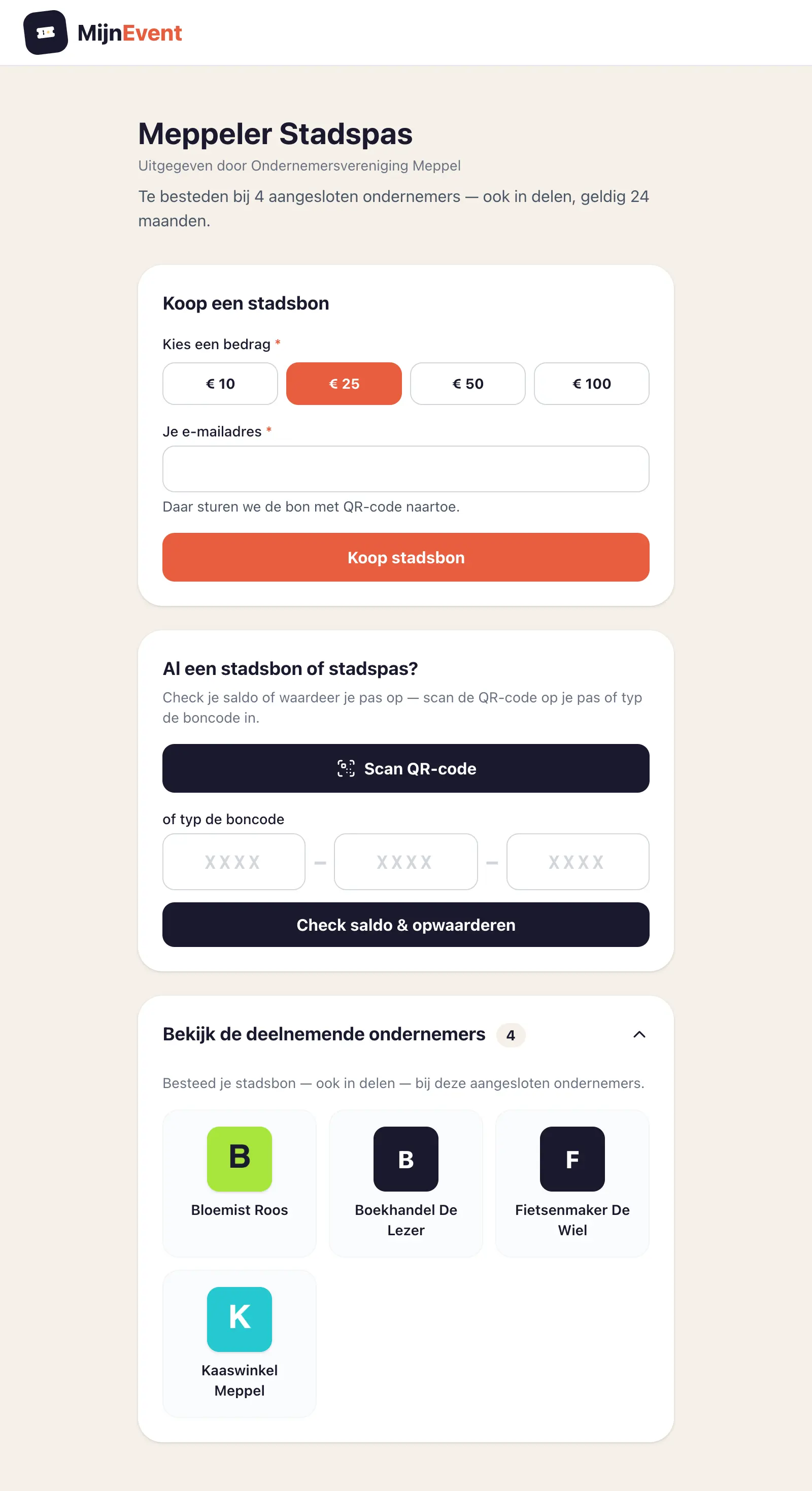
  The public page: buy, check the balance, top up and see participating businesses 

 ![The public page: buy, check the balance, top up and see participating businesses](https://regify-mijnevent.s3.eu-central-1.amazonaws.com/blog/screenshots/stadsbon.webp) 

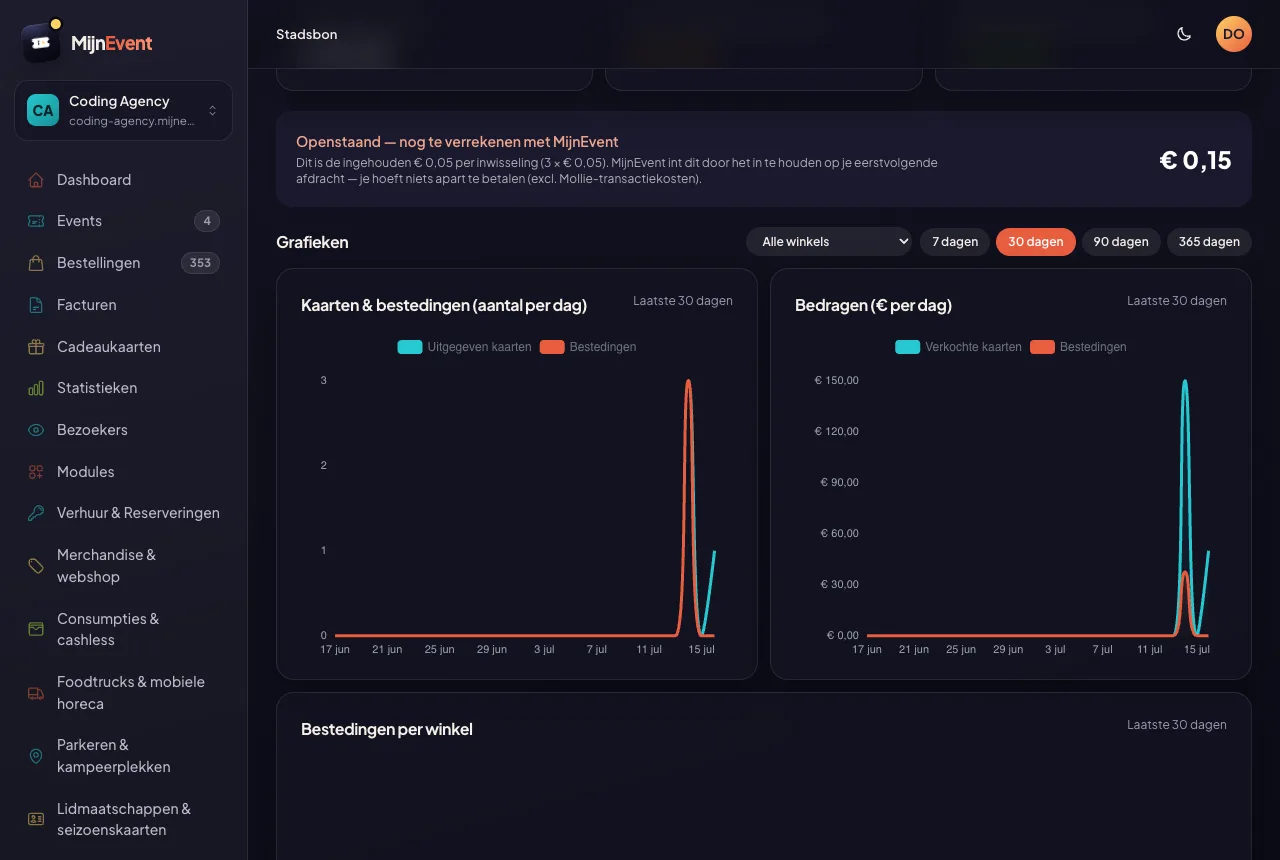
  The local voucher module turns local credit into one card redeemable at more than one business — under your own name, taken from your own village, municipality or region. Residents buy the voucher online with iDEAL | Wero (or receive it physically, no email address required) and spend it — in parts if they like — at participating shops. The idea is that of a local gift card, except the spending power stays in your own community: whether you call it a regional voucher, a municipal voucher or simply your city card, the technology underneath is the same. Every pass can also be topped up: scan the QR or type the card code on the public page, pick an amount and pay — an empty or expired pass is instantly usable again and its validity is extended. Physical cards are a first-class product: generate pass IDs in the dashboard, download print-ready files (PDF sheet with print instructions, SVG, PNG, CSV) for your own print shop, and cards can be taken in and safely reissued — everything the previous holder still had is invalidated automatically, wallet pass included. Cards with credit can be ordered up front: you only pay the issuance fees, the credit itself is funded outside the platform. Every shop gets its own scanning app with email + PIN: scan the QR or type the code, see the balance, redeem an amount; the holder is automatically emailed the remaining balance and finds their cards in their MijnEvent account. The public balance page shows the participating shops with their logos next to the balance. In the dashboard you get charts of sold cards and spending (filterable per shop), spending per shop at a glance, and per shop exactly what to pay out — the amount deducted at that shop, less €0.05 per redemption. Paying out runs in rounds: you select the shops, MijnEvent books the payouts and produces a SEPA payment file (pain.001) you import at your own bank — plus, on behalf of each shop, a self-billed invoice or payment statement with UBL where allowed, and one summary sheet per round. And the holder is never on their own: they link the card to their own email address, are automatically warned when someone else takes the card over, and freeze it after loss or theft with one button from the email — the balance stays put and you release the card from the dashboard after checking. Cards are valid for 24 months by default. Built for business associations, municipalities and regional initiatives that want to keep spending power local.

   See it in action

## Your own city pass for your municipality, region or town centre

    Video in Dutch.

From the first voucher to the payout to the shop: how a municipality or business association issues its own pass while the balance stays in its own account.

   How it works

## From gift card to payout

1. 1 The buyer orders the voucher online and pays with iDEAL | Wero — or receives it physically
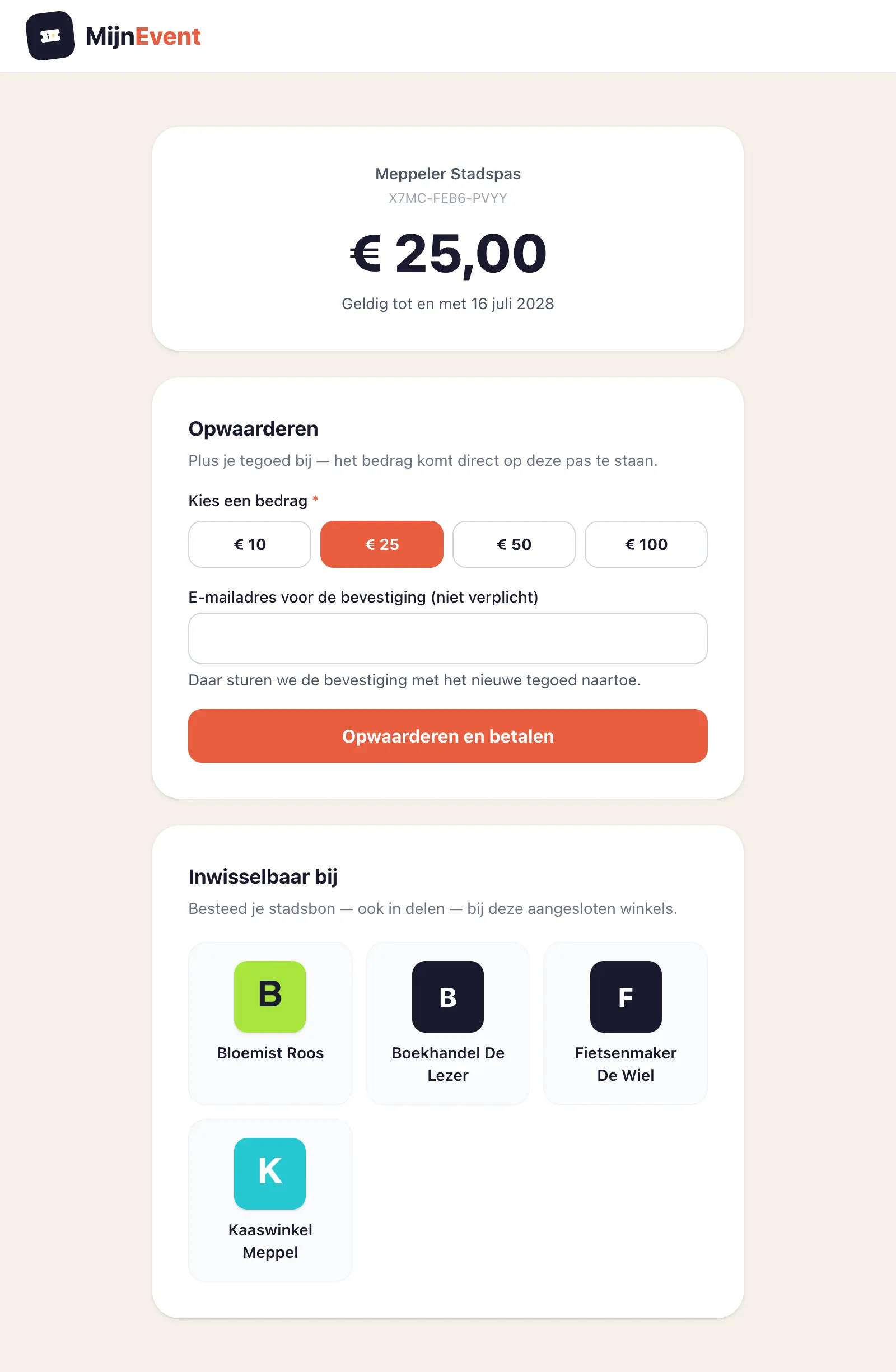
2. 2 Topping up is always possible: scan the QR on the pass (or type the code), pick an amount and pay
3. 3 The organisation invites shops; each shop sets its own PIN
4. 4 The shop scans the voucher in the app, sees the balance and redeems an amount
5. 5 The holder gets an email; the organisation pays the shops with a SEPA file at its own bank
 ![]() ![]()

  ![The public page: buy, check the balance, top up and see participating businesses](https://regify-mijnevent.s3.eu-central-1.amazonaws.com/blog/screenshots/stadsbon.webp) The public page: buy, check the balance, top up and see participating businesses   ![Topping up: check the balance and add credit right away — even on an empty or expired pass](https://regify-mijnevent.s3.eu-central-1.amazonaws.com/blog/screenshots/stadsbon-opwaarderen-saldo.webp) Topping up: check the balance and add credit right away — even on an empty or expired pass   ![Each shop logs in with email and PIN](https://regify-mijnevent.s3.eu-central-1.amazonaws.com/blog/screenshots/winkel-inloggen.webp) Each shop logs in with email and PIN   ![The dashboard: payout per shop, charts and spending per shop](https://regify-mijnevent.s3.eu-central-1.amazonaws.com/blog/screenshots/beheer-stadsbon.webp) The dashboard: payout per shop, charts and spending per shop  

   What you get

## What is included

- One voucher, redeemable at every participating shop — under your own name, in your own community's branding
- Each shop gets its own login (email + PIN) and a scanning app
- Scan the QR or type the code, see the balance and redeem an amount — in parts if needed
- New (beta): after redeeming, the app shows a till barcode carrying the amount — scan it with the shop's own till scanner and the line lands straight in the register, no retyping
- Top up on the public page: scan the QR or type the code, pick an amount and pay — an empty or expired card is instantly usable again
- Print and reuse physical cards: generate pass IDs, print-ready exports with print instructions, take cards in and safely reissue them — or order them pre-loaded
- The holder is automatically emailed the remaining balance and finds their cards in their account
- Payouts in rounds: select the shops, a SEPA payment file for your own bank, self-billed invoices on behalf of the shops and automatic notification per shop
- Dashboard charts: cards sold and spending per day, filterable per shop, plus spending per shop
- Public balance page with a shop overview; digital with QR or as a physical card (email optional)
- Double redemption is technically impossible; the remaining balance simply stays
- Card lost or stolen? The holder links the card to their email address and freezes it with one button from the email — the balance stays put, you release it from the Frozen cards overview

   Pricing

## Low flat fees — never a percentage

 Yearly licence  Regular price: regular €1,250  €499 per year Limited-time price 

 Per card €0.35 per issued or topped-up card 

- **Volume tiers:** from 25,000 cards in twelve months €0.28 · from 50,000 cards in twelve months €0.21 · custom above that
- Plus €0.05 per redemption, settled against the payout to the shop where the card was redeemed: a shop that redeems ten times sees €0.50 come off its payout. The issuing organisation then passes that amount on with the next card that is bought or topped up — excluding the transaction fees Mollie charges at that time. That way the shop that redeems the most carries the most, instead of the issuer subsidising its busiest shops.
- Physical cards: generating card IDs and exporting print-ready files is free — the printing you arrange with your own printer. Order a batch pre-loaded with credit and you pay €0.50 issuing cost per card up front; the value itself runs outside MijnEvent.
- The setup fee is a yearly amount; on top of that flat fees per card apply. Pricing is agreed per programme.

 All amounts incl. VAT and excluding the transaction fees Mollie charges — those run directly through your own Mollie account, outside MijnEvent. Every fee is a flat amount per unit and can be tailored per organisation.

   White label

## Prefer a fully white-label setup?

For municipalities and business associations that want to run the city card entirely as their own product, the city card module is also available white label: your card, your name — MijnEvent runs invisibly as the technology underneath.

- Your own city card on your own domain name, for example citycard-yourtown.com
- Fully in your own branding — logo, colours and name; including the emails and the shop environment
- No references to MijnEvent: card holders and shops see no MijnEvent logo, name or links

 Pricing on request [Request white label](https://mijnevent.nl/en/contact) 

   Availability

## Available on request

This module is available. Interested? Get in touch and we will activate the module for your organisation.

   Same foundation

## Everything on one account and one dashboard

Every module runs on the same backbone as your ticket sales: payments through your own Mollie account with direct payouts, one customer base, one dashboard, passwordless login and WCAG AA accessibility. No separate tools to stitch together.


   Frequently asked questions

## Frequently asked questions

## What exactly is a local voucher or city card?

  One pot of local credit under your own name — named after your village, municipality or region — redeemable at multiple participating businesses. Residents buy it online with iDEAL | Wero or receive it physically, and spend it — in parts if they like — at the shops. You will also see it called a regional voucher, a municipal voucher or a local gift card; it is the same product.

## How is this different from a gift card for a single organisation?

  A gift card applies to one organisation or one event: the credit sits on your own till. A local voucher or city card applies to every participating business in an area; MijnEvent tracks what each shop is owed and you settle it with one click. You can issue both with MijnEvent.

## Can I have physical cards printed and reuse them?

  Yes. In the dashboard you generate batches of pass IDs for free and download print-ready files for your own print shop — the PDF sheet carries the full print instructions as its first page. A returned card can safely be reissued: everything the previous holder still had is invalidated automatically, wallet pass included. Cards with credit can be ordered up front; you then only pay the €0.50 issuance fee per card.

## How do shops redeem a card?

  Each shop gets its own scanning app with email and PIN: scan the QR or type the code, see the balance and redeem an amount. Double redemption is technically impossible and the remaining balance simply stays.

## Does the shopkeeper still have to ring the amount into their own till?

  Not by hand any more. After redeeming, the shop app shows a till barcode (beta) carrying the exact amount — the same kind of code as the scale label from the butcher. The shopkeeper scans it from the phone screen with their own till scanner and the amount lands straight in the register as a line: no retyping, and the receipt and till count are right by themselves. This works with scanners that can read a code from a phone screen (2D imagers); if a scanner cannot, nothing changes about the current routine.

## What if a holder loses their card?

  The holder links the card to their email address on the balance page. After a purchase or takeover they do not recognise, they freeze the card with one button from their email: spending and topping up lock down, the balance stays put. You see frozen cards in the dashboard and release them after checking.

## How are the shops paid out?

  In the dashboard you see per shop exactly what to pay out: the amount that was deducted at that shop, less €0.05 per redemption. You settle it with one click and the shop is notified automatically. That €0.05 stays with the issuing organisation and is passed on to MijnEvent with the next card, so on balance it costs the issuer nothing.

## Who pays the €0.05 per redemption?

  The shop where the card is redeemed. The amount is settled against its payout: ten redemptions means €0.50 less paid out. The issuing organisation withholds it and passes it on with the next card, so the shop that redeems the most carries the most instead of the issuer subsidising its busiest shops. As a shopkeeper you therefore know up front: you receive the amount deducted, minus five cents each time you accept a card.

## What does the local voucher module cost?

  A limited-time €499 per year (regular €1,250) plus €0.35 per issued or topped-up card. From 25,000 issued or topped-up cards in twelve months that fee drops to €0.28 and from 50,000 to €0.21; custom above that. On top of that €0.05 per redemption, settled against the payout to the shop that accepts the card.

## Can the buyer choose their own amount?

  Yes. Alongside four familiar amounts — €10, €25, €50 and €100 — there is an "Other amount" field that takes any amount between €5.00 and €150.00, including €17.50. The same applies when topping up. Anyone wanting to give more buys several cards; €150.00 is also the maximum balance per card.

## How long is a card valid?

  24 months by default, configurable per programme. Each card gets its own expiry date from issue. Before expiry the holder automatically receives a reminder email with a top-up link, and topping up reactivates an empty or expired card and extends its validity — free of charge to the holder.

## Where does the money sit between purchase and spending?

  In the issuing organisation's own Mollie account, from the first euro. MijnEvent settles only its module fee and never holds the balance: there is no pooled account and no intermediary foundation. That is why a platform bankruptcy cannot touch the value of the cards.

## Can we show our own name, branding and sponsors?

  Yes. Name, logo, header photo, brand colours and fonts are yours to set; the public purchase and balance pages, the emails and the pass in Apple or Google Wallet pick that up directly. Sponsors and participating businesses appear with their own logos. A fully own domain name and an environment without platform references belong to the white-label option: bespoke, on request.

## Can several places or villages join one programme?

  Yes. Participating businesses are not tied to one place, so a regional voucher with shops from several villages is the same construction as a voucher for one town centre: one programme, one name, one participant list.

## Can we put the voucher on our own website?

  Yes, with a single line of code: an empty block with the data-mijnevent-citycard attribute plus our script. That widget holds the whole shopfront — buying, checking a balance and topping up — in your own branding, and it is set to noindex so you do not create duplicate content. If your CMS does not allow scripts, there is an iframe variant.

## Do we as the issuer need a licence?

  Usually not: vouchers like these generally fall under the limited network exclusion in PSD2 and the Dutch Financial Supervision Act, with an obligation to notify the Dutch central bank once spending value exceeds €1 million per twelve months. This is general information, not legal advice — have it checked by a lawyer or put it to the regulator before you start.

## What happens if a participating shop closes?

  You set that participant to inactive: it disappears from the public participant list and can no longer deduct anything. Amounts deducted before that go into the next payout round, and the balance on residents' cards stays spendable at every other connected business.

   Keep reading &amp; watching

## Help, videos and articles for this module

     Tutorial video · 0:24  [Issuing a city voucher for your town: keeping the money local](https://mijnevent.nl/en/blog/city-voucher-for-your-town)  

 [  ![](https://regify-mijnevent.s3.eu-central-1.amazonaws.com/blog/covers/fysieke-stadspasjes-drukken-en-hergebruiken.webp)   Article · 4 min read Printing and reusing physical city cards: how it works  ](https://mijnevent.nl/en/blog/printing-and-reusing-physical-city-cards)     Tutorial video · 0:12  [Buying and spending a city voucher](https://mijnevent.nl/en/blog/buying-and-spending-a-city-voucher)  

     Tutorial video · 0:16  [Redeeming a city voucher as a shop](https://mijnevent.nl/en/blog/redeeming-a-city-voucher-as-a-shop)  

 [  ![](https://regify-mijnevent.s3.eu-central-1.amazonaws.com/blog/covers/white-label-stadspas-eigen-domein.webp)   Article · 4 min read White label: your city card on your own domain, without a trace of MijnEvent  ](https://mijnevent.nl/en/blog/white-label-city-card-own-domain) 

# Other modules

 [          Rentals &amp; reservations ](https://mijnevent.nl/en/modules/rentals) [                     Reserved seating &amp; floor plans ](https://mijnevent.nl/en/modules/reserved-seating) [          Event feedback ](https://mijnevent.nl/en/modules/attendee-feedback) [          Merchandise &amp; web shop ](https://mijnevent.nl/en/modules/merchandise) [               Food trucks &amp; mobile catering ](https://mijnevent.nl/en/modules/food-trucks) [        Safety &amp; permit ](https://mijnevent.nl/en/modules/safety-permit) [            Parking &amp; camping pitches ](https://mijnevent.nl/en/modules/parking) [          Memberships &amp; season passes ](https://mijnevent.nl/en/modules/memberships) [           Newsletter integration ](https://mijnevent.nl/en/modules/newsletter-integration) [          Attendee mailings ](https://mijnevent.nl/en/modules/attendee-mailings) [           Courses &amp; workshops ](https://mijnevent.nl/en/modules/courses) [                Attendee details ](https://mijnevent.nl/en/modules/attendee-details) [           Donations &amp; fundraising ](https://mijnevent.nl/en/modules/fundraising) [          Minty — AI chat assistant ](https://mijnevent.nl/en/modules/minty) [              Consumptions &amp; cashless ](https://mijnevent.nl/en/modules/cashless) [            Website ](https://mijnevent.nl/en/modules/website) 

# Interested in this module?

Get in touch — we will discuss what fits your organisation and activate the module together.

 [Get in touch](https://mijnevent.nl/en/contact) [View all modules](https://mijnevent.nl/en/modules)