# Draw your own hall: the floor plan editor — MijnEvent

  [Home](https://mijnevent.nl/en) / [Blog for event organizers](https://mijnevent.nl/en/blog) / Draw your own hall: the floor plan editor   modules reserved-seating dashboard 

# Draw your own hall: the floor plan editor

With the new floor plan editor in your dashboard you build your own hall: generate sections with rows and seats, tag wheelchair spaces and price tiers, place the stage and entrances, and publish. Or send us your plan — then we set up every hall for free.

 [Jasper Koers](https://mijnevent.nl/en/author/jasper-koers) · 18 June 2026 · 3 min read 

       In short

- Build your hall yourself in the dashboard: generate sections with rows and seats, tag wheelchair spaces and price tiers, and publish.
- You place the stage or screen and the entrances on the plan; price tiers are linked to your existing ticket types.
- Not keen on drawing? Send us your floor plan and we set up every hall for free.

  A floor plan is the heart of seated sales. In the previous post we showed how a visitor picks their seat; this time we turn it around and look at the **other side**: how you, as the organiser, set up your hall. There is now an editor in your dashboard for that — deliberately kept simple.

# A hall in a few minutes

In your dashboard, go to **Floor plans** and click **New floor plan**. Give it a name ("Main hall", "Theatre Room 1") and you have an empty canvas. A floor plan is **reusable**: draw it once, then use it for every performance.
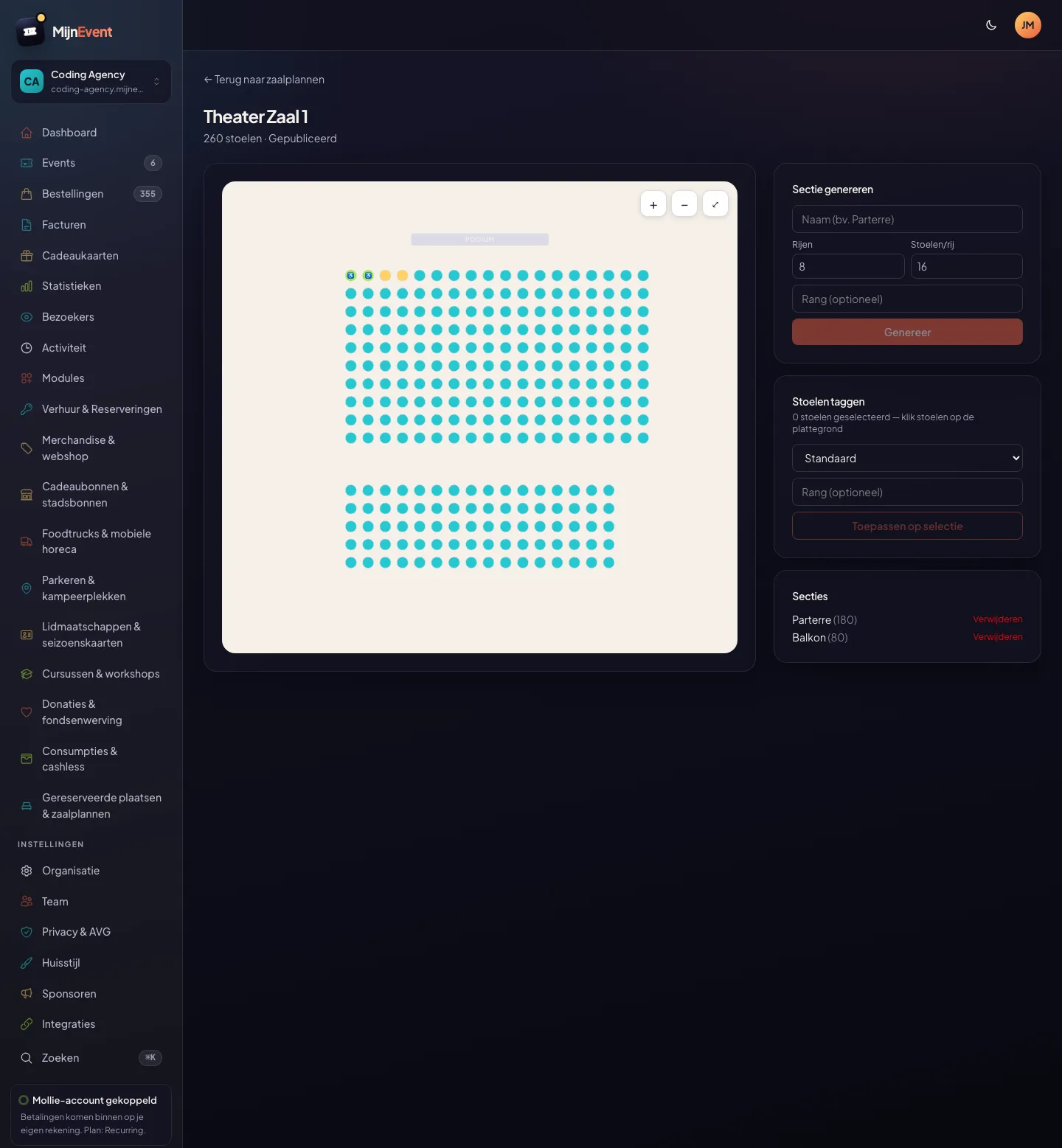
![The floor plan editor in the dashboard: the plan on the left, generating sections and tagging seats on the right](https://regify-mijnevent.s3.eu-central-1.amazonaws.com/blog/screenshots/seating-editor.webp)*The editor: the floor plan on the left, on the right the panels for generating sections, tagging seats and publishing.*

The heavy lifting is done by the **section generator**. Enter how many rows and how many seats per row, pick a numbering scheme (consecutive, odd-even, or right to left) and optionally a price tier — and the editor draws the whole section in one click. A 10×18 stalls block goes down just as easily as a 5×16 balcony. Add sections until your hall is complete.

# Tagging seats and setting price tiers

Not every seat is the same. **Click seats** on the floor plan and edit them in bulk: mark a few spots at the front as a **wheelchair space** with companion seat, remove a seat where there is a gap in real life, or give a cluster of seats a **price tier**. Because the tier is a property of the seat itself, you can also create a "star tier" in the middle of the hall that runs right across the rows — exactly as a real playhouse does.

A price tier, by the way, is simply one of your **existing ticket types**. Link the floor plan to an event, map each tier to a ticket type (= price), and that is it: prices, service fees and discount codes keep working unchanged.

# Publishing — or having it set up for you

Once you are happy, **publish** the floor plan and it can be linked to your events. Plans you have not published stay drafts you can finish at your leisure.

No appetite for drawing at all? You do not have to. Send us your existing **floor plan** and we set up **every hall free of charge**. After that it is simply your own reusable floor plan, which you can adjust yourself.

Ready to start? See the [reserved seating module](/en/modules/reserved-seating) or read how [visitors pick their seat](/en/blog/reserved-seating-and-floor-plans).

   Frequently asked questions

## Frequently asked questions

## How do I create a floor plan?

 In your dashboard go to Floor plans, click 'New floor plan' and give it a name. Then generate sections: fill in the number of rows and seats per row, pick a numbering scheme and optionally a price tier, and the editor draws the section for you. Repeat for every block (stalls, balcony, box).

## Can I adjust wheelchair spaces and individual seats?

 Yes. Click seats on the floor plan and edit them in bulk: mark them as a wheelchair space, companion seat or gap, or give them a price tier. That is also how you create per-seat tiers that run right across rows.

## Do I really have to draw it myself?

 No. If you already have a floor plan, send it to us and we will set it up for you free of charge — and that goes for every hall, not just your first. After that it is simply your own reusable floor plan.

  [    Back to blog ](https://mijnevent.nl/en/blog) 

  MijnEvent

## Read more

 [ ![](https://regify-mijnevent.s3.eu-central-1.amazonaws.com/blog/covers/automatic-membership-renewal-dutch-law.webp) memberships 

 Jasper Koers · 27 July 2026 · 6 min read

## Automatic membership renewal: collecting fees within Dutch renewal law

Automatic renewal saves your club a pile of chasing work, but the law has rules about cancelling. Here is how renewal works in MijnEvent, and how to keep it clean.

 ](https://mijnevent.nl/en/blog/automatic-membership-renewal-dutch-law) [ ![](https://regify-mijnevent.s3.eu-central-1.amazonaws.com/blog/covers/ontruimingsverslag-evenement-bewijsstuk.webp) safety 

 MijnEvent · 27 July 2026 · 5 min read

## The evacuation record: why the day after your event matters for the next permit

An evacuation — real or drilled — is only finished once it is on paper. What belongs in an evacuation record, why the municipality asks for it, and how to make the record write itself instead of reconstructing it afterwards?

 ](https://mijnevent.nl/en/blog/evacuation-record-event-evidence) [ ![](https://regify-mijnevent.s3.eu-central-1.amazonaws.com/blog/covers/knmi-weeralerts-veiligheidsplan.webp) safety 

 MijnEvent · 27 July 2026 · 3 min read

## Weather monitoring in your safety plan: how KNMI warnings land in your alerts and logbook automatically

Almost every safety-plan format has a 'weather monitoring' section — and almost nobody fills it in concretely. The Safety &amp; Permit module pulls the KNMI warning code for your event location every hour and turns it into a demonstrable process.

 ](https://mijnevent.nl/en/blog/knmi-weather-alerts-event-safety-plan) 

   MijnEvent

## Ready to get started?

Create a free account and sell your first tickets today.

 [Start free](https://mijnevent.nl/registreer) [Pricing](https://mijnevent.nl/en/pricing)


