# Multi-day event? Copy your time slot day schedule to the other days in one go — MijnEvent

  [Home](https://mijnevent.nl/en) / [Blog for event organizers](https://mijnevent.nl/en/blog) / Multi-day event? Copy your time slot day schedule to the other days in one go   time-slots events dashboard 

# Multi-day event? Copy your time slot day schedule to the other days in one go

New in the dashboard: put the time slot schedule of one day onto the other days of your event in a single action. The times stay identical, every copy starts at zero sold, and running it twice is harmless.

 [Jasper Koers](https://mijnevent.nl/en/author/jasper-koers) · 15 July 2026 · 4 min read 

       In short

- The Time slots tab now has 'Copy day to…': one source day's schedule goes to multiple target days in a single action.
- Clock times stay exactly the same — even across the DST switch — and every copied slot starts at zero sold.
- Running the copy again never creates duplicates, and replacing is refused as soon as tickets have been sold in a slot that would disappear.

  A three-day parade, an exhibition that spans two weekends, a festival with the same entry windows on Friday, Saturday and Sunday: at a multi-day event the day schedule looks the same every day. Until now that meant re-running the [time slots](/en/time-slots) generator per day — filling in the block length, gap and capacity all over again. That is now a single action: **copy one day's schedule to all the other days.**

# How it works

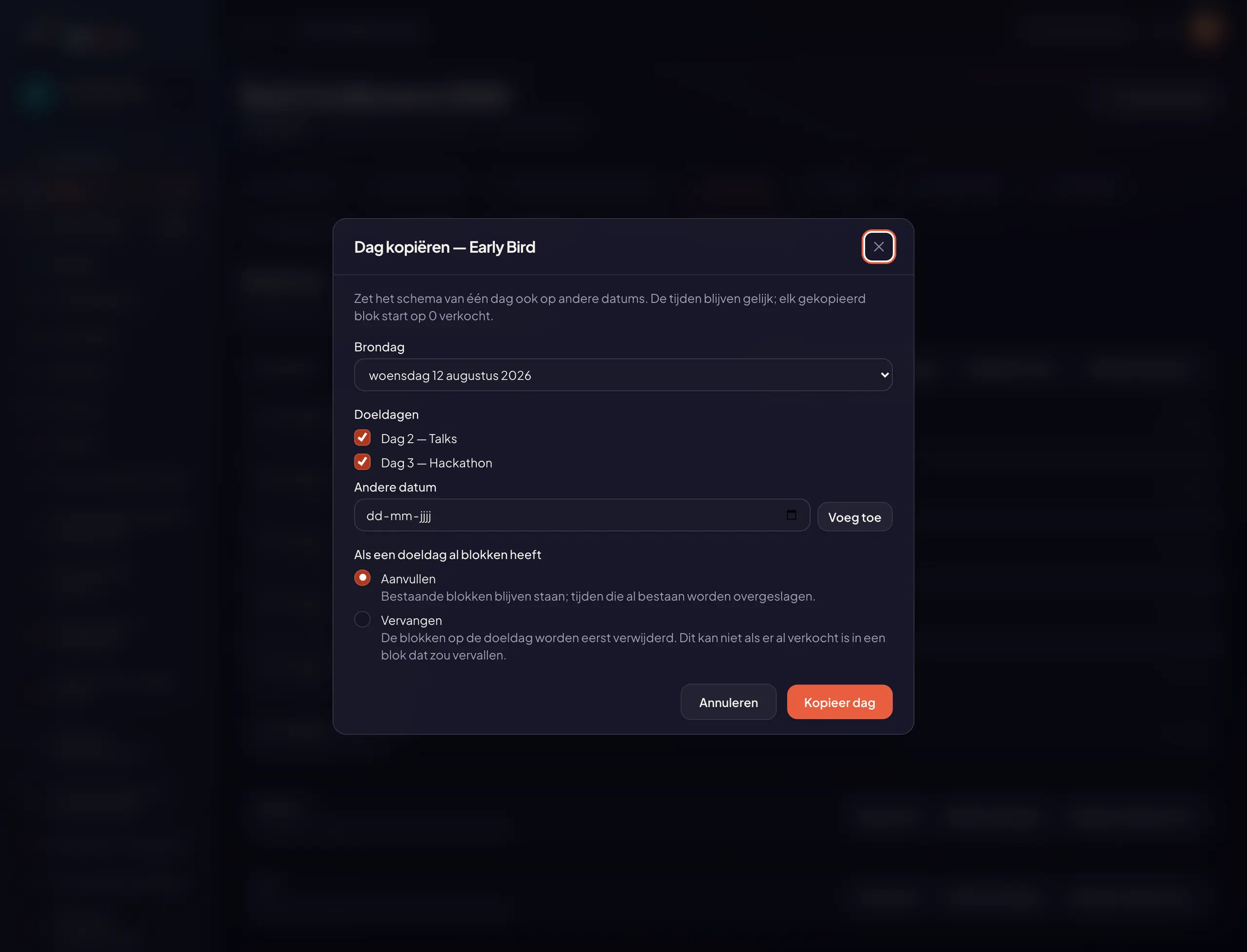
Open your event and go to the **Time slots** tab. Next to the existing buttons, every ticket type with a schedule now shows **Copy day to…**. You pick three things:

- the **source day** — the day whose schedule is right;
- the **target days** — on a multi-day event your event days are ready as a checklist, and *Another date* lets you add any loose date you like;
- what should happen when a target day **already has slots**: add or replace.

![The "Copy day" modal with a source day, checkable target days and the choice between adding and replacing](https://regify-mijnevent.s3.eu-central-1.amazonaws.com/blog/inline/tijdsloten-dag-kopieren-modal.webp)*Pick the source day, tick the target days, copy — your event days are already lined up.*

Click **Copy day** and the schedule appears on every chosen day. The clock times stay exactly the same: a 10:00–10:30 slot really is 10:00–10:30 on every target day. Afterwards you immediately see what happened — for instance *"12 new slots created"* — and the new slots are listed per day, with the day prefix so Wednesday and Thursday never blur together.
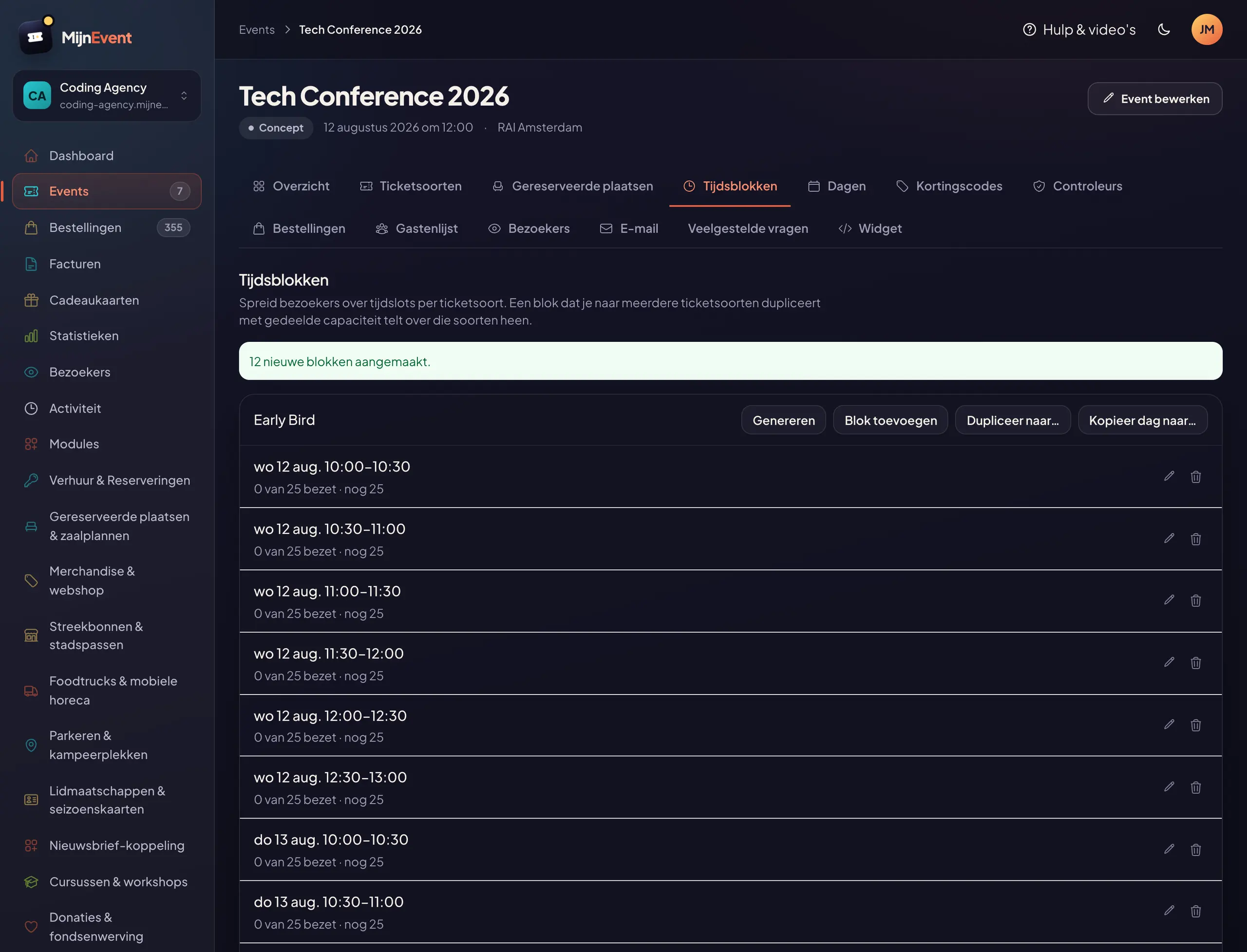
![The Time slots tab after copying: a green confirmation and the same slots on multiple days](https://regify-mijnevent.s3.eu-central-1.amazonaws.com/blog/inline/tijdsloten-dag-kopieren-resultaat.webp)*One action later: the same schedule on Wednesday, Thursday and Friday — everything at zero sold.*

# Every copy starts at zero

Good to know: **sales numbers do not come along.** Every copied slot is its own slot with its own counter starting at zero. That is exactly what you want: the 10:00 slot being full on Wednesday says nothing about the same window on Thursday. If you want multiple ticket types to share *the same* slots with one joint counter instead, that is what the existing duplicate function between ticket types is for — it works just like [capacity groups with shared capacity](/en/blog/capacity-groups-shared-capacity).

# Safe to repeat, careful with replacing

Two things you never have to think about, because the platform catches them for you:

- **Copying again never creates duplicate slots.** Times that already exist are skipped. Add a slot to your source day later, simply run the copy again and only that new slot is added.
- **Replacing is blocked as soon as anything is sold.** Choose "Replace" while the target day already has tickets sold in a slot that would disappear, and the platform refuses with a clear message. Sold places never vanish silently — pick "Add" in that case and the sold slot stays put.

The edge cases are covered too: a slot that runs past midnight (22:00–02:00) moves along as a whole to the next day, and copying across the daylight saving switch simply keeps the clock time — 10:00 stays 10:00, even in late October.

# Who is this for?

Anyone with the same daily rhythm on multiple dates: the guided tours of a museum weekend, the entry windows of a parade, the day plan of a multi-day conference. You set up one day carefully, copy it to the rest, and then adjust whatever differs per day — every slot remains individually editable. No event with time slots yet? Start with [creating your first event](/en/blog/creating-your-first-event) and switch on time slots for the ticket types that need them.

   Frequently asked questions

## Frequently asked questions

## Do sales numbers come along when I copy a day?

 No. Every copied slot is its own slot with its own counter starting at zero. The source day keeps its own sales; the target days start clean.

## What happens when the target day already has slots?

 You choose. With 'Add' the existing slots stay put and only missing times are added. With 'Replace' the target day's slots are removed first — and the platform politely refuses that as soon as tickets have been sold in a slot that would disappear.

## Can I accidentally create duplicate slots by copying twice?

 No. Times that already exist are skipped, and afterwards you see exactly how many slots were created and how many were skipped.

  [    Back to blog ](https://mijnevent.nl/en/blog) 

  MijnEvent

## Read more

 [ ![](https://regify-mijnevent.s3.eu-central-1.amazonaws.com/blog/covers/automatic-membership-renewal-dutch-law.webp) memberships 

 Jasper Koers · 27 July 2026 · 6 min read

## Automatic membership renewal: collecting fees within Dutch renewal law

Automatic renewal saves your club a pile of chasing work, but the law has rules about cancelling. Here is how renewal works in MijnEvent, and how to keep it clean.

 ](https://mijnevent.nl/en/blog/automatic-membership-renewal-dutch-law) [ ![](https://regify-mijnevent.s3.eu-central-1.amazonaws.com/blog/covers/ontruimingsverslag-evenement-bewijsstuk.webp) safety 

 MijnEvent · 27 July 2026 · 5 min read

## The evacuation record: why the day after your event matters for the next permit

An evacuation — real or drilled — is only finished once it is on paper. What belongs in an evacuation record, why the municipality asks for it, and how to make the record write itself instead of reconstructing it afterwards?

 ](https://mijnevent.nl/en/blog/evacuation-record-event-evidence) [ ![](https://regify-mijnevent.s3.eu-central-1.amazonaws.com/blog/covers/knmi-weeralerts-veiligheidsplan.webp) safety 

 MijnEvent · 27 July 2026 · 3 min read

## Weather monitoring in your safety plan: how KNMI warnings land in your alerts and logbook automatically

Almost every safety-plan format has a 'weather monitoring' section — and almost nobody fills it in concretely. The Safety &amp; Permit module pulls the KNMI warning code for your event location every hour and turns it into a demonstrable process.

 ](https://mijnevent.nl/en/blog/knmi-weather-alerts-event-safety-plan) 

   MijnEvent

## Ready to get started?

Create a free account and sell your first tickets today.

 [Start free](https://mijnevent.nl/registreer) [Pricing](https://mijnevent.nl/en/pricing)