# Who is on the waiting list? Now you can see — MijnEvent

  [Home](https://mijnevent.nl/en) / [Blog](https://mijnevent.nl/en/blog) / Who is on the waiting list? Now you can see   waiting list sold out ticket sales organiser 

# Who is on the waiting list? Now you can see

 The waiting list already worked on its own: sold out, someone signs up, and the moment a ticket frees up the email goes out. You just could not look inside it. Now you can — with names, positions and a button to email them yourself.

 [Jasper Koers](https://mijnevent.nl/en/author/jasper-koers) · 14 September 2026 · 6 min read 

  ![](https://regify-mijnevent.s3.eu-central-1.amazonaws.com/blog/covers/waiting-list-for-a-sold-out-event.webp)  Photo: [Philip Yu](https://unsplash.com/@philipyu?utm_source=MijnEvent&utm_medium=referral) / [Unsplash](https://unsplash.com/?utm_source=MijnEvent&utm_medium=referral)     In short

- Every event now has a Waiting list tab: the queue per ticket type in order of sign-up, with position, sign-up date and status.
- When capacity frees up, MijnEvent automatically emails the first five per ticket type every fifteen minutes — and the 'Email the waiting list now' button runs that same round immediately.
- Email addresses are masked; you can reveal one with a single click, and every reveal is recorded in your activity log.
- The waiting list is on by default and can be switched off per event; existing sign-ups are kept, they simply stop receiving messages.

# "So where do I find those people?"

The question came from an organiser who had watched his hall fill up twice. The waiting list was doing its job — people signed up, tickets freed up, the emails went out — but he could not see anywhere *who* was waiting. Which is exactly what you want to know when you are weighing up an extra performance.

The honest answer was: nowhere. The waiting list was a machine without a window in it. That window is in now.

# The Waiting list tab

Open an event in the organiser panel and next to Orders and Guest list you will find a **Waiting list** tab. It shows the queue per ticket type, in order of sign-up — first to sign up, top of the list.
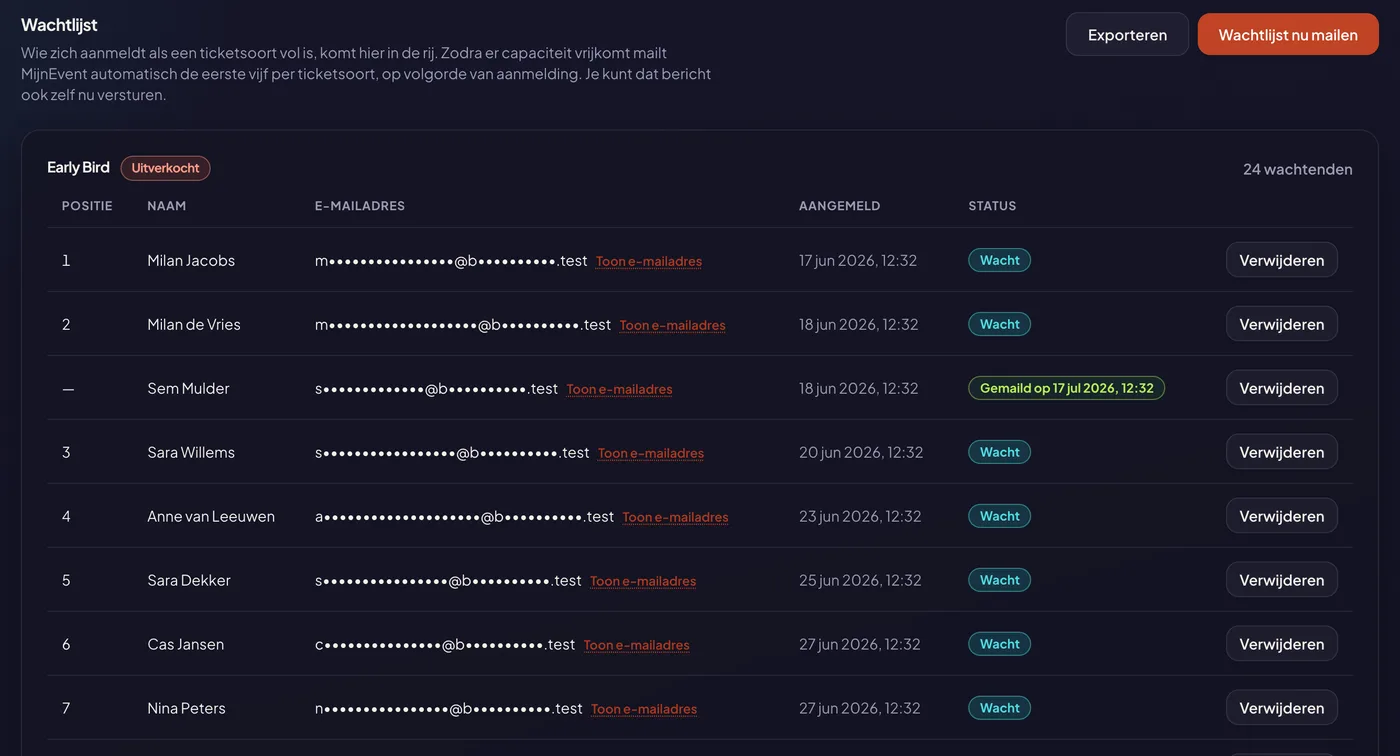
![The waiting list of an event: the queue per ticket type with position, masked email address, sign-up date and status](https://regify-mijnevent.s3.eu-central-1.amazonaws.com/blog/screenshots/wachtlijst-overzicht.webp)

Each row shows four things: the **position** in the queue, the **name**, the **sign-up moment** and the **status**. That status is either "Waiting" or "Emailed on ‹date›". Anyone who has already been notified no longer counts towards the queue: that row gets a dash instead of a number, and the next person waiting is back at position 1. That way "position 3" keeps meaning what it says — there are three people ahead of you.

Top right of each ticket type sits the counter: **24 people waiting**. That is the number that matters when you have to decide whether to schedule a second night.

# How it works underneath

For anyone not using the waiting list yet, here is the short version.

When a ticket type sells out, the buy button on your event page turns into **"Add me to the waiting list"**. The visitor leaves a name and an email address. Nothing else — no payment, no account.
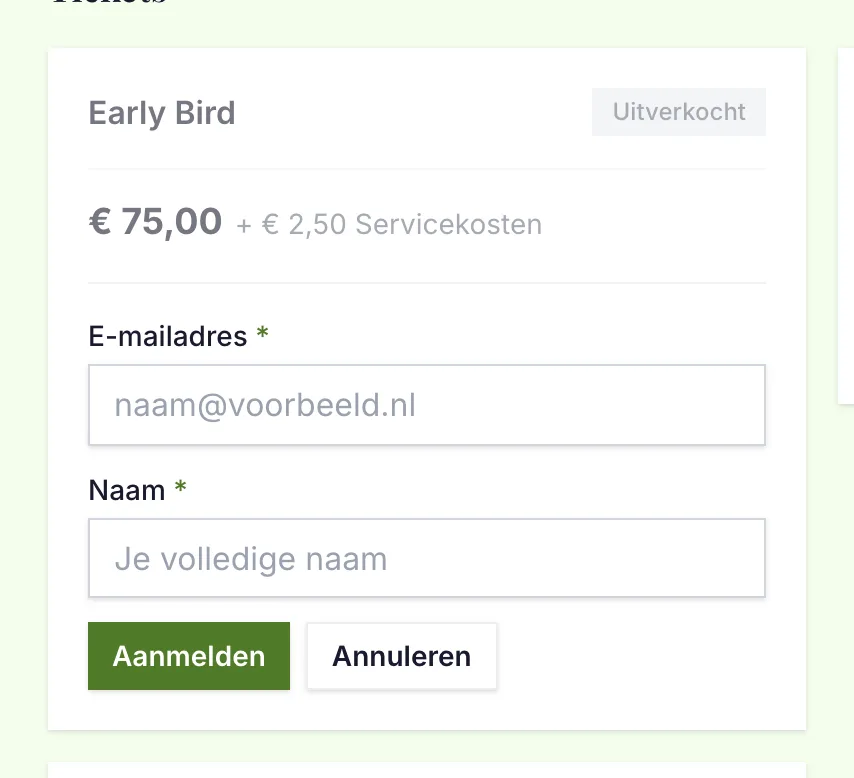
![The event page for a sold-out ticket type: signing up for the waiting list with a name and an email address](https://regify-mijnevent.s3.eu-central-1.amazonaws.com/blog/screenshots/wachtlijst-bezoeker.webp)

Every fifteen minutes MijnEvent checks each ticket type for freed-up capacity — through a cancellation, a refund, or because you raised the capacity yourself. If there is room, an email goes to the first five on the list, in order of sign-up, and never to more people than there are seats. Anyone who has been notified is not notified again.

That email goes out in the visitor's own language and points at your event page, where they buy their ticket the normal way.

# The two buttons

There are two at the top of the tab.

**Email the waiting list now** runs exactly the same round as the scheduled task, but immediately. Useful when you have just raised the capacity and do not want to wait, or when you promised someone on the phone that word would go out today. The rules still apply: never more messages than there are seats.

**Export** hands you the list as a CSV with the full email addresses in it — because an export exists precisely so you can get in touch. The file arrives as an encrypted zip and the password comes separately by email. That permission can be granted separately to team members, just like the other exports containing personal data.

And each row has a **remove** action. For someone you already helped outside the platform, or who asks to be taken off. Everyone behind them moves up a place.

# How many people are waiting for *this* ticket type?

The Ticket types tab now answers that too, without a click. Underneath the capacity bar sits the number of people waiting — and for a sold-out type that is the most interesting figure on the screen.
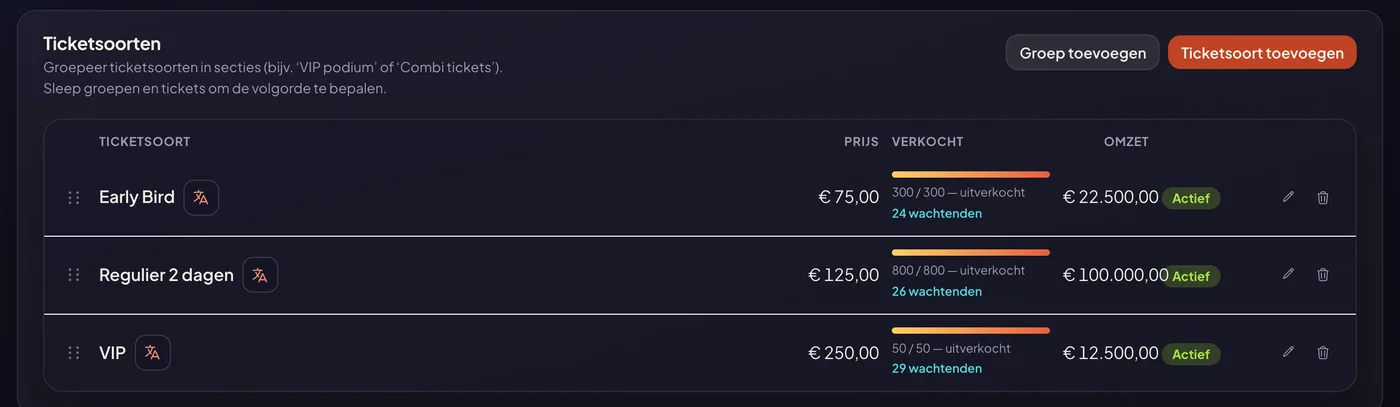
![The ticket types of a sold-out event, with the number of people waiting under each capacity bar](https://regify-mijnevent.s3.eu-central-1.amazonaws.com/blog/screenshots/wachtlijst-teller-ticketsoorten.webp)

# Privacy: masked, unless

A waiting list is a list of personal data belonging to people who have not bought anything from you yet. We treat it the way we treat your visitors: the email address appears **masked**.

Need the full address? Click "Show email address". That is entirely fine — but it is recorded in your activity log, with who did it and when. Not to look over your shoulder; so that you can show it later if anyone asks.

The list is only visible to team members with the events permission, and anyone whose permissions are limited to certain events only sees the waiting lists of *those* events.

# Switching the waiting list off

The waiting list is **on by default** for every new event. That is the setting you want in almost every case: it costs you nothing and it hands you a list of people who would love to come.

But some events do not suit it. A private evening that is full and stays full. A performance where you know for certain nothing will free up, and a waiting list would only raise false hope. In that case, untick it under **Edit event**.

![The 'Offer a waiting list when tickets are sold out' checkbox in the event edit screen](https://regify-mijnevent.s3.eu-central-1.amazonaws.com/blog/screenshots/wachtlijst-aan-uit.webp)

With it off, your event page simply says "Sold out" and the sign-up button disappears. Existing sign-ups stay exactly where they are — nobody's data is thrown away — but no messages go out while the list is off. The panel warns you about that if people are still waiting, so you do not do it by accident.

# What comes next

The next step is a personal buy link with an expiry time: whoever gets notified holds their place for a number of hours and is the only one who can buy through that link. That turns it into "it is your turn" instead of "be quick". Today's window into the list is needed for that anyway — and stands on its own, because the question this all started with now has an answer.

**See for yourself:** Organiser panel → Events → your event → the **Waiting list** tab.

   Frequently asked questions

## Frequently asked questions

## How does someone end up on the waiting list?

  As soon as a ticket type sells out, your event page replaces the buy button with 'Add me to the waiting list'. The visitor leaves a name and an email address, nothing more. They only pay if a ticket actually becomes available.

## Does everyone get notified at once when a ticket frees up?

  No. Never more messages than there are seats, and at most five per ticket type per round, in order of sign-up. It does not turn into a race between two hundred people for one ticket.

## Is a notified spot reserved?

  Not yet. Whoever is notified gets first go — leave it too long and someone else on the list takes it. A personal buy link with an expiry time is on the roadmap.

## Why are the email addresses hidden?

  Because a waiting list is a list of personal data. You see the name and a masked address, and you can reveal the full address whenever you need it. That action lands in your activity log, so it stays traceable who looked at what.

## Can I use the list outside MijnEvent?

  Yes, through the Export button. You get an encrypted zip and the password arrives separately by email — so the file and the key never travel through the same channel.

  [    Back to blog ](https://mijnevent.nl/en/blog) 

  MijnEvent

## Read more

 [ ![](https://regify-mijnevent.s3.eu-central-1.amazonaws.com/blog/covers/event-poster-on-your-event-page.webp) poster 

 Jasper Koers · 14 September 2026 · 4 min read

## Putting your poster on your event page

The poster you already had designed belongs online too. Upload it once and it appears on your event page, on the overview card, in the widget and in the preview on social media.

 ](https://mijnevent.nl/en/blog/event-poster-on-your-event-page) [ ![](https://regify-mijnevent.s3.eu-central-1.amazonaws.com/blog/covers/change-the-email-address-on-an-order.webp) orders 

 Jasper Koers · 14 September 2026 · 4 min read

## A visitor gave the wrong email address — now what?

A typo in an email address used to mean a manual detour. You can now change the address on the order yourself, and the tickets go out again straight away with you in cc.

 ](https://mijnevent.nl/en/blog/change-the-email-address-on-an-order) [ ![](https://regify-mijnevent.s3.eu-central-1.amazonaws.com/blog/covers/share-a-preview-before-publishing.webp) draft 

 Jasper Koers · 14 September 2026 · 4 min read

## Let your board look before you publish

A draft event used to be visible only to people with a management account. With a preview link you send the real page to your board or your client, with a clear banner and nothing on sale.

 ](https://mijnevent.nl/en/blog/share-a-preview-before-publishing) 

   MijnEvent

## Ready to get started?

Create a free account and sell your first tickets today.

 [Start free](https://mijnevent.nl/registreer) [Pricing](https://mijnevent.nl/en/pricing)



