# Sending a floor plan: attachments on your confirmation email — MijnEvent

  [Home](https://mijnevent.nl/en) / [Blog for event organizers](https://mijnevent.nl/en/blog) / Sending a floor plan: attachments on your confirmation email   management email tickets 

# Sending a floor plan: attachments on your confirmation email

You can now send one file along with every confirmation email — a floor plan, directions or rental terms. With clear limits, because an oversized message never arrives.

 [Jasper Koers](https://mijnevent.nl/en/author/jasper-koers) · 20 July 2026 · 4 min read 

  ![](https://regify-mijnevent.s3.eu-central-1.amazonaws.com/blog/covers/attachment-with-your-confirmation-email.webp)  Photo: [Sergey Zolkin](https://unsplash.com/@szolkin?utm_source=MijnEvent&utm_medium=referral) / [Unsplash](https://unsplash.com/?utm_source=MijnEvent&utm_medium=referral)    In short

- Every configurable email — an event's ticket confirmation and your modules' emails — can carry one file. It is optional; most organisers send nothing at all.
- Allowed: PDF, JPG, PNG and WebP. A PDF may be up to 3.5 MB, an image up to 2 MB — beyond that, mail servers reject your message or flag it as spam.
- Every file is checked for unsafe content on upload, and the email preview shows the attachment exactly as your visitor will see it.

  A visitor who has never been to your site hunts for the entrance on arrival. A renter wants to reread the terms. A course participant wonders what to bring. Those are exactly the moments where a file in the confirmation email helps — which is why you can now send one along.

# Where to set it

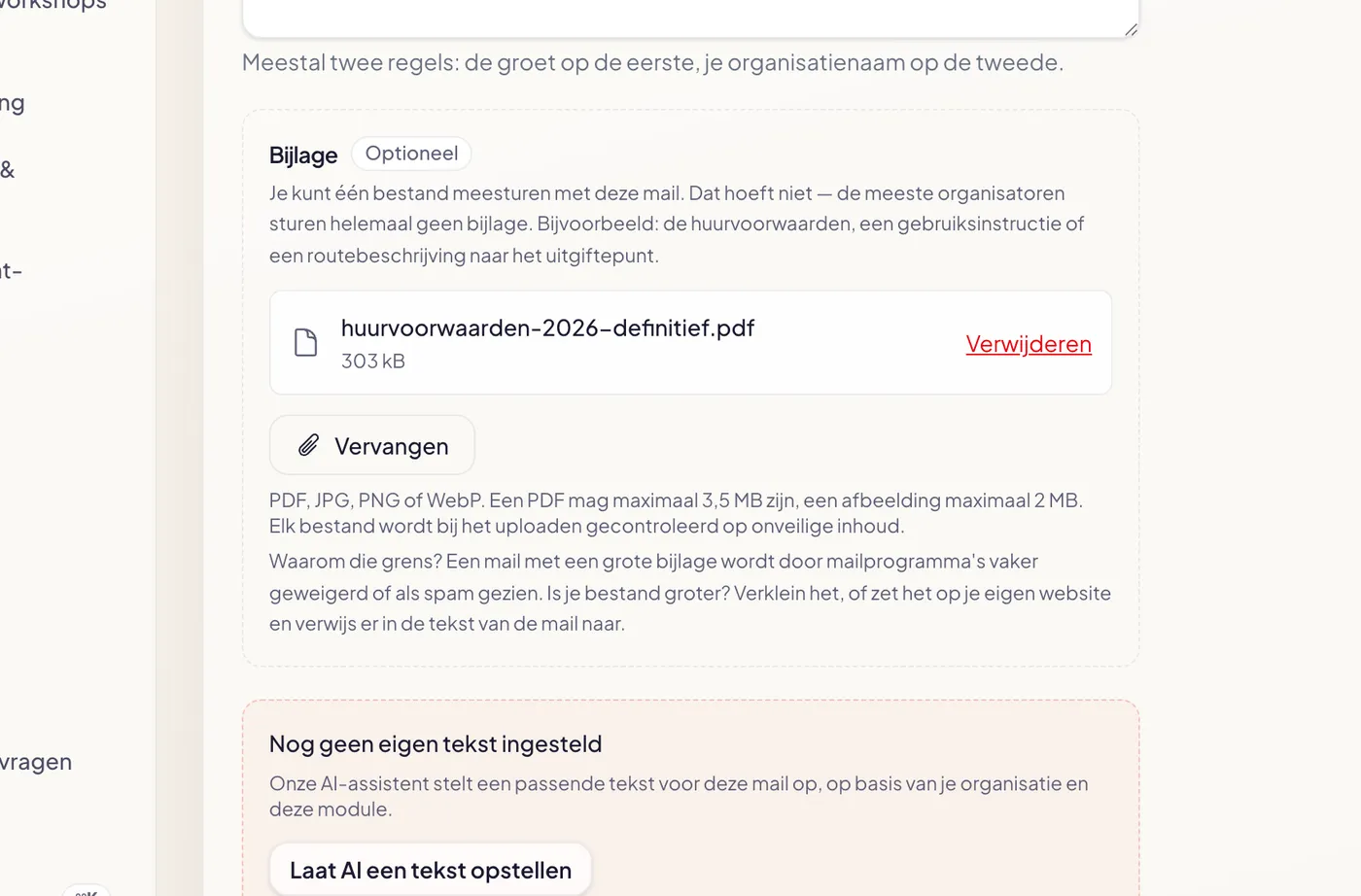
Everywhere you could already edit an email text, there is now an **Attachment** block. For an event you will find it under **Events → your event → E-mail tab**, below the fields for subject, greeting and body. For a module — rentals, shop, courses, food trucks, donations, memberships, cashless or the city card — it sits on that module's **E-mails** tab.

![The attachment block in the management area, with an uploaded PDF and the explanation of the limits](https://regify-mijnevent.s3.eu-central-1.amazonaws.com/blog/inline/bijlage-instelveld.webp)*The block sits below the text fields. Uploading saves immediately — no separate save step needed.*

Note the **Optional** label: it really is. Most organisers send no attachment at all, and that is perfectly fine. The block shows, per type of email, what a sensible attachment could be — a floor plan or directions for an event, the rental terms for rentals, the menu with allergen information for food trucks — so you never have to guess what it is for.

# The limits, and why they exist

A PDF may be up to **3.5 MB**, an image up to **2 MB**. That sounds tight if you are used to mailboxes that swallow 25 MB, but there is a reason behind it.

An attachment grows by roughly a third in transit because mail has to re-encode it. A ticket confirmation carries the ticket PDF on top of that. And the smallest limit in the chain always wins: Outlook.com and iCloud cap at 20 MB, and older corporate servers sometimes still sit at 10. Go over it and your visitor receives nothing — or the message lands in the spam folder, taking every later message to that address with it. These limits keep you well clear.

If your file is too large, the error tells you what to do: shrink it, or put it on your own website and link to it from the email text. That second option is almost always the safer one — a link keeps your message light, and you can update the file later without everyone holding an outdated copy in their inbox.

# Only file types that actually arrive

You can send a **PDF, JPG, PNG or WebP**, and nothing else. That is not arbitrary: zip archives, executables and macro-enabled Office documents get stopped by Gmail and Outlook regardless. If you could upload them, your attachment would vanish on the way to your visitor — or worse, make the whole message look suspicious.

Every file is **checked for unsafe content** on upload. For a PDF we verify that it really is a PDF and that it carries no active content: JavaScript, auto-running actions, embedded files or self-executing forms. For an image we check that the file genuinely opens as an image. If anything looks off, the file is not stored and you are told why.

# You see it in the preview

As soon as an attachment is set, it appears at the bottom of the **email preview** next to the form — with a paperclip, file name and size, exactly the way your visitor will see it in their mail client.
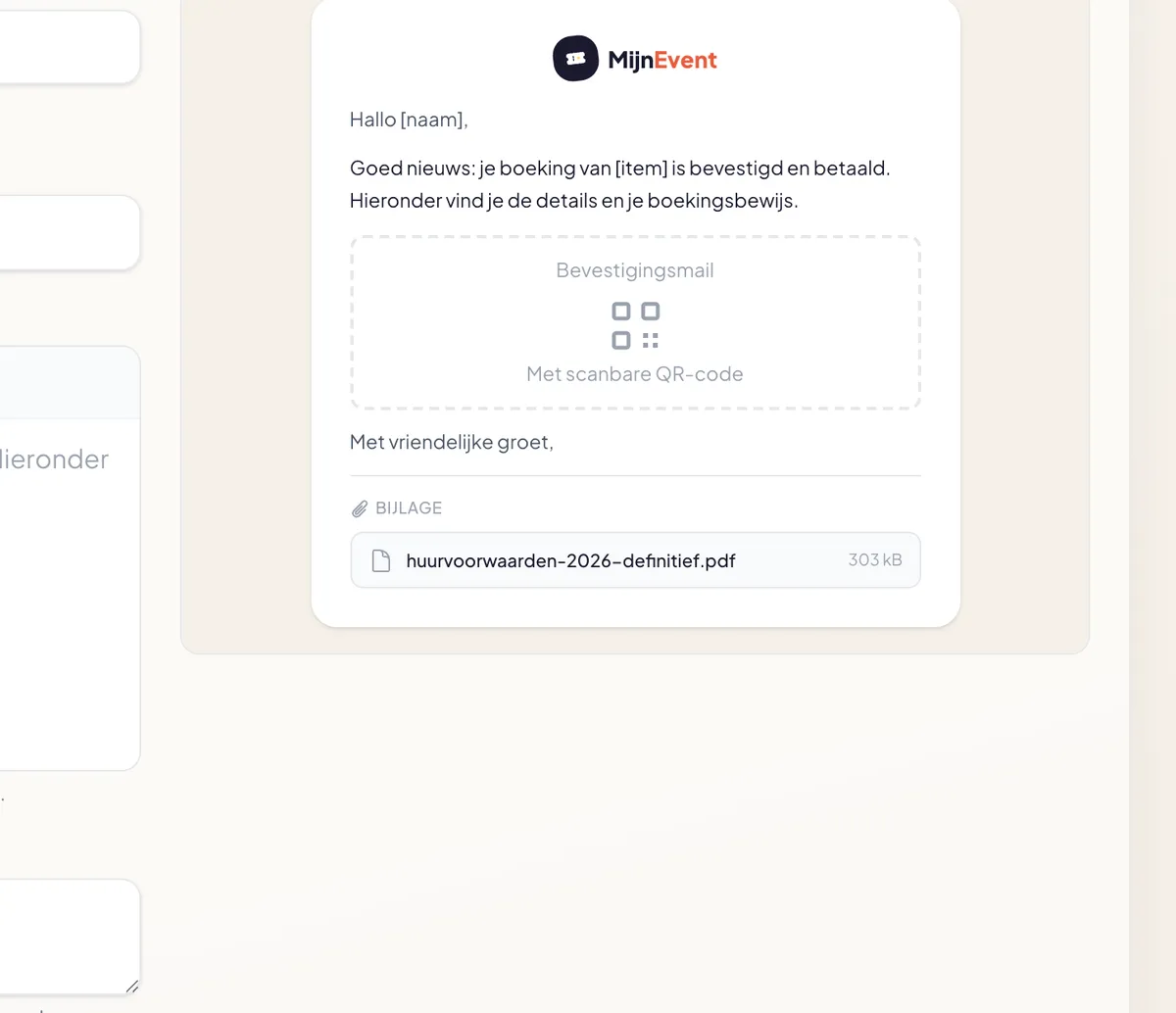
![The email preview with the attachment at the bottom, the way a mail client shows it](https://regify-mijnevent.s3.eu-central-1.amazonaws.com/blog/inline/bijlage-mailvoorbeeld.webp)*The attachment appears below the closing, with file name and size.*

You will also notice the file name has been cleaned up: spaces, capitals, accents and punctuation are stripped, while the extension stays. So "Rental terms 2026 (final).pdf" becomes `rental-terms-2026-final.pdf`. That saves trouble with mail clients and operating systems that get picky about odd characters in file names.

# And if something goes wrong

If the file happens to be unreachable at the moment of sending, the email simply goes out without it. A confirmation carrying tickets is too important to strand on a floor plan — that can always follow later.

Want to know more about what you can change in your confirmation email? Read how to [set the text of your confirmation emails](/en/blog/customize-confirmation-emails-per-module) or browse all [modules](/en/modules).

   Frequently asked questions

## Frequently asked questions

## Where do I set an attachment?

 For an event, go to Events, open the event and pick the E-mail tab — the 'Attachment' block sits below the text fields. For a module (rentals, shop, courses, food trucks, donations, memberships, cashless or the city card), open that module and pick the E-mails tab. Uploading saves immediately; there is no separate save step.

## Why is a PDF limited to 3.5 MB?

 An attachment grows by roughly a third in transit because mail has to re-encode it, and a ticket confirmation carries the ticket PDF as well. Above about 10 MB, receiving mail servers start rejecting messages or marking them as spam. At 3.5 MB for a PDF and 2 MB for an image you stay comfortably below that.

## My file is too large. What now?

 Shrink it, or put it on your own website and link to it from the email text. A PDF usually shrinks a lot if you compress the images inside it or keep only the relevant pages; a photo can be saved as a JPG at lower quality. Linking is friendlier for deliverability anyway.

## Can I send multiple attachments?

 No, one per email. That is deliberate: several separate attachments make the message heavier and make it look more like phishing to spam filters. If you have more to share, bundle it into one PDF or put it on a page you link to.

## Which file types are not allowed?

 Anything other than PDF, JPG, PNG and WebP. Zip archives, executables and macro-enabled Office documents are blocked or quarantined by Gmail and Outlook anyway, so we do not accept them. SVG is excluded too, because it can contain scripts.

  [    Back to blog ](https://mijnevent.nl/en/blog) 

  MijnEvent

## Read more

 [ ![](https://regify-mijnevent.s3.eu-central-1.amazonaws.com/blog/covers/automatic-membership-renewal-dutch-law.webp) memberships 

 Jasper Koers · 27 July 2026 · 6 min read

## Automatic membership renewal: collecting fees within Dutch renewal law

Automatic renewal saves your club a pile of chasing work, but the law has rules about cancelling. Here is how renewal works in MijnEvent, and how to keep it clean.

 ](https://mijnevent.nl/en/blog/automatic-membership-renewal-dutch-law) [ ![](https://regify-mijnevent.s3.eu-central-1.amazonaws.com/blog/covers/ontruimingsverslag-evenement-bewijsstuk.webp) safety 

 MijnEvent · 27 July 2026 · 5 min read

## The evacuation record: why the day after your event matters for the next permit

An evacuation — real or drilled — is only finished once it is on paper. What belongs in an evacuation record, why the municipality asks for it, and how to make the record write itself instead of reconstructing it afterwards?

 ](https://mijnevent.nl/en/blog/evacuation-record-event-evidence) [ ![](https://regify-mijnevent.s3.eu-central-1.amazonaws.com/blog/covers/knmi-weeralerts-veiligheidsplan.webp) safety 

 MijnEvent · 27 July 2026 · 3 min read

## Weather monitoring in your safety plan: how KNMI warnings land in your alerts and logbook automatically

Almost every safety-plan format has a 'weather monitoring' section — and almost nobody fills it in concretely. The Safety &amp; Permit module pulls the KNMI warning code for your event location every hour and turns it into a demonstrable process.

 ](https://mijnevent.nl/en/blog/knmi-weather-alerts-event-safety-plan) 

   MijnEvent

## Ready to get started?

Create a free account and sell your first tickets today.

 [Start free](https://mijnevent.nl/registreer) [Pricing](https://mijnevent.nl/en/pricing)