
# Confirmation emails in your own tone: customise them per module — MijnEvent

  [Home](https://mijnevent.nl/en) / [Blog for event organizers](https://mijnevent.nl/en/blog) / Confirmation emails in your own tone: customise them per module   modules beheer 

# Confirmation emails in your own tone: customise them per module

Every module dashboard now has an Emails tab: adjust the subject, greeting, body and sign-off of each confirmation email. Empty fields fall back to the default text, and placeholders like \[naam\] are filled in automatically.

 [Jasper Koers](https://mijnevent.nl/en/author/jasper-koers) · 11 May 2026 · 4 min read 

  ![](https://regify-mijnevent.s3.eu-central-1.amazonaws.com/blog/covers/bevestigingsmails-zelf-aanpassen-per-module.webp)  Photo: [Corinne Kutz](https://unsplash.com/@corinnekutz?utm_source=MijnEvent&utm_medium=referral) / [Unsplash](https://unsplash.com/?utm_source=MijnEvent&utm_medium=referral)    In short

- Every module dashboard now has an Emails tab where you set the subject, greeting, body and sign-off of each confirmation email yourself.
- Any field you leave empty falls back to MijnEvent's default text, so you only change what you want.
- Placeholders such as \[naam\] (and module-specific ones like \[item\], \[truck\], \[cursus\] and \[tier\]) are filled in with the real data automatically when the email is sent.
- A 'Back to default' button resets everything, so you can experiment without breaking anything.

  The confirmation email is often the first thing a customer sees from you after paying. MijnEvent's default texts are neat, complete and bilingual — but neat is not the same as *your* tone. A marina sounds different from a museum, and a food truck different from a municipality. That's why **every module dashboard now has an Emails tab**, where you decide the subject, greeting, body and sign-off of each confirmation email yourself.

*Note: the screenshot below shows the Dutch interface — the flow is identical in every language.*

# Four fields, your story

Per email you get four fields: **Subject**, **Greeting**, **Body** and **Sign-off**. You don't have to rewrite everything: whatever you leave empty simply uses MijnEvent's default text. Just want your own greeting and nothing else? Fill in one field and you're done.

It works exactly like the email settings you already know from your events — the same pattern, now for the modules. And it applies to the confirmation email of every module: the booking confirmation for rentals and parking (they share one, since parking bookings run on the same rental engine), the collection receipt for merchandise, the membership card, the series pass for courses, the order confirmation for food trucks, the cashless top-up and the city card. The fundraising module has a thank-you email instead — you customise that one here too.

# Placeholders fill themselves in

Just like with event emails, you work with placeholders: type `[naam]` and the email shows the customer's real name. Each module adds its own relevant fields — `[item]` for rentals, `[truck]` and `[nummer]` for food trucks, `[cursus]` and `[reeks]` for courses, `[tier]` for memberships. The tab shows exactly which placeholders are available per email, so you never have to guess. When the email is sent, they're automatically replaced with the real data.

# From formal to your own voice

An example. A marina rents out sloops through the rentals module. The default email opens with the Dutch equivalent of "Dear Jan," — correct, but hardly the feeling of a day on the water. In the Emails tab the harbour master turns it into:

- **Subject:** Your sloop is ready, \[naam\]!
- **Greeting:** Ahoy \[naam\]!
- **Sign-off:** See you on the water! — Team Jachthaven De Kolk

The next booking confirmation lands in the customer's inbox as "Ahoy Jan!" — with all the booking details MijnEvent always included right below it. The content stays complete and correct; only the tone now belongs to the marina.
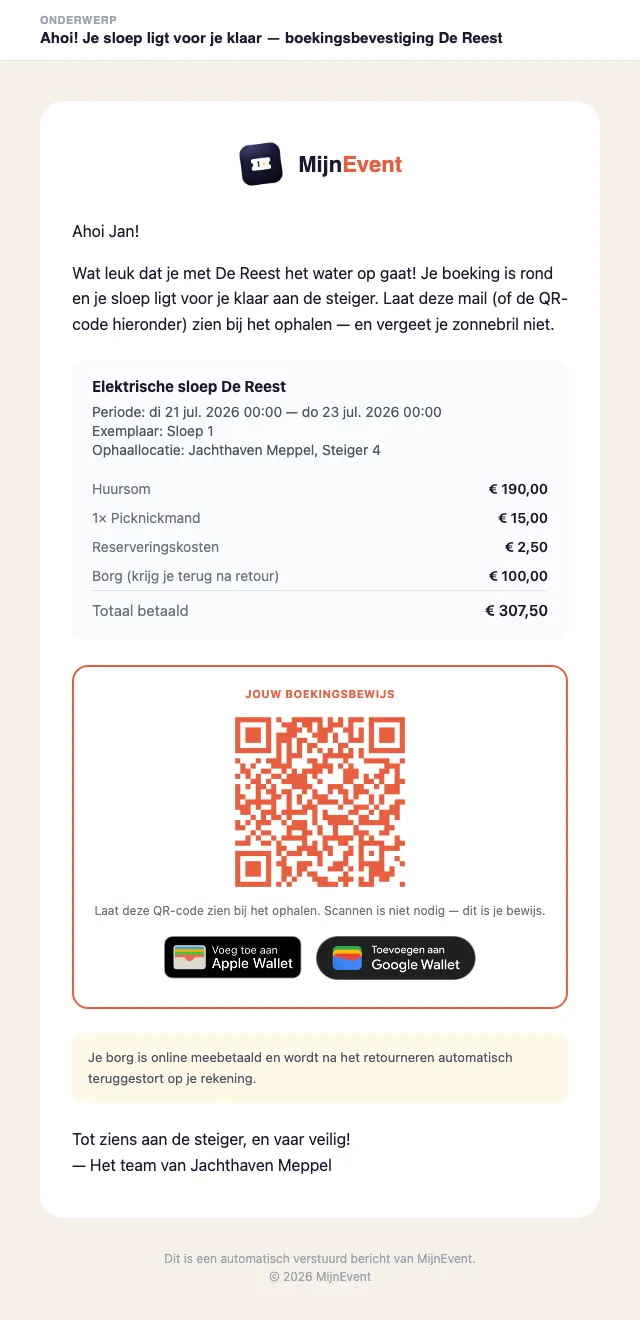
![A confirmation email with its own subject, greeting and sign-off](https://regify-mijnevent.s3.eu-central-1.amazonaws.com/blog/inline/bevestigingsmail-eigen-toon.webp)*The same booking confirmation, now with its own subject, greeting and sign-off — MijnEvent fills in the details automatically.*

# Empty means default, and going back is always possible

Regret a text? Clear the field and the default text is back. Want to reset everything at once? That's the **"Back to default"** button. You can experiment freely without breaking anything: there's always a working text, and your changes apply immediately to the next email the module sends.

That also makes this a safe place to try seasonal texts — a summery sign-off in July, a down-to-earth one in November — without having to keep an original somewhere.

# How to customise it

1. Open the module's dashboard, for example **Dashboard → Rentals** or **Dashboard → City card**.
2. Click the **Emails** tab.
3. Fill in the fields you want to change — the rest stays default — and save.

The confirmation email is more than text alone, by the way: every module order with a scannable proof now automatically includes a [branded PDF attachment](/en/blog/pdf-proof-with-every-order) as well. Your tone in the email, the proof as an attachment — together in one message. Curious which modules exist? Browse the [module overview](/en/modules).

   Frequently asked questions

## Frequently asked questions

## Which confirmation emails can I customise?

 Every module's confirmation email: the rentals and parking booking confirmation, the merchandise collection receipt, the membership card, the courses series pass, the food-truck order confirmation, the cashless top-up and the city card, plus the fundraising thank-you email.

## What happens if I leave a field empty?

 An empty field simply uses MijnEvent's default text. You can fill in just one field, like the greeting, and leave the rest on the default.

## How do placeholders work?

 You type a placeholder such as [naam] and it is automatically replaced with the customer's real name when the email is sent. The tab shows which placeholders are available per email.

  [    Back to blog ](https://mijnevent.nl/en/blog) 

  MijnEvent

## Read more

 [ ![](https://regify-mijnevent.s3.eu-central-1.amazonaws.com/blog/covers/automatic-membership-renewal-dutch-law.webp) memberships 

 Jasper Koers · 27 July 2026 · 6 min read

## Automatic membership renewal: collecting fees within Dutch renewal law

Automatic renewal saves your club a pile of chasing work, but the law has rules about cancelling. Here is how renewal works in MijnEvent, and how to keep it clean.

 ](https://mijnevent.nl/en/blog/automatic-membership-renewal-dutch-law) [ ![](https://regify-mijnevent.s3.eu-central-1.amazonaws.com/blog/covers/ontruimingsverslag-evenement-bewijsstuk.webp) safety 

 MijnEvent · 27 July 2026 · 5 min read

## The evacuation record: why the day after your event matters for the next permit

An evacuation — real or drilled — is only finished once it is on paper. What belongs in an evacuation record, why the municipality asks for it, and how to make the record write itself instead of reconstructing it afterwards?

 ](https://mijnevent.nl/en/blog/evacuation-record-event-evidence) [ ![](https://regify-mijnevent.s3.eu-central-1.amazonaws.com/blog/covers/knmi-weeralerts-veiligheidsplan.webp) safety 

 MijnEvent · 27 July 2026 · 3 min read

## Weather monitoring in your safety plan: how KNMI warnings land in your alerts and logbook automatically

Almost every safety-plan format has a 'weather monitoring' section — and almost nobody fills it in concretely. The Safety &amp; Permit module pulls the KNMI warning code for your event location every hour and turns it into a demonstrable process.

 ](https://mijnevent.nl/en/blog/knmi-weather-alerts-event-safety-plan) 

   MijnEvent

## Ready to get started?

Create a free account and sell your first tickets today.

 [Start free](https://mijnevent.nl/registreer) [Pricing](https://mijnevent.nl/en/pricing)


