# A PDF proof with every order: print it, forward it, show it offline — MijnEvent

  [Home](https://mijnevent.nl/en) / [Blog for event organizers](https://mijnevent.nl/en/blog) / A PDF proof with every order: print it, forward it, show it offline   modules emails 

# A PDF proof with every order: print it, forward it, show it offline

Every module order now comes with a PDF attached to the confirmation email: booking confirmation, city card, membership card, series pass or pickup receipt — branded, with a QR code and exactly the fields that belong to it.

 [Jasper Koers](https://mijnevent.nl/en/author/jasper-koers) · 23 April 2026 · 4 min read 

  ![](https://regify-mijnevent.s3.eu-central-1.amazonaws.com/blog/covers/pdf-proof-with-every-order.webp)  Photo: [2H Media](https://unsplash.com/@2hmedia?utm_source=MijnEvent&utm_medium=referral) / [Unsplash](https://unsplash.com/?utm_source=MijnEvent&utm_medium=referral)    In short

- Every module order with a scannable proof now gets a PDF attached to its confirmation email, in your organisation's brand style and with a QR code.
- There are five kinds: booking confirmation (rentals and parking), city card, membership card, series pass (courses) and pickup receipt (merchandise), each with the fields that belong to it.
- The QR on the PDF is exactly the same code as in the email, so the PDF opens and scans offline at the gate too.
- There is nothing to switch on: if you use a module, the PDF is attached to every new confirmation email automatically.

  For ticket orders it has been a given for years: next to the email with QR codes, a neat PDF ticket sits in the attachment. But anyone who booked a sloop, bought a city voucher or became a member had to make do with just the email. That is now fixed: **every module order with a scannable proof gets a PDF attachment** with its confirmation email — branded, with a QR code, and with exactly the fields that belong to *that* kind of order.

*Note: the screenshots below show Dutch documents — the layout is identical in every language.*

# Five kinds of proof, each with the right fields

Not a generic A4 with a code slapped on, but a dedicated document per module:

- **Booking confirmation** (rentals and parking) — the booked item, the **period** (day-based rentals neatly include the last day), the assigned **unit** and, where applicable, the **deposit** with the agreement spelled out.
- **City card** — the **card code**, the **balance** and the **validity date**, plus the programme's issuer. Topping up a pass? The confirmation email then carries an **updated pass** with the new balance.
- **Membership card** — the **member number**, the member's name and the validity of the membership.
- **Series pass** (courses and workshops) — the participant, the group and the full **session schedule**, so every date of the series sits on one sheet.
- **Pickup receipt** (merchandise) — the **order lines** with quantities and the total, ready to show at the pickup point.
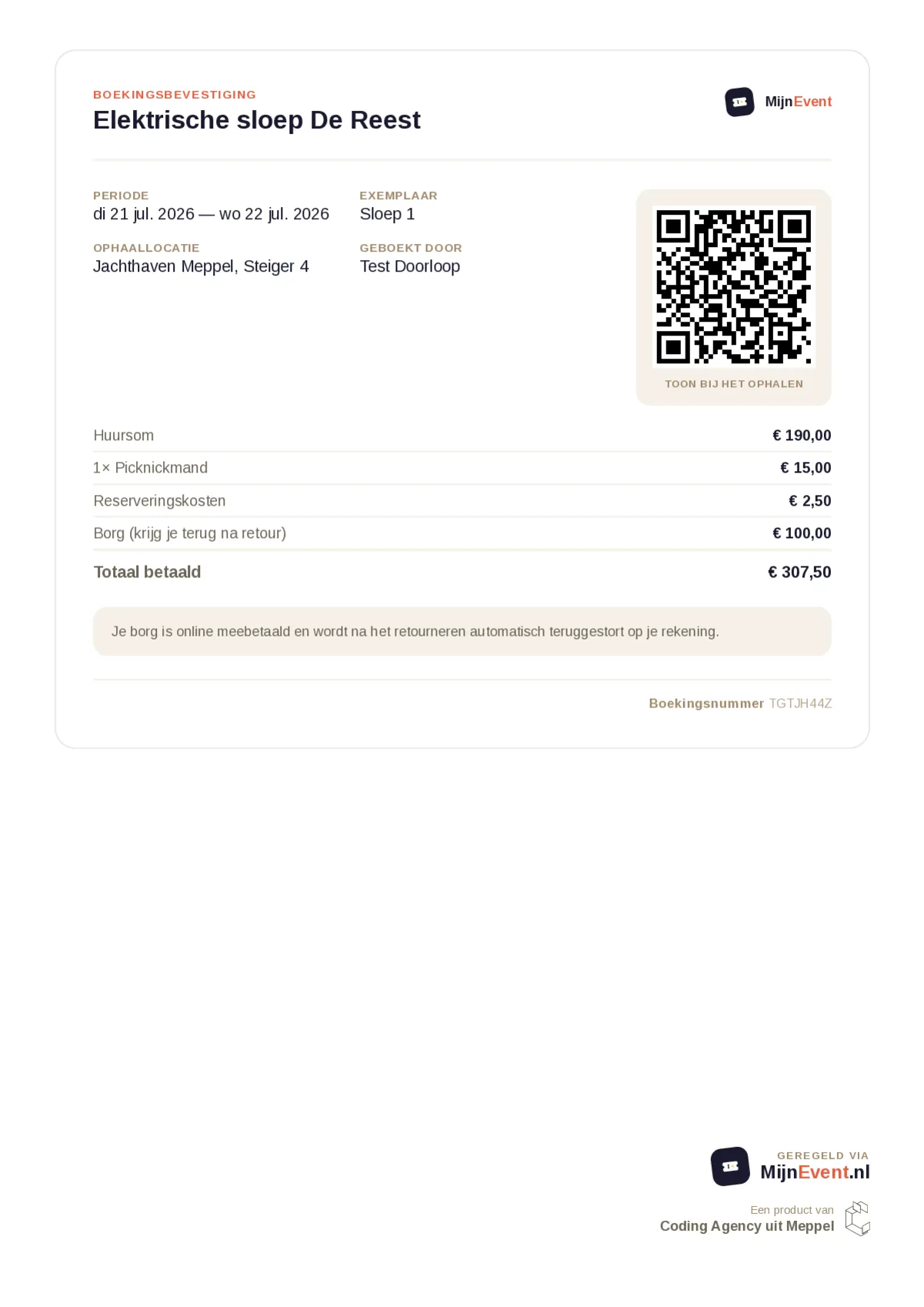
![The booking confirmation as a PDF](https://regify-mijnevent.s3.eu-central-1.amazonaws.com/blog/inline/pdf-boekingsbevestiging-v2.webp)*The booking confirmation: item, period, unit and deposit on one sheet, with the QR code for handover.*

# Why a PDF, in 2026?

Because real life is messier than an inbox. Three situations where the attachment earns its keep:

- **Printing.** The camper booking for grandma and grandpa, the pickup receipt for whoever prefers to leave their phone at home — a PDF simply rolls out of the printer, working QR included.
- **Forwarding.** One person orders, someone else picks up or takes the boat out. A PDF forwards over WhatsApp or email without the recipient having to log in anywhere.
- **Offline at the gate.** A saved PDF always opens, even on grounds without reception. The QR on it is exactly the same code as in the email, so the scanner sees no difference.

There is one more quiet win: **fewer discussions at handover**. With the deposit agreement in black and white on the booking confirmation the renter brings along, nobody at the counter has to reconstruct what exactly was agreed.
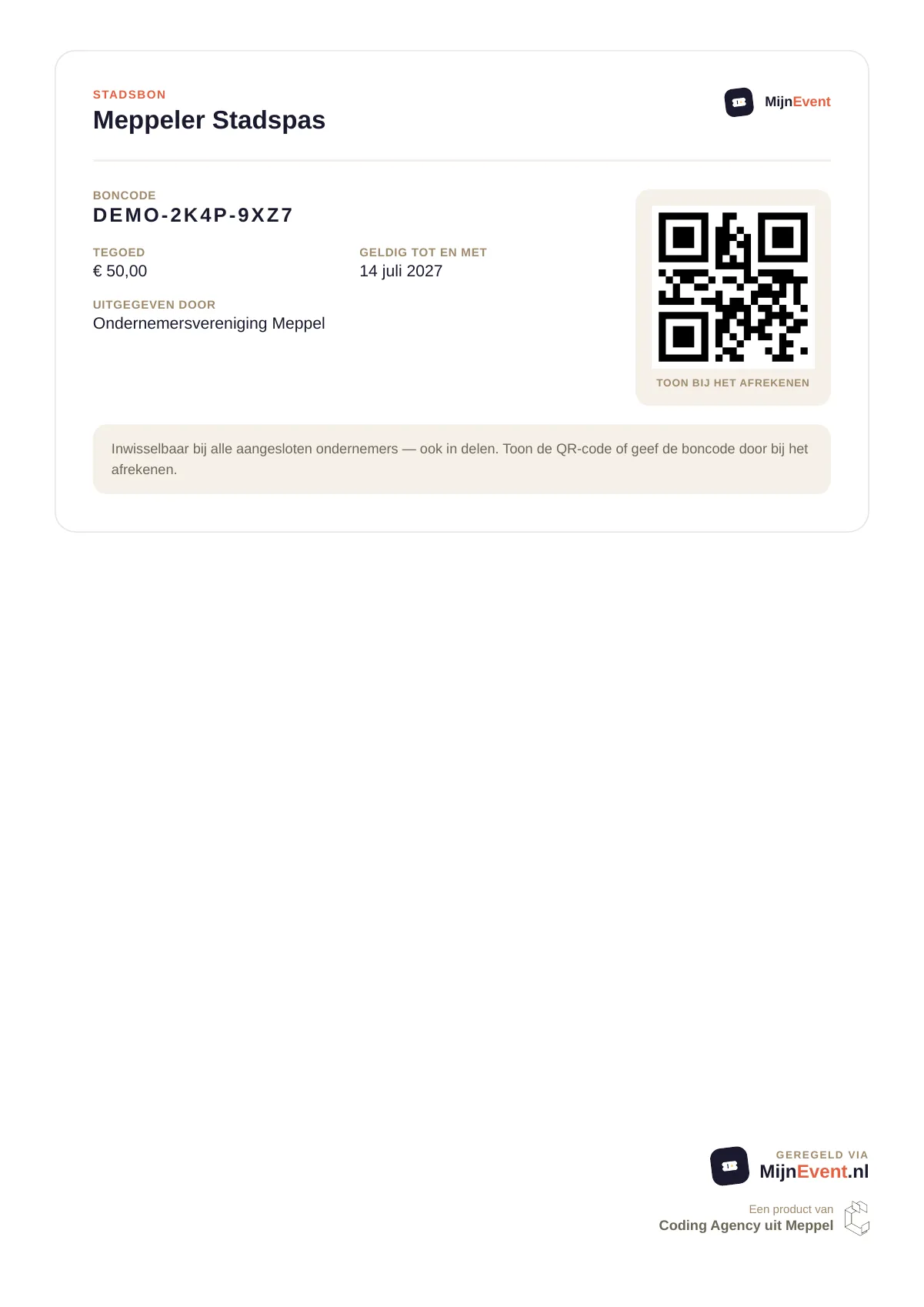
![The city card as a PDF](https://regify-mijnevent.s3.eu-central-1.amazonaws.com/blog/inline/pdf-stadsbon.webp)*The city card as a PDF: card code, balance and validity — to print or to give away.*

# In your brand, not ours

The PDFs use the same layout pattern as the familiar PDF ticket: a clean, highly readable design with the **logo and name of your organisation** at the top. Someone printing a city voucher from the local retailers' association holds a document from that association — not an anonymous system sheet. Every attachment also carries a short reference code in the filename, so "boekingsbevestiging-7XK2M9QD.pdf" can still be found in a crowded downloads folder.

And the copy? It simply follows the recipient's language, Dutch or English — just like the emails themselves.

# Nothing to set up

There is nothing to switch on: if you use one of the modules — say [Rentals &amp; reservations](/en/modules/rentals) or [the city voucher for your town](/en/blog/city-voucher-for-your-town) — the PDF is automatically attached to every new confirmation email. The email itself stays in the lead and always arrives; the PDF is the proof your visitors can print, share and keep.

A small detail, a big difference at the counter.

   Frequently asked questions

## Frequently asked questions

## Which orders now include a PDF proof?

 Every module order with a scannable proof: rental and parking bookings, city cards, membership cards, series passes for courses and pickup receipts for merchandise. Each document shows the fields that belong to that kind of order.

## Does the PDF carry my own logo or MijnEvent's?

 Your own brand. The PDFs use the same layout as the familiar ticket PDF, with the logo and name of your organisation at the top — not an anonymous system sheet.

## Do I have to enable the PDF attachment myself?

 No. If you use one of the modules, the PDF is attached to every new confirmation email automatically. The email stays in the lead; the PDF is the proof your visitors can print, share and keep.

  [    Back to blog ](https://mijnevent.nl/en/blog) 

  MijnEvent

## Read more

 [ ![](https://regify-mijnevent.s3.eu-central-1.amazonaws.com/blog/covers/automatic-membership-renewal-dutch-law.webp) memberships 

 Jasper Koers · 27 July 2026 · 6 min read

## Automatic membership renewal: collecting fees within Dutch renewal law

Automatic renewal saves your club a pile of chasing work, but the law has rules about cancelling. Here is how renewal works in MijnEvent, and how to keep it clean.

 ](https://mijnevent.nl/en/blog/automatic-membership-renewal-dutch-law) [ ![](https://regify-mijnevent.s3.eu-central-1.amazonaws.com/blog/covers/ontruimingsverslag-evenement-bewijsstuk.webp) safety 

 MijnEvent · 27 July 2026 · 5 min read

## The evacuation record: why the day after your event matters for the next permit

An evacuation — real or drilled — is only finished once it is on paper. What belongs in an evacuation record, why the municipality asks for it, and how to make the record write itself instead of reconstructing it afterwards?

 ](https://mijnevent.nl/en/blog/evacuation-record-event-evidence) [ ![](https://regify-mijnevent.s3.eu-central-1.amazonaws.com/blog/covers/knmi-weeralerts-veiligheidsplan.webp) safety 

 MijnEvent · 27 July 2026 · 3 min read

## Weather monitoring in your safety plan: how KNMI warnings land in your alerts and logbook automatically

Almost every safety-plan format has a 'weather monitoring' section — and almost nobody fills it in concretely. The Safety &amp; Permit module pulls the KNMI warning code for your event location every hour and turns it into a demonstrable process.

 ](https://mijnevent.nl/en/blog/knmi-weather-alerts-event-safety-plan) 

   MijnEvent

## Ready to get started?

Create a free account and sell your first tickets today.

 [Start free](https://mijnevent.nl/registreer) [Pricing](https://mijnevent.nl/en/pricing)

