
# Demo mode: test your whole event before going live — MijnEvent

  [Home](https://mijnevent.nl/en) / [Blog for event organizers](https://mijnevent.nl/en/blog) / Demo mode: test your whole event before going live   getting-started onboarding payments mollie 

# Demo mode: test your whole event before going live

With demo mode you run your complete sales flow with test orders through Mollie's test environment — no real money, no real tickets. Perfect for checking your event page, prices and confirmation email before real sales begin.

 [Jasper Koers](https://mijnevent.nl/en/author/jasper-koers) · 25 March 2026 · 4 min read 

  ![](https://regify-mijnevent.s3.eu-central-1.amazonaws.com/blog/covers/demo-mode-test-your-event-before-going-live.webp)  Photo: [Oscar Keys](https://unsplash.com/@oscartothekeys?utm_source=MijnEvent&utm_medium=referral) / [Unsplash](https://unsplash.com/?utm_source=MijnEvent&utm_medium=referral)    In short

- Demo mode lets you test your entire sales flow with real payments in Mollie's test environment — no real money, no valid tickets.
- At checkout the buyer clearly sees a 'Test order in demo mode' notice.
- It is a master switch that overrides live payments, even with a connected Mollie account; without a connection it falls back to a test profile.
- Turn demo mode off under Settings → Demo mode to start real sales.

  **Before you sell a single real ticket, you want to know everything works.** Is the price right? Does the confirmation email arrive with the correct ticket? Does the checkout add up correctly, including any service fees? With **demo mode** you run your whole sales flow from start to finish — with real payments in Mollie's test environment, but without a single cent of real money ever moving.

*Note: the screenshots below show the Dutch interface.*

# Test orders without real money

In demo mode you go through exactly the same steps as a real visitor: you pick tickets, fill in your details and pay. The only difference is that the payment runs through **Mollie's test environment** instead of live. No money is charged and no valid tickets are sold — it's a dress rehearsal of your own checkout, as often as you like.

That's how you catch the small things you only notice once you buy something yourself: a ticket type accidentally set to zero euros, a wrong start date, or a confirmation email where the wording isn't quite right.

# The buyer sees straight away that it's a test

Nothing is worse than someone who ends up in a test environment by accident and thinks they really bought something. That's why the public checkout is crystal clear about it. Before the order goes through, a clear notice appears: **"Test order in demo mode"**. It states in plain terms that this is a test order through Mollie's test environment, that no real money is charged and that no valid tickets are sold.
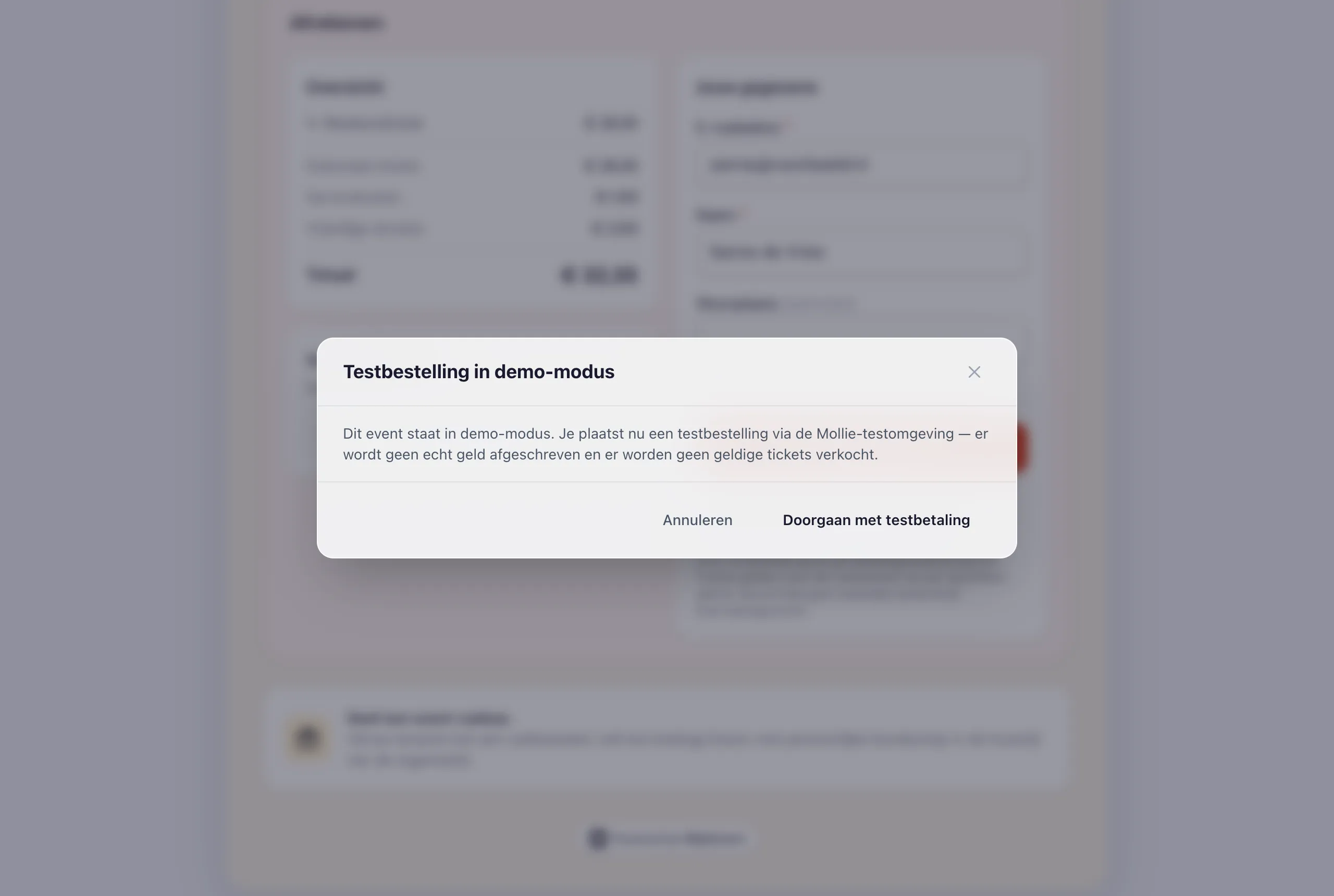
![The test-mode notice in the checkout](https://regify-mijnevent.s3.eu-central-1.amazonaws.com/blog/inline/demo-modus-checkout.webp)*Before a test order goes through, the buyer clearly sees that nothing is actually charged.*

# Real test payments, not a fake

Demo mode is a **master switch that overrides everything**. When it's on, MijnEvent ignores live payments entirely — even if your Mollie account is already connected. If you have connected your account, test orders run through that same account's test mode, with no platform fee. Not connected yet? Then MijnEvent falls back to a test profile, so you can still practise the complete flow. So you test with the exact same payment screens your visitors will see live — not a mocked-up dialog, but the real Mollie test environment.

# Ideal for checking everything before you sell

Demo mode is meant for that final check before you truly open up. Use it to calmly go through:

- **Your event page** — are the description, photos, date and location correct?
- **Your prices** — is every ticket type set to the right amount, and does any service fee add up neatly in the checkout?
- **Your confirmation email** — does the email arrive, with the correct ticket attached and the right sender?

Everything checks out? Then you switch demo mode off and start real sales with peace of mind.

# Test the way your visitors do

The best way to test isn't from behind your dashboard, but with your phone in hand. Open your own event page, pick tickets and pay as if you were an ordinary visitor. That's how you immediately see how the page looks on mobile, how fast everything loads and whether the buttons feel logical. Do it a few times, with different ticket types and quantities — in demo mode it costs nothing and nothing breaks. Your team can watch and click along too, before anyone from outside sees a thing.

# Switching demo mode on

You turn demo mode on yourself under **Settings → Demo mode**: a single switch. While it's on, your environment clearly shows you're in test mode — flip it off and you're live. That way you decide when you're practising and when the real sale begins.

That's how you test your whole event without risk. Ready for the real setup afterwards? Read how to [create your first event](/en/blog/creating-your-first-event), how to [connect your Mollie account](/en/blog/connect-your-mollie-account) and which [payment methods your visitors get](/en/blog/supported-payment-methods).

   Frequently asked questions

## Frequently asked questions

## Does demo mode charge real money?

 No. Payments run through Mollie's test environment, so no money is charged and no valid tickets are sold. It is a full dress rehearsal of your checkout.

## Does demo mode work if my Mollie account is already connected?

 Yes. Demo mode is a master switch that overrides live payments; with a connected account test orders run through that account's test mode with no platform fee, and without a connection MijnEvent falls back to a test profile.

## How do I turn demo mode off to start selling?

 You flip the single switch under Settings → Demo mode. With it off you are live and real sales begin.

  [    Back to blog ](https://mijnevent.nl/en/blog) 

  MijnEvent

## Read more

 [ ![](https://regify-mijnevent.s3.eu-central-1.amazonaws.com/blog/covers/automatic-membership-renewal-dutch-law.webp) memberships 

 Jasper Koers · 27 July 2026 · 6 min read

## Automatic membership renewal: collecting fees within Dutch renewal law

Automatic renewal saves your club a pile of chasing work, but the law has rules about cancelling. Here is how renewal works in MijnEvent, and how to keep it clean.

 ](https://mijnevent.nl/en/blog/automatic-membership-renewal-dutch-law) [ ![](https://regify-mijnevent.s3.eu-central-1.amazonaws.com/blog/covers/ontruimingsverslag-evenement-bewijsstuk.webp) safety 

 MijnEvent · 27 July 2026 · 5 min read

## The evacuation record: why the day after your event matters for the next permit

An evacuation — real or drilled — is only finished once it is on paper. What belongs in an evacuation record, why the municipality asks for it, and how to make the record write itself instead of reconstructing it afterwards?

 ](https://mijnevent.nl/en/blog/evacuation-record-event-evidence) [ ![](https://regify-mijnevent.s3.eu-central-1.amazonaws.com/blog/covers/knmi-weeralerts-veiligheidsplan.webp) safety 

 MijnEvent · 27 July 2026 · 3 min read

## Weather monitoring in your safety plan: how KNMI warnings land in your alerts and logbook automatically

Almost every safety-plan format has a 'weather monitoring' section — and almost nobody fills it in concretely. The Safety &amp; Permit module pulls the KNMI warning code for your event location every hour and turns it into a demonstrable process.

 ](https://mijnevent.nl/en/blog/knmi-weather-alerts-event-safety-plan) 

   MijnEvent

## Ready to get started?

Create a free account and sell your first tickets today.

 [Start free](https://mijnevent.nl/registreer) [Pricing](https://mijnevent.nl/en/pricing)


