# Save time: duplicate your event or course in one click

  [Home](https://mijnevent.nl/en) / [Blog](https://mijnevent.nl/en/blog) / Save time: duplicate your event or course in one click   events courses dashboard 

# Save time: duplicate your event or course in one click

 The same workshop every month, the same show every year? Duplicate creates a draft with all your ticket types, prices, time slots and texts in one step. The dates move along; sales and visitors stay behind.

 [Jasper Koers](https://mijnevent.nl/en/author/jasper-koers) · 18 September 2026 · 5 min read 

  ![](https://regify-mijnevent.s3.eu-central-1.amazonaws.com/blog/covers/duplicate-an-event-or-course.webp)  Photo: [Cat Guffin](https://unsplash.com/@hiddenbubbles?utm_source=MijnEvent&utm_medium=referral) / [Unsplash](https://unsplash.com/?utm_source=MijnEvent&utm_medium=referral)     In short

- The Duplicate button turns any event or course into a draft copy with its ticket types, prices, capacity, time slots, forms and email texts.
- You choose one new start date; every other date moves by the same amount and keeps its clock time, even across the switch to winter time.
- Orders, visitors, the guest list, the waiting list, discount codes and sales figures never come along. The copy starts at zero.

  Do you run the same workshop every month, organise the same festival every year, or put on a show over several evenings? Until now you rebuilt every edition from scratch: copying the description, creating the ticket types one by one, the prices, the capacity, the time slots, the confirmation email. Not anymore. **Duplicate** turns an existing event or course into a new version in one step.

# How it works for an event

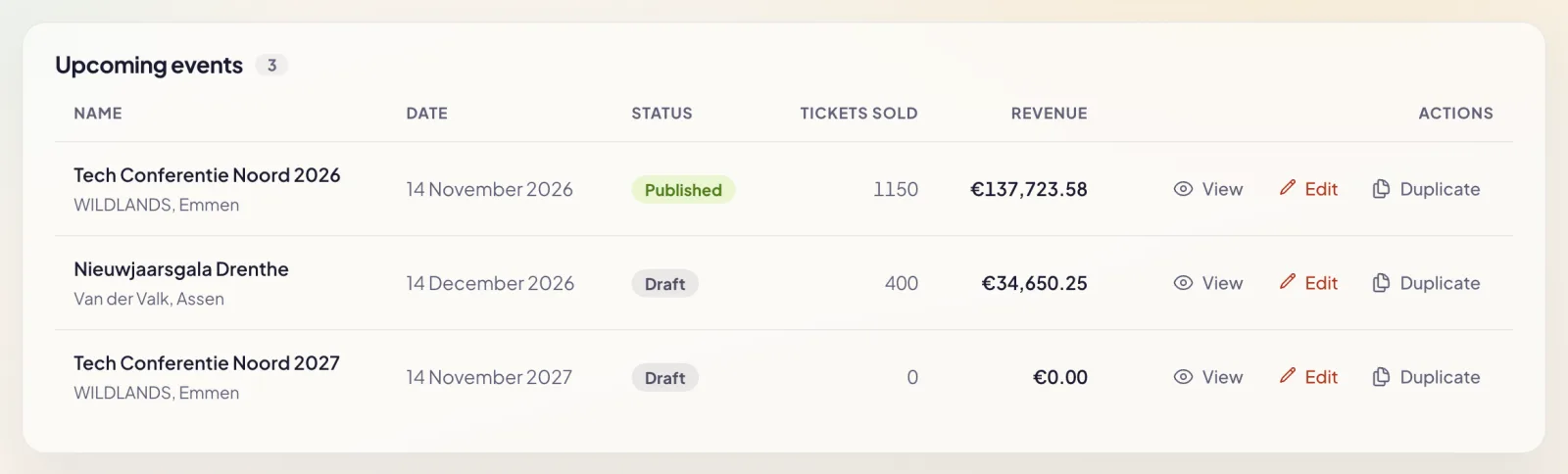
In your events overview, every event has a **Duplicate** action, including past events. On an event's detail page you'll find the same button next to *Edit event*.

![The events overview in the dashboard, with View, Edit and Duplicate actions on every event](https://regify-mijnevent.s3.eu-central-1.amazonaws.com/blog/inline/duplicate-event-list.webp)*Duplicate sits next to every event, including editions that are already over.*

A window asks you two things:

- **The name of the copy.** If the name contains a year, it follows the date you pick: "Summer festival 2026" becomes "Summer festival 2027".
- **The new start date and time.** The *+1 week*, *+1 month* and *+1 year* buttons shift from the original in one click.
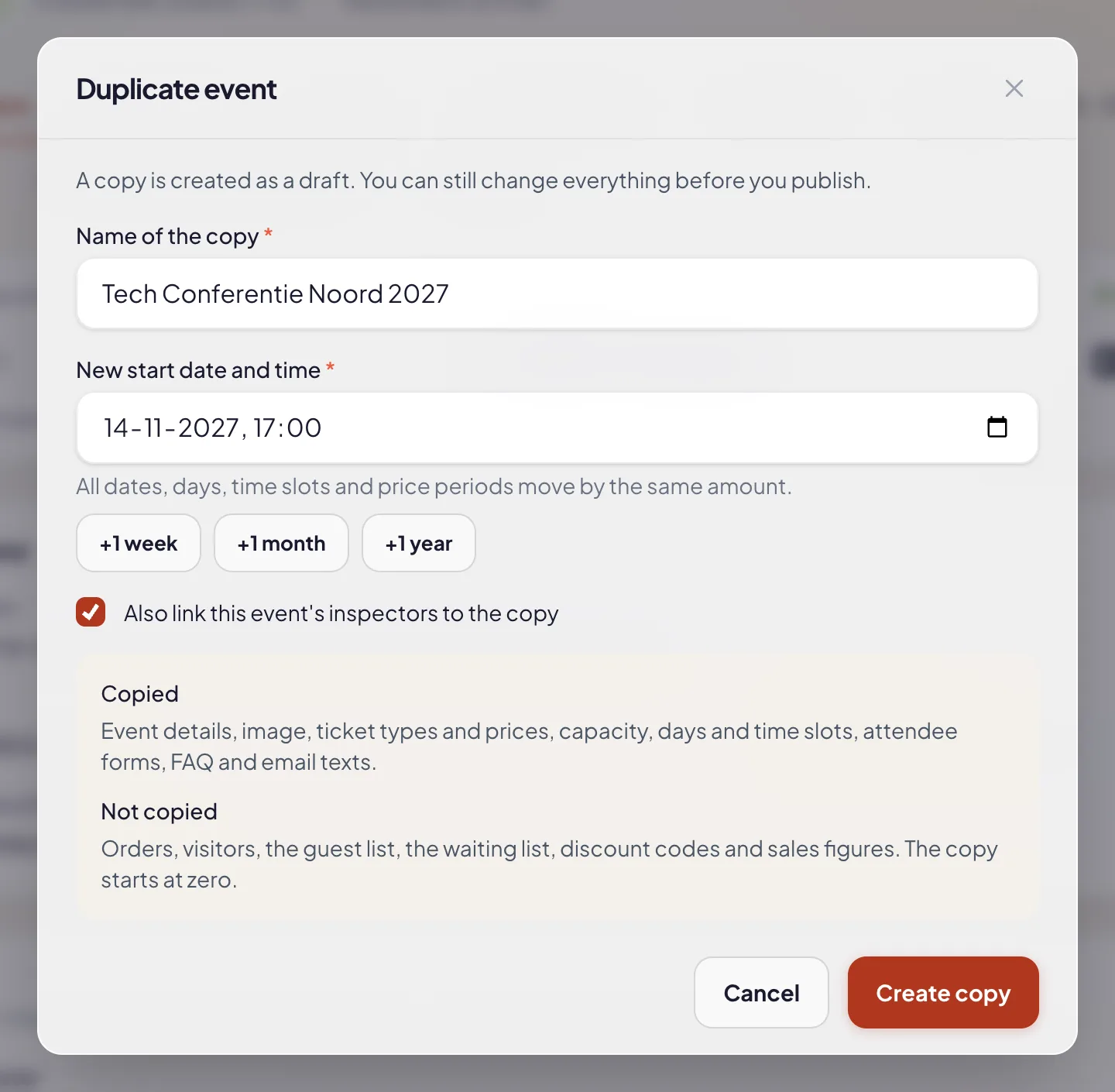
![The Duplicate event window with the name, the new start date, the quick buttons and an overview of what is and isn't copied](https://regify-mijnevent.s3.eu-central-1.amazonaws.com/blog/inline/duplicate-event-modal.webp)*Name and start date, and you can see right away what's copied and what isn't.*

Click **Create copy** and you land on the new event's page. At the top it says where it was copied from, with a link back to the original.
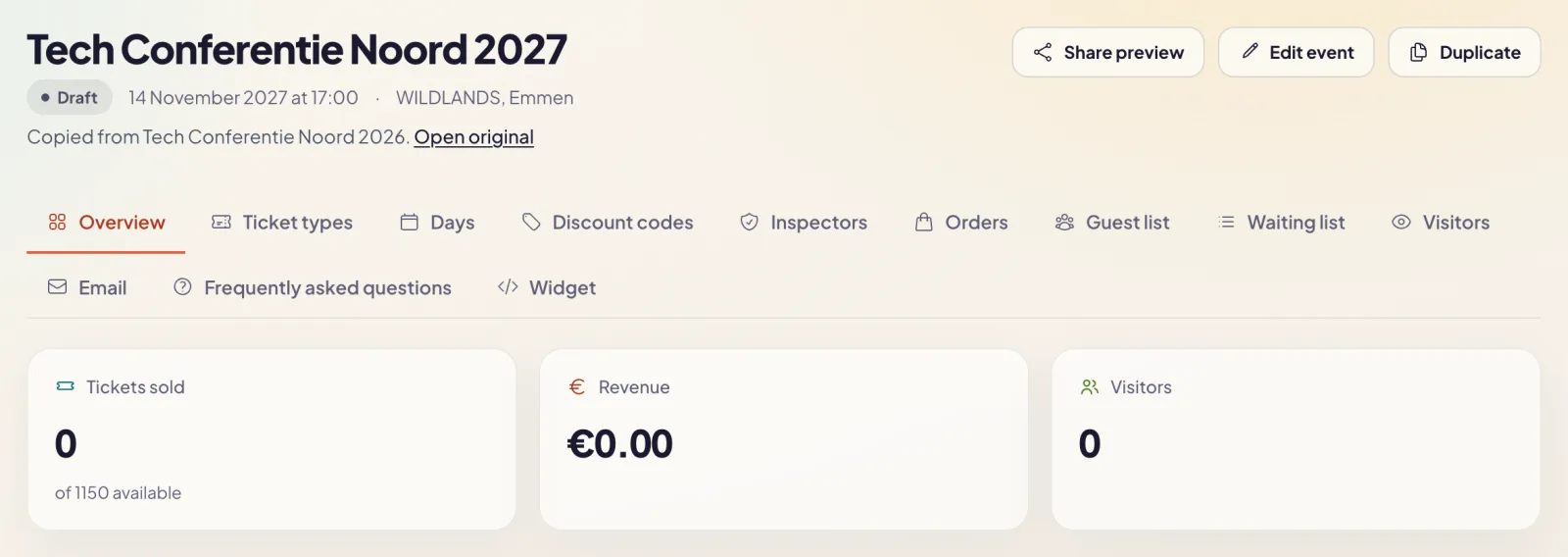
![The copied event as a draft: 0 tickets sold and a Copied from note linking to the original](https://regify-mijnevent.s3.eu-central-1.amazonaws.com/blog/inline/duplicate-event-copy.webp)*The copy is ready as a draft, with all ticket types and nothing sold.*

# One date, everything moves along

You only choose the new start. Every other date moves by the same amount: the end date, the days of a multi-day event, the time slots, the early-bird periods and the sales window. The clock time stays the same, even if there's a switch between summer and winter time in between. A workshop at 7 pm in September stays at 7 pm in November.

If a sales start would already be in the past after shifting, we leave it out. Sales then simply open as soon as you publish the event.

# What comes along, and what doesn't

Everything you **set up** comes along:

CopiedNot copiedName, description, location and posterOrders and ticketsTicket types, prices and service feesVisitors and the guest listCapacity and capacity groupsThe waiting listDays and time slotsDiscount codesAttendee forms and FAQSales figures and statisticsEmail texts and the confirmation attachmentThe paid publication and the preview linkInspectors (if you tick the box)If you use a seating plan or the safety module, you can also bring along the seating (with prices per tier and blocked seats) and your gates, emergency numbers and documents. Sold and reserved seats always stay with the original. An access code for a held-back block doesn't come along either: whoever had last year's code can't use it to book the new edition.

A copy is **always a draft**. Nobody sees it until you publish it yourself.

# Courses: a new group or a whole series

Courses work slightly differently, because a course is made up of groups and lessons.

**Duplicating a group** is the fastest way to a new intake. Open *Groups &amp; lessons*, click the copy icon next to a group and pick the date of the first lesson. The new group gets the same price, the same number of places and the same lessons. Every lesson keeps its time: the Tuesday evening at 7:30 pm stays a Tuesday evening at 7:30 pm.
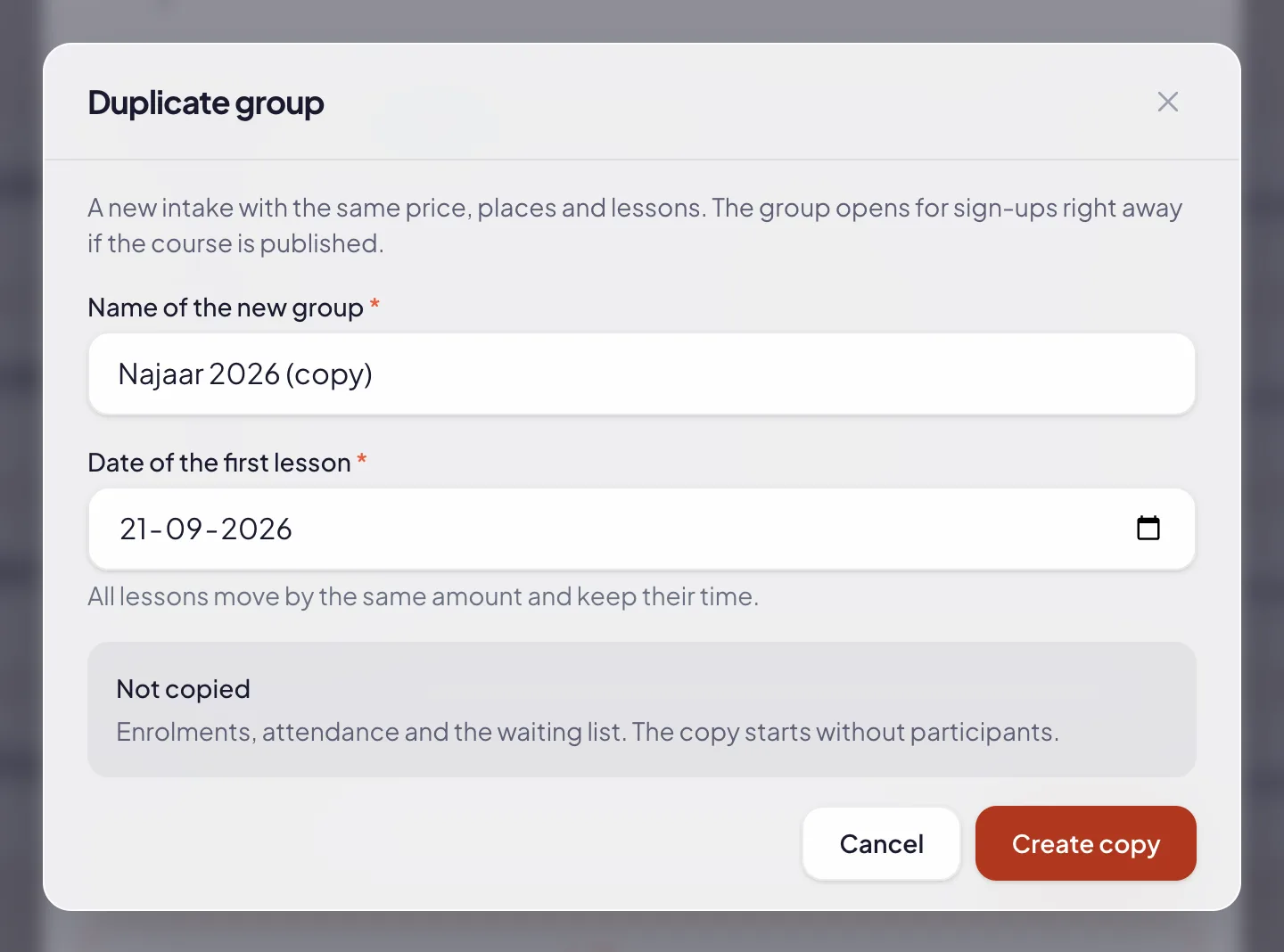
![The Duplicate group window with the name of the new group and the date of the first lesson](https://regify-mijnevent.s3.eu-central-1.amazonaws.com/blog/inline/duplicate-course-group-modal.webp)*A new intake: pick the date of the first lesson and every lesson moves along.*

**Duplicating a course** is done with the button on the course card. You choose: just the course (text, instructor, materials, image and forms), or the course with all its groups and lessons. In that case the earliest group starts on the date you pick, and the rest moves along. Enrolments, attendance and the waiting list never come along.

# Afterwards: compare your editions

Do you run [visitor feedback](/en/blog/event-feedback-hear-what-visitors-thought) after your event? For a copied event, the feedback survey starts with the same questions as the previous edition. That lets you put this year's answers right next to last year's.

# Who is this for?

Anyone who does the same thing more than once: the monthly workshop, the course that restarts every season, the show on four evenings, the festival that comes back every year. Set up your event properly once, then duplicate it. Haven't created an event yet? Start with [creating your first event](/en/blog/creating-your-first-event). For courses, [courses and workshops with a series pass](/en/blog/courses-and-workshops-with-a-series-pass) explains how groups and lessons work.
   Frequently asked questions

## Frequently asked questions

## Do my orders or visitors come along to the copy?

  No. A copy only takes over the setup. Orders, tickets, the guest list, the waiting list and sales figures stay with the original, and the copy starts with zero sold.

## What happens to my discount codes?

  They don't come along. A discount code is unique across your whole organisation, so you create new codes for the new edition. That way an old code can't stay valid by accident.

## Is the copy published straight away?

  No, a copy is always a draft. You change what needs changing and publish once everything is right. If your plan has a fixed price per event, it applies to the copy again: it's a new event.

## Can I duplicate a course group too?

  Yes. For a course you duplicate a whole group as a new intake: same price, same places, same lessons, on a new start date. Enrolments and attendance don't come along.

  [    Back to blog ](https://mijnevent.nl/en/blog) 

  MijnEvent

## Read more

 [ ![](https://regify-mijnevent.s3.eu-central-1.amazonaws.com/blog/covers/memberships-town-restriction.webp) memberships 

 Jasper Koers · 15 September 2026 · 6 min read

## Membership only for residents of your village

A village association is for the village. Now you can set that up instead of checking it by hand — and you only ask for your members' addresses if you actually use them.

 ](https://mijnevent.nl/en/blog/memberships-only-for-residents-of-your-village) [ ![](https://regify-mijnevent.s3.eu-central-1.amazonaws.com/blog/covers/event-poster-on-your-event-page.webp) poster 

 Jasper Koers · 14 September 2026 · 4 min read

## Putting your poster on your event page

The poster you already had designed belongs online too. Upload it once and it appears on your event page, on the overview card, in the widget and in the preview on social media.

 ](https://mijnevent.nl/en/blog/event-poster-on-your-event-page) [ ![](https://regify-mijnevent.s3.eu-central-1.amazonaws.com/blog/covers/waiting-list-for-a-sold-out-event.webp) waiting list 

 Jasper Koers · 14 September 2026 · 6 min read

## Who is on the waiting list? Now you can see

The waiting list already worked on its own: sold out, someone signs up, and the moment a ticket frees up the email goes out. You just could not look inside it. Now you can — with names, positions and a button to email them yourself.

 ](https://mijnevent.nl/en/blog/waiting-list-for-a-sold-out-event) 

   MijnEvent

## Ready to get started?

Create a free account and sell your first tickets today.

 [Start free](https://mijnevent.nl/registreer) [Pricing](https://mijnevent.nl/en/pricing)