Selling an eight-class course with separate tickets is a struggle: creating eight events, scanning eight times, and hoping nobody buys a single ticket for class five only. The Courses & workshops module is built for the way courses actually work: a participant signs up for the whole series in one go, pays once and gets one pass that covers every class.
The module can be activated on request through MijnEvent and suits studios, music schools, sports clubs and community centres — anywhere teaching happens in series.
Courses, groups and a class schedule
The structure is simple and familiar. A course is the offering: "Watercolour for beginners" or "Streetdance 8+". Within a course you create groups (cohorts) — the Tuesday evening group and the Saturday morning group, for instance — and every group gets its own class schedule with all the dates and times. That way participants see exactly when they are expected before they sign up, and you decide for yourself how many groups you run alongside each other.
The course page itself tells the whole story: its own photo as an eye-catcher, a level badge (beginner, advanced or expert), the teacher, and separate sections for "What to expect", "Who this course is for" and "Materials & requirements". Participants therefore know exactly what they are getting into — which saves questions by email and no-shows in class one.
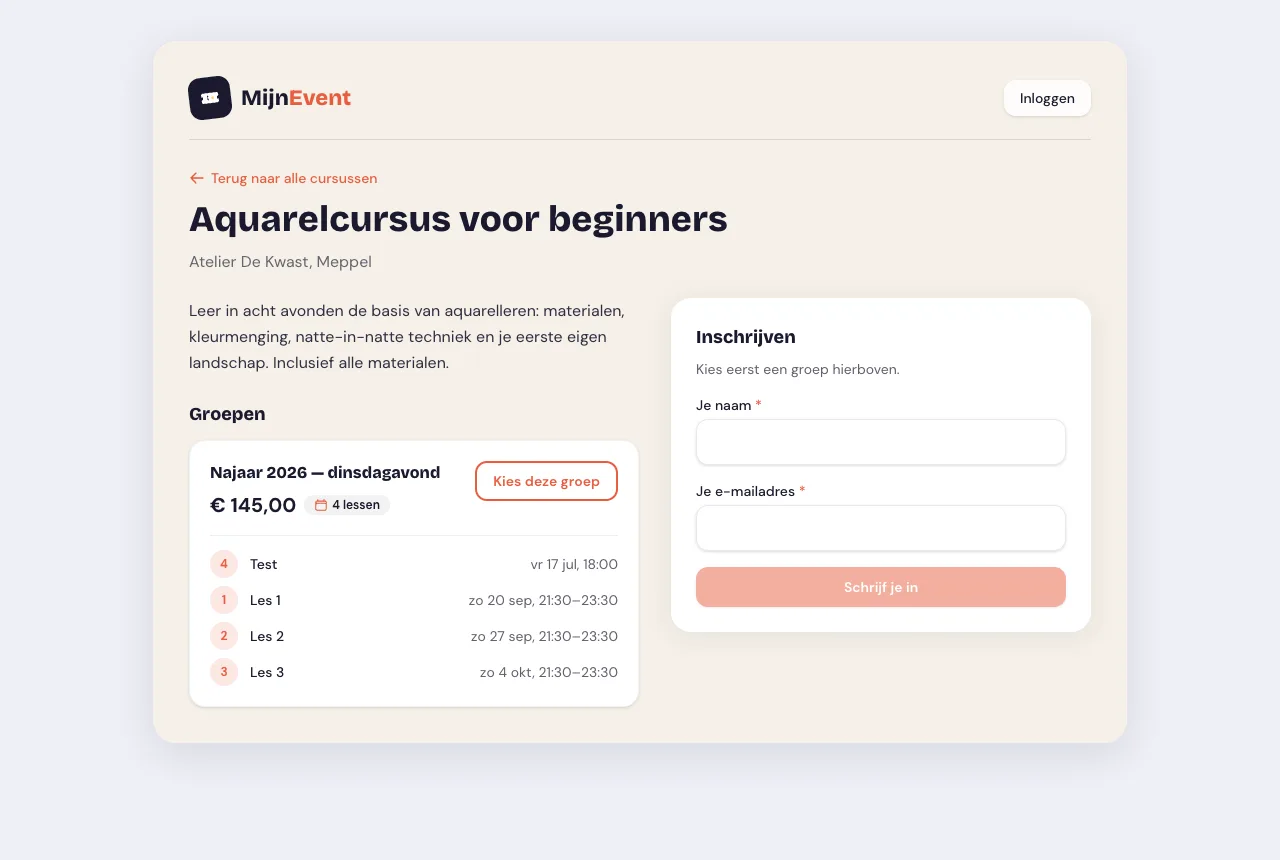 The public course page: the participant picks a group and sees the full class schedule straight away.
Full is full — and the waitlist holds the spot
You set a capacity per group. A studio with ten easels simply has room for ten students, and the module guards that strictly. But full does not mean the conversation stops: once a group is full, the next sign-up joins the waitlist.
When a spot frees up — someone withdraws, a payment fails, or you make the group bigger yourself — the invitation goes to whoever has been in line longest. That spot then stays reserved for them for 48 hours. During that window the spot counts as taken, so nobody can snatch it while they are still checking with the family. If they do not sign up within those 48 hours, the invitation lapses and the spot moves on to the next person in line. A scheduled task clears out expired invitations, so that handover happens by itself — you do not have to sit and watch it. The window is fixed at 48 hours.
In your dashboard the whole queue sits under the Waitlist tab: who is waiting, since when, and who currently has a spot reserved and until when. If you do not want to wait for the automatic round, you invite someone yourself with Invite now; anyone who drops out you remove with Remove from list.
Do you sell separate tickets as well? There is a comparable waitlist per ticket type — read how to turn it on for a sold-out event.
The series pass: one QR code for every class
After signing up, the participant receives a series pass by email: a pass with a QR code plus the complete class overview for the chosen group. That pass is valid for every class in the series — the participant shows the same QR code at each class, you (or your teacher) scan it, and attendance is taken care of. No separate tickets per class, no paper attendance list, no fuss when someone can no longer find the email from week three.
Attendance per class
You keep track of attendance in your dashboard. Under the Attendance tab you pick a class and open the attendance list for that single class. Per participant you mark Present, Absent or Excused — big buttons, because you use this on a phone at the door. The state of that class sits at the top, including how many participants you have not ticked off yet.
When the series pass is scanned, the participant is set to present straight away, marked By QR scan. If you then tick something else by hand, the status simply changes — there is nothing to undo.
Under Whole series overview you see every participant in one table: a tick, a cross or a dash per class, and at the end how many of the classes someone attended. Handy for a certificate, a subsidy report, or simply the conversation with a parent asking how things are going.
Sign-ups on your own page
As soon as the module is active, your subdomain gets a public page at /cursussen. That is where your whole offering sits together, with the groups, the schedule and the number of remaining spots per course. Signing up goes through a clear form, and payment runs through your own Mollie account with iDEAL | Wero — so the course fee lands directly with you.
And do you offer council-subsidised or free classes? Free series are possible too: if the course costs nothing, no payment screen appears at all. No detour past a € 0.00 payment — the participant fills in their details, confirms, and has their series pass. For a community-centre course or a taster class that removes exactly the barrier you do not want.
On your studio or school website as well
Do you already have a website of your own? Then embed your course offering there as a widget — two lines of code (data-mijnevent-module="courses" plus the embed script), growing in height automatically. The snippet is ready and waiting in your dashboard under Integrations.
Dashboard: from schedule to participant list
In your dashboard you handle the entire course administration in one place:
- Creating courses with a description and a price;
- Groups with their own capacity and class schedule;
- Adding, moving or cancelling classes;
- The participant list per group, always up to date;
- The waitlist, showing who is waiting and where a spot is reserved;
- Attendance per class and across the whole series.
Is a class cancelled or a date moved? You adjust the schedule and the change appears immediately in the overview that belongs to the series pass.
Who is this for?
The module is made for everyone who works in series: the studio with a six-week painting course, the music school with weekly band coaching, the sports club with a beginners' clinic and the community centre with a cookery course. Anywhere the same group of people comes back several times, the series pass replaces a stack of separate tickets.
Getting started
Ready to put your course offering online? Have a look at the module page for all the details — the module can be activated on request through MijnEvent. No MijnEvent account yet? Register your organisation and open sign-ups for your next series.


