# Event feedback in practice: from finished event to anonymous results dashboard — MijnEvent

  [Home](https://mijnevent.nl/en) / [Blog for event organizers](https://mijnevent.nl/en/blog) / Event feedback in practice: from finished event to anonymous results dashboard   feedback organisers modules walkthrough 

# Event feedback in practice: from finished event to anonymous results dashboard

A complete walkthrough with screenshots: the question wizard, the invitation email, responding on a phone and the dashboard with response rate, NPS and towns.

 [Jasper Koers](https://mijnevent.nl/en/author/jasper-koers) · 23 July 2026 · 5 min read 

  ![](https://regify-mijnevent.s3.eu-central-1.amazonaws.com/blog/covers/zo-werkt-terugblik-in-de-praktijk.webp)  Photo: [Cathryn Lavery](https://unsplash.com/@cathrynlavery?utm_source=MijnEvent&utm_medium=referral) / [Unsplash](https://unsplash.com/?utm_source=MijnEvent&utm_medium=referral)    In short

- After your event ends the button appears in management by itself; the wizard guides you in three steps from questions to sending.
- The mandatory test email and the 'this can only happen once' confirmation prevent accidents — there is exactly one feedback round per event.
- Visitors respond on their phone without logging in; stopping halfway is fine, the form remembers their answers.
- The dashboard shows response rate, averages, NPS and towns only above the anonymity thresholds — below 5 responses it deliberately stays empty.

  In [the announcement of Event feedback](/en/blog/event-feedback-hear-what-visitors-thought) you can read why you ask feedback only from checked-in visitors and how the anonymity works technically. This article shows what that looks like in practice — from the first click to the results dashboard, with real screens from the module.

# Step 0: your event has ended

Nothing to remember. As soon as an event is over, it appears in **Event feedback** in your management menu under "Events you can send a feedback round for now" — with the date the window closes (30 days after the end). One click on *Start feedback round* and the wizard opens with the standard template already filled in.

# Step 1: composing questions

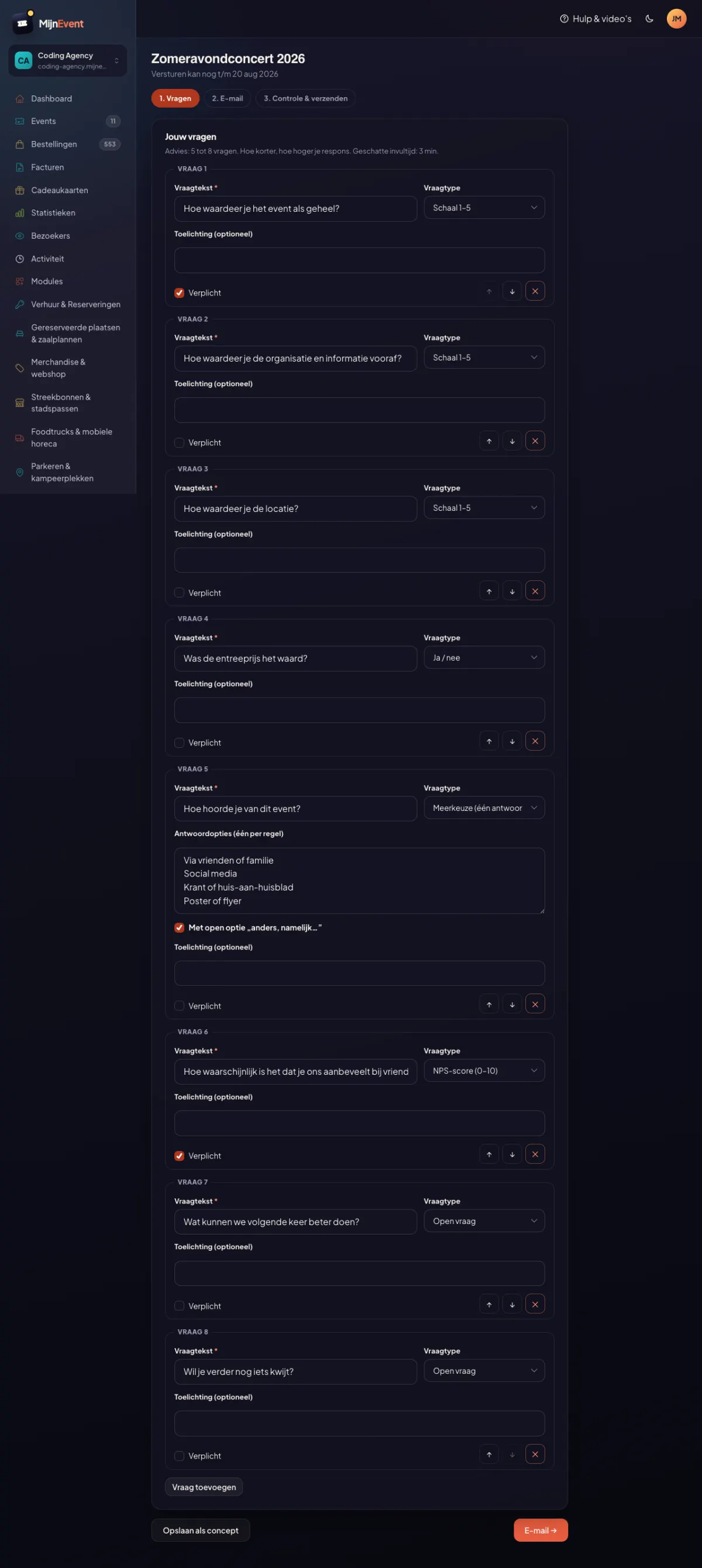
![The question wizard with the standard template: eight questions, each with type, explanation and required toggle](https://regify-mijnevent.s3.eu-central-1.amazonaws.com/blog/screenshots/terugblik-wizard-vragen.webp)

The *Standard visitor survey* template prepares eight questions: an overall rating, a few deep-dive questions, an NPS question and two open questions. Every question is adjustable:

- **Six question types** — multiple choice (one or several answers), open question, 1–5 scale, yes/no and NPS (0–10).
- **Reordering** with the arrow buttons — fully keyboard-accessible too.
- **Required or optional** per question, with an optional explanation below it.
- The wizard shows the **estimated completion time** live. Above four minutes you get a warning: the longer the form, the lower your response rate. The maximum is 15 questions; 5 to 8 is the advice.

Good to know: if you keep the template questions unchanged, you can compare editions one-to-one later — the system recognises identical questions.

# Step 2: the invitation email

Subject, intro and button text are yours to write, with placeholders such as `[naam]` and `[event]` filled in per recipient. MijnEvent automatically adds the anonymity note and the response button, in the house style of your confirmation emails. This is also where you enable the **automatic reminder**: after three days everyone who has not responded gets one friendly nudge — nothing more.

# Step 3: review and send

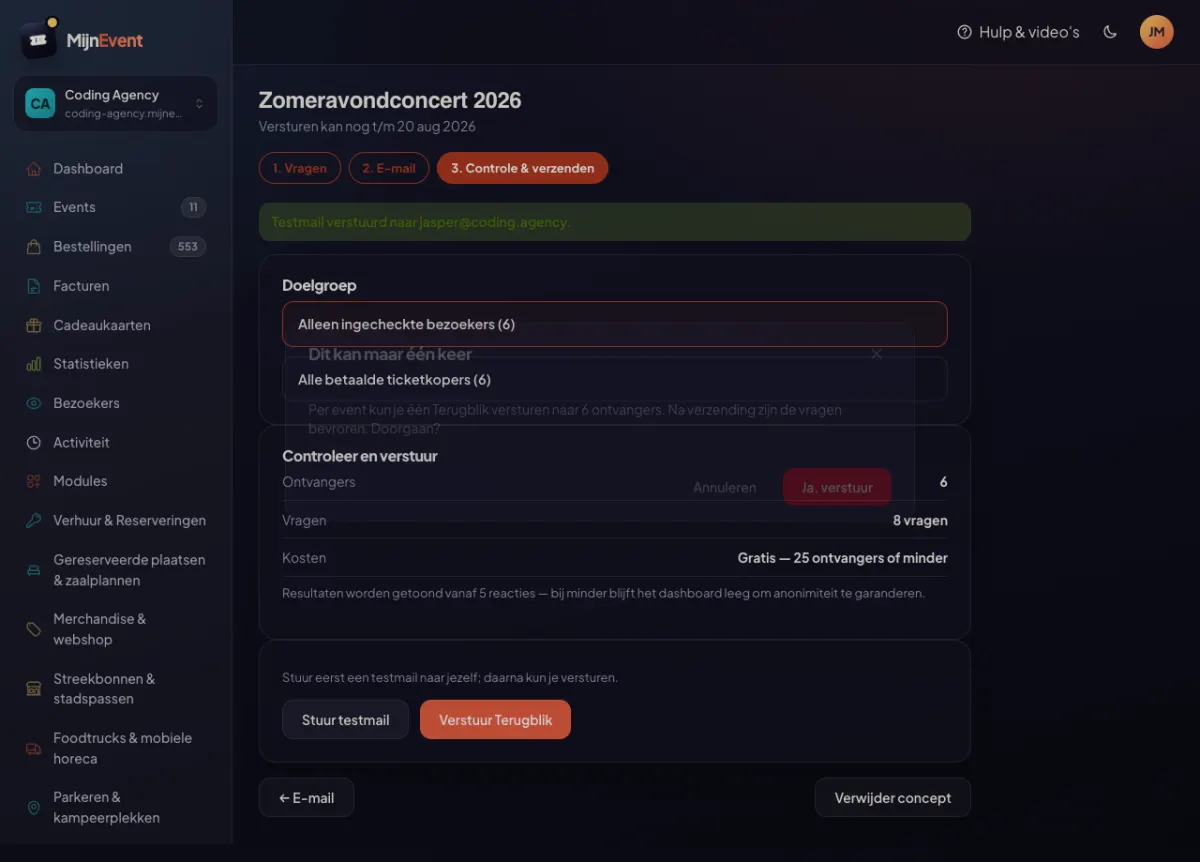
![The review step: audience choice, numbers, cost and the confirmation that it can only happen once](https://regify-mijnevent.s3.eu-central-1.amazonaws.com/blog/screenshots/terugblik-wizard-verzenden.webp)

The last step leaves no room for surprises:

- **Audience**: by default *only checked-in visitors*, with the live count next to it. If you did not scan, you deliberately choose *all paid ticket buyers* — with a clear warning, because that choice is also noted with your results.
- **Cost**: at 25 recipients or fewer it simply says *Free*. Your very first round is free anyway; above that it is a single flat €10.
- **The test email is mandatory.** The send button only unlocks after you have seen the email in your own inbox.
- And then the confirmation: *"This can only happen once."* There is exactly one feedback round per event — after sending, the questions are frozen.

# What your visitor sees

![The response page on a phone: large touch targets, clear questions, no login](https://regify-mijnevent.s3.eu-central-1.amazonaws.com/blog/screenshots/terugblik-invulpagina-mobiel.webp)

The invitation contains a personal link. No account, no password — click and respond, on any phone. The privacy promise is explicit at the top: *your answers are decoupled from your name and email address and cannot be traced back to you — not even by the organiser.* Interrupted halfway? The form remembers the answers on the device. After sending, the link expires: one person, one vote.

The form is fully accessible (WCAG AA) and even works without JavaScript — important for anyone responding with a screen reader or an older phone.

# The results dashboard

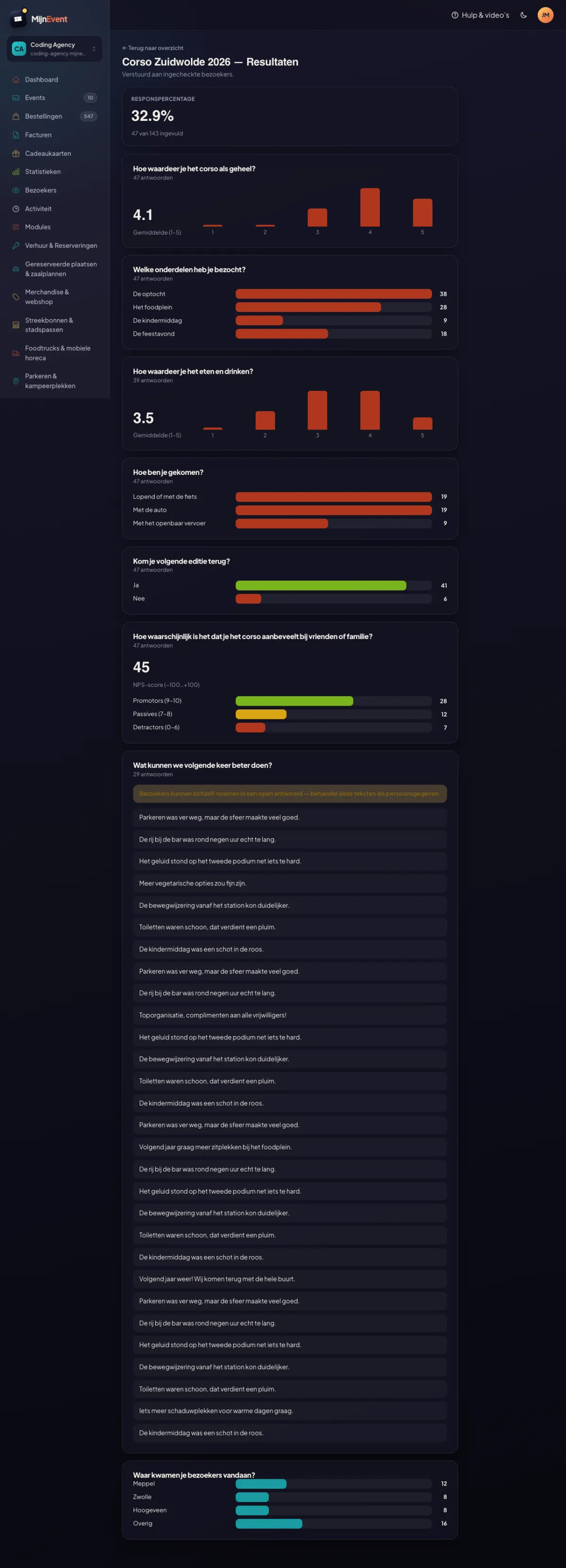
![The results dashboard: response rate, average rating, NPS split, open answers and towns](https://regify-mijnevent.s3.eu-central-1.amazonaws.com/blog/screenshots/terugblik-resultaten.webp)

As responses come in, the dashboard grows with them:

- **Response rate** at the top, calculated on actually delivered invitations.
- **The right visual per question**: an average with distribution for scale questions, bar charts for multiple choice, green/red for yes/no.
- **NPS** with the split of promoters, passives and detractors — not just the bare number, because an NPS without context is misleading.
- **Open answers** as a list, with a fixed warning above it: visitors can mention themselves, treat these texts as personal data.
- **Towns** as bars, with small towns merged under *Other* — so that one visitor from a small village is never recognisable.

And the thresholds are visible policy, not small print: below 5 responses the dashboard stays empty, the town distribution only appears from 20. Better an honest empty screen than a promise that cannot be kept.

# Afterwards

You use the figures both ways: internally to make the next edition better (the open answers are gold — "more benches near the bandstand" is not something you invent behind a desk), and externally towards sponsors and funders, who would rather see an NPS of +45 than a gut feeling.

Event feedback is available for all organisers. Get in touch and we will activate the module — your first feedback round is free, so you can try it without risk at your very next event.


   Frequently asked questions

## Frequently asked questions

## When can I send a feedback round?

 From the moment your event ends until 30 days after. Management shows the exact closing date; after that the option lapses for good.

## Do I have to invent the questions myself?

 No. You start from one of three templates — Short &amp; sweet, Standard visitor survey, or Festival/multi-day — and adjust what you want. Every question type (multiple choice, open, scale, yes/no, NPS) is included.

## Why do I have to send a test email first?

 Because sending can only happen once. The test email shows you exactly what your visitors will receive, including your own subject and text — only then does the send button unlock.

## What do my visitors see about the anonymity?

 It is stated explicitly at the top of the form: answers are decoupled from name and email address and cannot be traced back — not even by you as the organiser. That is technically enforced, not a promise on good faith.

## What if too few responses come in?

 Below 5 responses the dashboard deliberately stays empty (anonymity threshold). That is why a round to 25 or fewer recipients is free, and you can enable an automatic reminder that raises the response rate considerably.

  [    Back to blog ](https://mijnevent.nl/en/blog) 

  MijnEvent

## Read more

 [ ![](https://regify-mijnevent.s3.eu-central-1.amazonaws.com/blog/covers/automatic-membership-renewal-dutch-law.webp) memberships 

 Jasper Koers · 27 July 2026 · 6 min read

## Automatic membership renewal: collecting fees within Dutch renewal law

Automatic renewal saves your club a pile of chasing work, but the law has rules about cancelling. Here is how renewal works in MijnEvent, and how to keep it clean.

 ](https://mijnevent.nl/en/blog/automatic-membership-renewal-dutch-law) [ ![](https://regify-mijnevent.s3.eu-central-1.amazonaws.com/blog/covers/ontruimingsverslag-evenement-bewijsstuk.webp) safety 

 MijnEvent · 27 July 2026 · 5 min read

## The evacuation record: why the day after your event matters for the next permit

An evacuation — real or drilled — is only finished once it is on paper. What belongs in an evacuation record, why the municipality asks for it, and how to make the record write itself instead of reconstructing it afterwards?

 ](https://mijnevent.nl/en/blog/evacuation-record-event-evidence) [ ![](https://regify-mijnevent.s3.eu-central-1.amazonaws.com/blog/covers/knmi-weeralerts-veiligheidsplan.webp) safety 

 MijnEvent · 27 July 2026 · 3 min read

## Weather monitoring in your safety plan: how KNMI warnings land in your alerts and logbook automatically

Almost every safety-plan format has a 'weather monitoring' section — and almost nobody fills it in concretely. The Safety &amp; Permit module pulls the KNMI warning code for your event location every hour and turns it into a demonstrable process.

 ](https://mijnevent.nl/en/blog/knmi-weather-alerts-event-safety-plan) 

   MijnEvent

## Ready to get started?

Create a free account and sell your first tickets today.

 [Start free](https://mijnevent.nl/registreer) [Pricing](https://mijnevent.nl/en/pricing)