# Private ticket sales: an event that can only be ordered with a code

  [Home](https://mijnevent.nl/en) / [Blog](https://mijnevent.nl/en/blog) / Private ticket sales: an event that can only be ordered with a code   private sales access code guests group booking 

# Private ticket sales: an event that can only be ordered with a code

 The staff party, the tickets for sponsors, the group booking of a travel company: you want to handle them online, but not among your regular events. With an access code the event cannot be found, and only the people you invite can order.

 [Jasper Koers](https://mijnevent.nl/en/author/jasper-koers) · 22 September 2026 · 5 min read 

  ![](https://regify-mijnevent.s3.eu-central-1.amazonaws.com/blog/covers/besloten-ticketverkoop-met-toegangscode.webp)  Photo: [Annie Spratt](https://unsplash.com/@anniespratt?utm_source=MijnEvent&utm_medium=referral) / [Unsplash](https://unsplash.com/?utm_source=MijnEvent&utm_medium=referral)     In short

- An access code on an event takes it out of your ticket shop, your event groups, your sitemap and the search engines. The event can only be reached through its own address.
- Without the code the event page shows only the name of the event and an input field. No description, no prices, no ticket types.
- The check is on the server: even someone who knows the address or a ticket type cannot see or order anything without the code. After ten wrong attempts in a minute it stops for a while.
- It is one shared code per event. A new code makes the old one invalid right away; removing the code makes the event public again.

# Not everything belongs in the shop window

Your ticket shop is your shop window: whoever passes by sees what you sell. That is the point, until you sell something that is not for everyone.

The staff party of a care organisation. Forty tickets a main sponsor hands out to business relations. A coach company booking three coaches at once at the group rate. A presale for your donors, a week before everyone else.

You do want that sale online. You want a list, a payment, a QR code at the door. You just do not want every visitor of your shop to see the group rate, or to wonder why they are not invited to the staff party.

Until now the workaround was a draft page, a separate account, or a form and a bank account number after all. That is no longer needed.

The screenshots below show the Dutch interface; the English one works the same way.

# One field on the event form

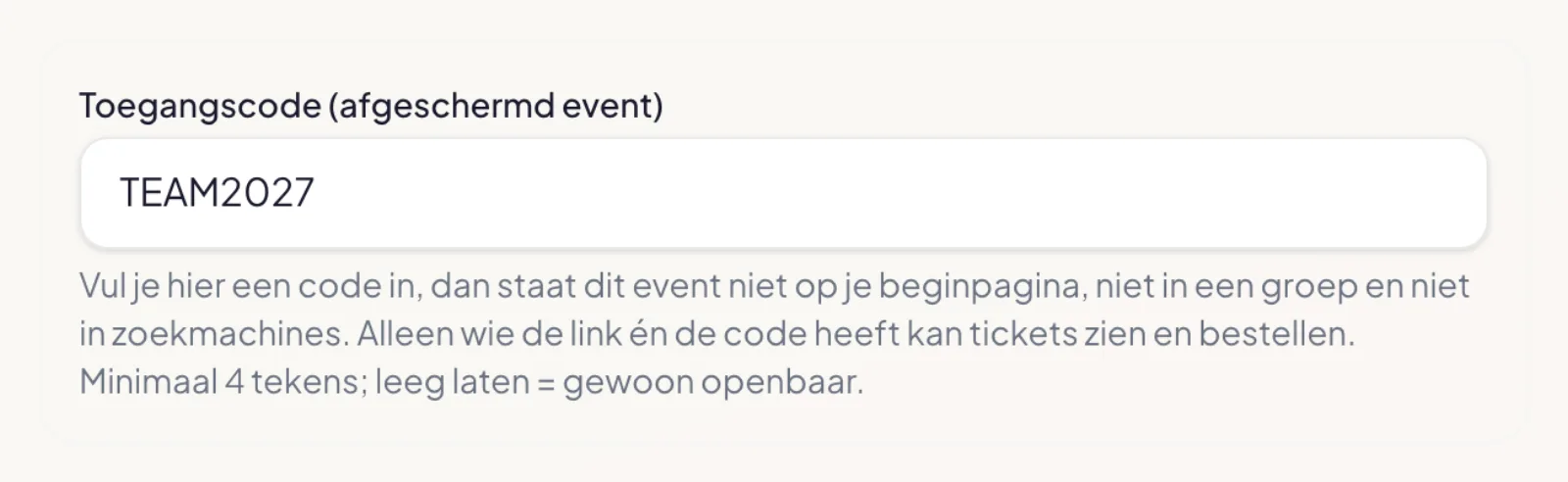
On the edit page of your event you will find the field **Access code**. Enter a code of at least four characters and the event is restricted from that moment. Leave it empty and it is an ordinary public event.
![The access code field on the event form in the dashboard, filled in with TEAM2027 and with the explanation below it](https://regify-mijnevent.s3.eu-central-1.amazonaws.com/blog/inline/beheer-toegangscode.webp)

You make up the code yourself. Upper or lower case does not matter when entering it, so `TEAM2027` and `team2027` both work.

# What happens next

With a code on the event, several things change at once:

- The event is **no longer on your home page** and not in an event group.
- It is **not in your sitemap**, and the page asks search engines not to include it.
- It does not appear in the list of events your gift card is valid for.
- The widget on your own website does not show it.

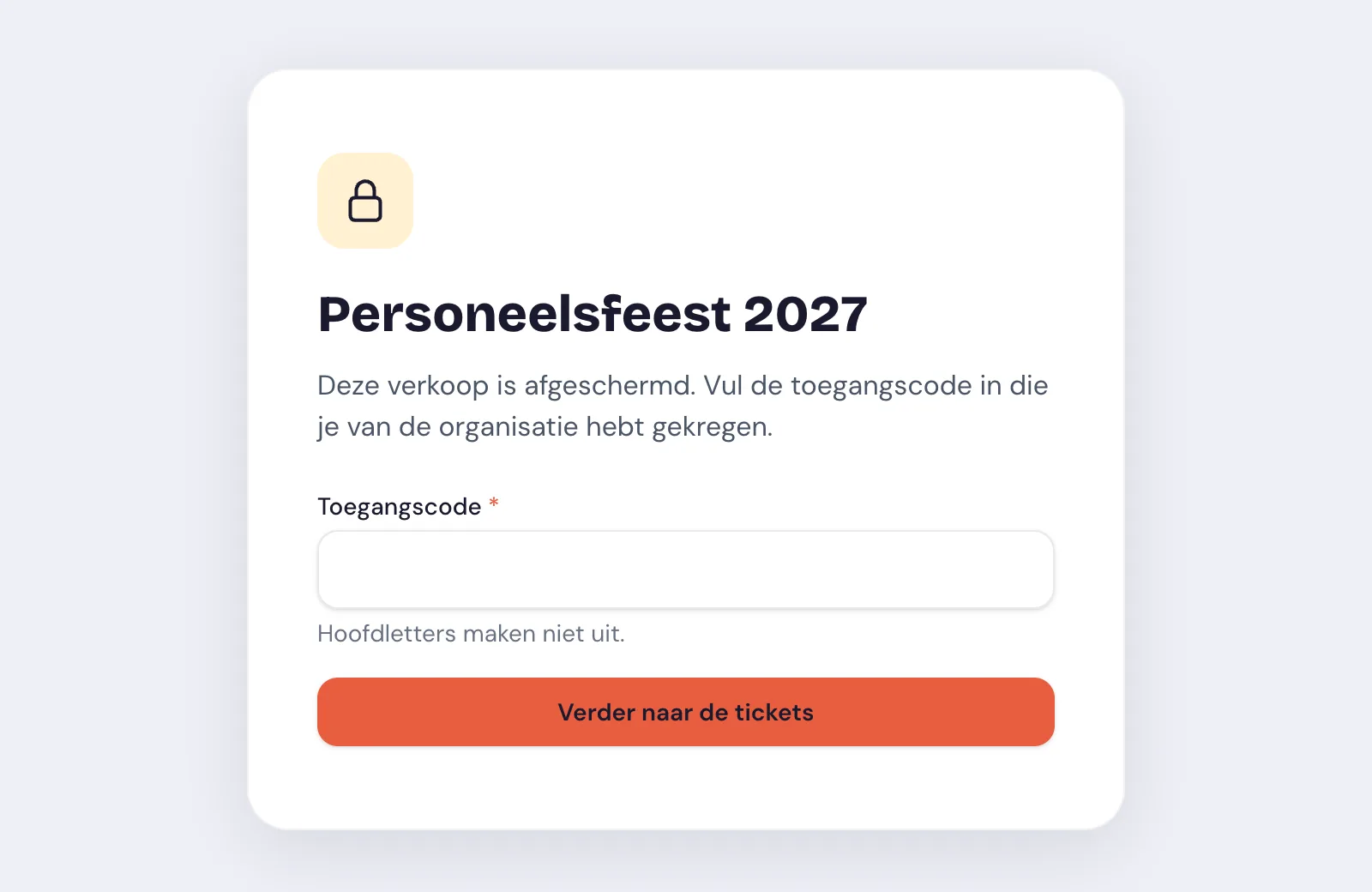
So the event can only be reached through its own address. And whoever arrives there without the code sees this:
![The event page of a restricted staff party: only the name, a field for the access code and the button to continue to the tickets](https://regify-mijnevent.s3.eu-central-1.amazonaws.com/blog/inline/toegangscode-formulier.webp)

The name of the event and an input field. No description, no location, no prices, no ticket types.

# You share the link and the code yourself

MijnEvent does not send the code for you. You share the address of the event page and the code in whatever way suits the group: in the invitation, in the staff newsletter, through your contact at the travel company. That way you know exactly who has it.

The guest enters the code, sees the tickets and orders as with any other event. They get the same confirmation email, the same PDF and the same pass in their wallet. At the door you scan the ticket with the same app.

# Hidden is not the same as restricted

Taking an event off the list is the easy part. What matters is what happens when someone has the address anyway: forwarded in a group chat, or simply guessed.

That is why the check is not only on the screen. Without a valid code the server returns no ticket types, no seat map and no availability, and refuses an order. Someone who knows the address but not the code gets no further than the input field.

After the right code the browser receives a proof of access that is valid for twelve hours and is kept in that tab only. The code itself does not travel along after that. And guessing does not pay off: after ten attempts within a minute you have to wait. The error message does not say whether the event exists or has a code either, only that it is not correct.

# Changing or removing the code

Has the code ended up somewhere it should not be? Enter a new one. The old one stops working from that moment, also for anyone who still has the page open. Share the new code with the people who are allowed to have it.

Remove the code and the event is public again and back in your shop. That also makes it useful for a **presale**: a week for your members or donors only, then for everyone, on the same page with the same tickets.

# What it is not

Two things to avoid confusion:

- **It is not a discount.** The access code decides who may see the event. A lower rate is something you arrange with the ticket price itself, or with a [discount code](/en/discount-codes) at checkout.
- **They are not personal codes.** Everyone you invite uses the same code. If you want to keep track of who is coming, the order already does that: every buyer enters a name and email address.

# Duplicating for next year

If you duplicate the event for a next edition, the code deliberately does not come along. The copy is a draft without a code. That prevents last year's code, which by now sits in dozens of mailboxes, from working next year as well.

There is more on the page [Private ticket sales](/en/private-ticket-sales).

   Frequently asked questions

## Frequently asked questions

## Can I restrict one ticket type instead of the whole event?

  No, the code is on the event. If you want a private offer next to your public sale, make it an event of its own with a code.

## Does every guest get their own code?

  No. It is one code per event that you share with the whole group. If you want to take away someone's access, you change the code and share the new one with the rest.

## Does a guest have to enter the code again every time?

  Not within the same browser tab. Access stays there until the tab is closed, with a maximum of twelve hours. On another device they enter the code again.

## Can my team members still see the event?

  Yes. Anyone logged in as a team member of your organisation sees the event without a code, and in your dashboard, your statistics and the scan app it is an event like any other.

## Does it cost extra?

  No. It is part of every pricing model. You only pay the fixed fee per paid ticket, and free tickets are fee-free.

  [    Back to blog ](https://mijnevent.nl/en/blog) 

  MijnEvent

## Read more

 [ ![](https://regify-mijnevent.s3.eu-central-1.amazonaws.com/blog/covers/rustige-ticketshop-event-groepen-en-ticketgroepen.webp) ticket shop 

 Jasper Koers · 22 September 2026 · 6 min read

## Many events, still a calm ticket shop

Three festival days, camping, parking and a row of separate events: your ticket shop quickly turns into a long list of prices. With event groups, collapsed ticket groups and a notice in the right place, your visitor chooses step by step.

 ](https://mijnevent.nl/en/blog/calm-ticket-shop-event-groups-and-ticket-groups) [ ![](https://regify-mijnevent.s3.eu-central-1.amazonaws.com/blog/covers/afhakers-in-je-ticketcheckout.webp) checkout 

 MijnEvent · 21 September 2026 · 7 min read

## Seven in ten walk away: where your ticket checkout loses buyers

On average only three in ten online shoppers finish their order. With tickets, the leaks sit in predictable places: surprise fees, forced accounts, too many fields. Here is how to audit your own checkout.

 ](https://mijnevent.nl/en/blog/ticket-checkout-abandonment) [ ![](https://regify-mijnevent.s3.eu-central-1.amazonaws.com/blog/covers/ai-connector-mcp-run-your-dashboard-from-claude.webp) ai 

 MijnEvent · 18 September 2026 · 8 min read

## AI connector (MCP): run your MijnEvent dashboard from ChatGPT, Claude or Cursor

With the AI connector you ask your own AI assistant how sales are going, look up orders without clicking around and have drafts prepared. Within your team member's permissions, with everything in the activity log. Refunds and publishing stay human work.

 ](https://mijnevent.nl/en/blog/ai-connector-mcp-run-your-dashboard-from-claude) 

   MijnEvent

## Ready to get started?

Create a free account and sell your first tickets today.

 [Start free](https://mijnevent.nl/registreer) [Pricing](https://mijnevent.nl/en/pricing)