# Rental deposits: paid online, automatically back after return — MijnEvent

  [Home](https://mijnevent.nl/en) / [Blog for event organizers](https://mijnevent.nl/en/blog) / Rental deposits: paid online, automatically back after return   modules rentals verhuur 

# Rental deposits: paid online, automatically back after return

Set a deposit per rental item. The renter pays it online on top of the rental sum — as a separate line in checkout, email and PDF. After return you send it back in one action. No more cash-deposit hassle.

 [Jasper Koers](https://mijnevent.nl/en/author/jasper-koers) · 14 April 2026 · 4 min read 

       In short

- Set a deposit amount per rental item; the renter pays it online on top of the rental price.
- The deposit shows as a separate line ('refunded after return') in checkout, the confirmation email and the PDF.
- After return you refund the deposit in one action via a Mollie refund; you can withhold all or part with a mandatory reason.
- MijnEvent charges no platform fee on the deposit.

  Renting out without a deposit is asking for trouble: a boat that comes back with a dent, a bike that doesn't come back at all, and you having to chase people for money afterwards. **With the [Rentals &amp; reservations](/en/modules/rentals) module you handle the deposit entirely online** — the renter simply pays it when booking, and after return you send it back in one action. No envelopes of cash at the counter, no separate admin.

*Note: the screenshots below show the Dutch interface.*

# Set a deposit per rental item

In the dashboard, every rental item has a **Deposit (€)** field and a **collect deposit** choice. Set the amount to zero and there is no deposit. Enter an amount and you choose how to collect it: **pay online** — then the deposit is included in the payment the renter makes online. That way you set a deposit per canoe, boat or trailer that matches the value of the item.

How high you set the deposit is entirely up to you. A deposit that's too low won't cover the damage; one that's too high scares renters off. Most rental businesses pick an amount that stings a little if you lose it, but that an honest renter fronts without hesitation — because they know they simply get it back.
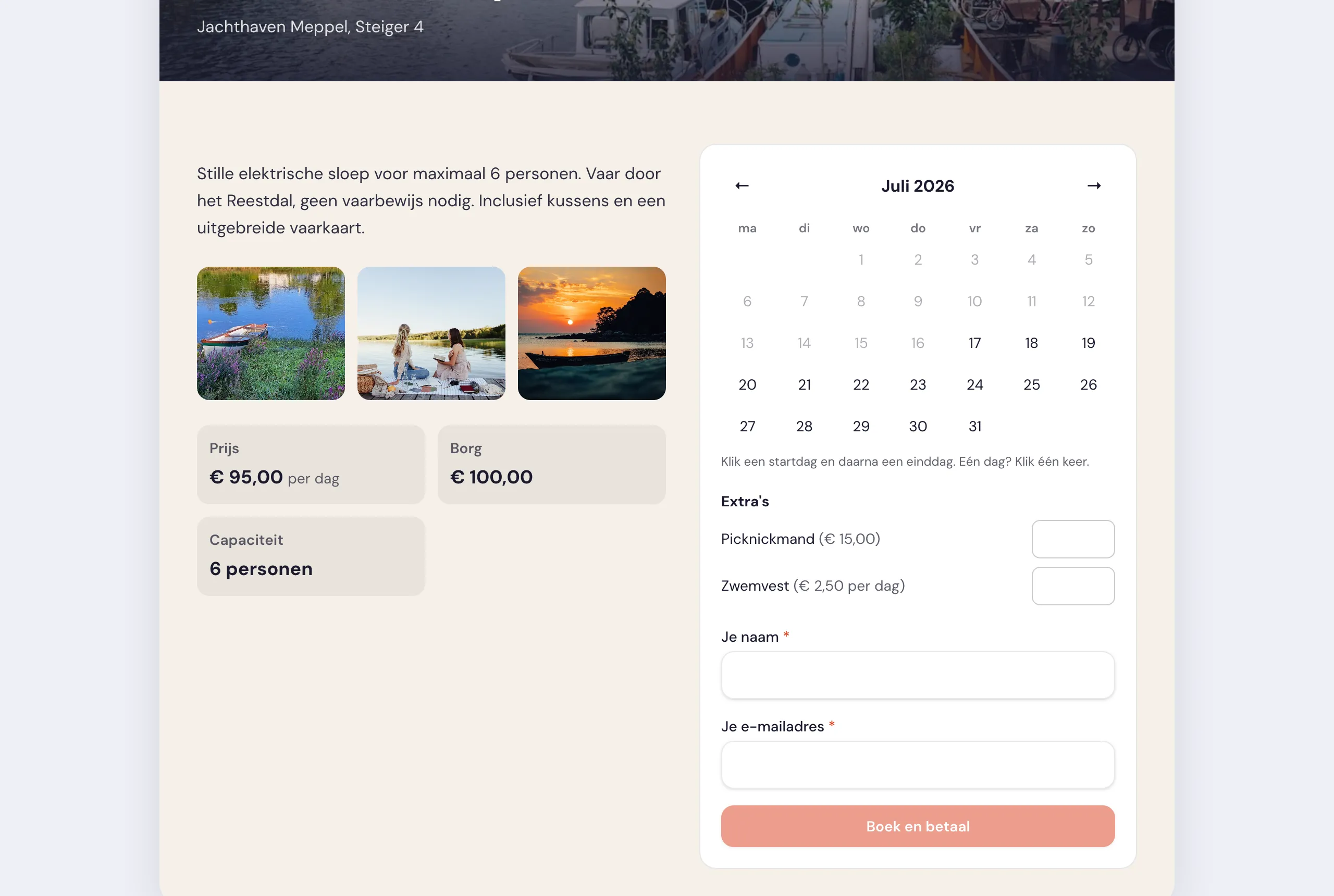
![The price block with Price, Deposit and Capacity, next to a booking card](https://regify-mijnevent.s3.eu-central-1.amazonaws.com/blog/inline/verhuur-borg-prijsblok.webp)*Price, deposit and capacity are set per rental item; the booking card shows the deposit status.*

# The renter simply pays the deposit online

At checkout the renter sees the deposit as a **separate line** in the price breakdown — neatly split from the rental sum and any extras. The line literally reads **"Deposit (you get it back after return)"**, so there's no confusion about what it is and that the money comes back. That same line later appears on the confirmation email and the PDF booking proof, with a note that the deposit was paid online and is automatically refunded after return.

Important: MijnEvent charges **no platform fee** on the deposit. The fee only applies to what you actually rent out, never to the amount the renter gets back anyway.

# After return: back in one action

Does everything come back intact and on time? Then you open the booking and press **Handle deposit**. The full deposit is automatically refunded via a Mollie refund on the original payment — straight to the renter's account. Depending on their bank the amount is back within a few working days, and the renter receives a confirmation email about it.

Is there damage or something missing? Then, while handling it, you withhold the deposit **in full or in part**, with a mandatory reason. The remaining part is simply refunded, and the renter sees in the settlement exactly which amount was withheld and why. Transparent for both sides — and it saves awkward conversations at the jetty.

# Everything adds up in the admin

The nice part is that no cash is involved anywhere. The deposit runs through the same payment as the rental, lands in your own Mollie account and leaves again via a real refund. In the bookings overview you see the deposit status per booking — still open, withheld or refunded — so you always know where you stand. No cash discrepancies, no loose notes, just a clean set of books.

# Who is this for?

This approach suits anyone who lends out equipment per period and wants to cover themselves against damage or loss: watersports rental, bike rental, clubs lending out stalls or party tents, and recreation businesses. Want to sell parking or camping spots alongside your rentals? Those run on the same reservation engine — have a look at the [parking module](/en/modules/parking).

Want to know more about the complete module? See the [Rentals &amp; reservations](/en/modules/rentals) module page — we activate it for your organisation on request.

   Frequently asked questions

## Frequently asked questions

## How does the renter pay the deposit?

 The renter pays it online on top of the rental sum. At checkout the deposit shows as a separate line reading "Deposit (you get it back after return)", and it later appears on the confirmation email and the PDF booking proof.

## How do I refund the deposit after return?

 Open the booking and press "Handle deposit". The full deposit is refunded via a Mollie refund on the original payment, back to the renter directly, and they receive a confirmation email; depending on the bank it is back within a few working days.

## Can I withhold the deposit if there is damage?

 Yes. While handling it you withhold the deposit in full or in part, with a mandatory reason. The remaining part is refunded and the renter sees exactly which amount was withheld and why.

  [    Back to blog ](https://mijnevent.nl/en/blog) 

  MijnEvent

## Read more

 [ ![](https://regify-mijnevent.s3.eu-central-1.amazonaws.com/blog/covers/automatic-membership-renewal-dutch-law.webp) memberships 

 Jasper Koers · 27 July 2026 · 6 min read

## Automatic membership renewal: collecting fees within Dutch renewal law

Automatic renewal saves your club a pile of chasing work, but the law has rules about cancelling. Here is how renewal works in MijnEvent, and how to keep it clean.

 ](https://mijnevent.nl/en/blog/automatic-membership-renewal-dutch-law) [ ![](https://regify-mijnevent.s3.eu-central-1.amazonaws.com/blog/covers/ontruimingsverslag-evenement-bewijsstuk.webp) safety 

 MijnEvent · 27 July 2026 · 5 min read

## The evacuation record: why the day after your event matters for the next permit

An evacuation — real or drilled — is only finished once it is on paper. What belongs in an evacuation record, why the municipality asks for it, and how to make the record write itself instead of reconstructing it afterwards?

 ](https://mijnevent.nl/en/blog/evacuation-record-event-evidence) [ ![](https://regify-mijnevent.s3.eu-central-1.amazonaws.com/blog/covers/knmi-weeralerts-veiligheidsplan.webp) safety 

 MijnEvent · 27 July 2026 · 3 min read

## Weather monitoring in your safety plan: how KNMI warnings land in your alerts and logbook automatically

Almost every safety-plan format has a 'weather monitoring' section — and almost nobody fills it in concretely. The Safety &amp; Permit module pulls the KNMI warning code for your event location every hour and turns it into a demonstrable process.

 ](https://mijnevent.nl/en/blog/knmi-weather-alerts-event-safety-plan) 

   MijnEvent

## Ready to get started?

Create a free account and sell your first tickets today.

 [Start free](https://mijnevent.nl/registreer) [Pricing](https://mijnevent.nl/en/pricing)

