
For a lot of clubs and associations the member administration is a patchwork: a spreadsheet for the members, a bank account full of loose transfers and a paper list at the door on club night. The Memberships & season passes module brings that together in one place: members sign up online, pay straight away and receive a digital membership card you can simply scan at the door.
The module can be activated on request through MijnEvent and works alongside your ticket sales.
Note: the screenshots below show the Dutch interface.
Tiers: every kind of membership its own price and period
No two associations are the same, so you decide which kinds of membership you offer. Think of a "Friend of the club" for a fixed amount per year, a season pass valid for the whole season, or a one-off supporter pass. Per tier you set:
- the price;
- the period: per month, per year, per season or one-off;
- optionally a member limit — useful when a season pass is tied to a maximum number of places;
- whether the membership renews automatically, and with what notice period after that renewal (more on this below).
Once a tier is full, sign-ups close by themselves. So you never sell more season passes than your stand can hold.
One public sign-up page
As soon as the module is active, your subdomain gets a sign-up page at /lidmaatschap — in the same house style as your ticket pages. All your tiers sit there side by side, with the price prominent, the period and a label for the member benefit. A new member picks a tier, fills in their details and pays straight away with iDEAL | Wero. No more chasing transfers, no more retyping paper forms. Have your own club website? Embed the sign-up page there as a widget — the snippet is in the dashboard under Integrations.
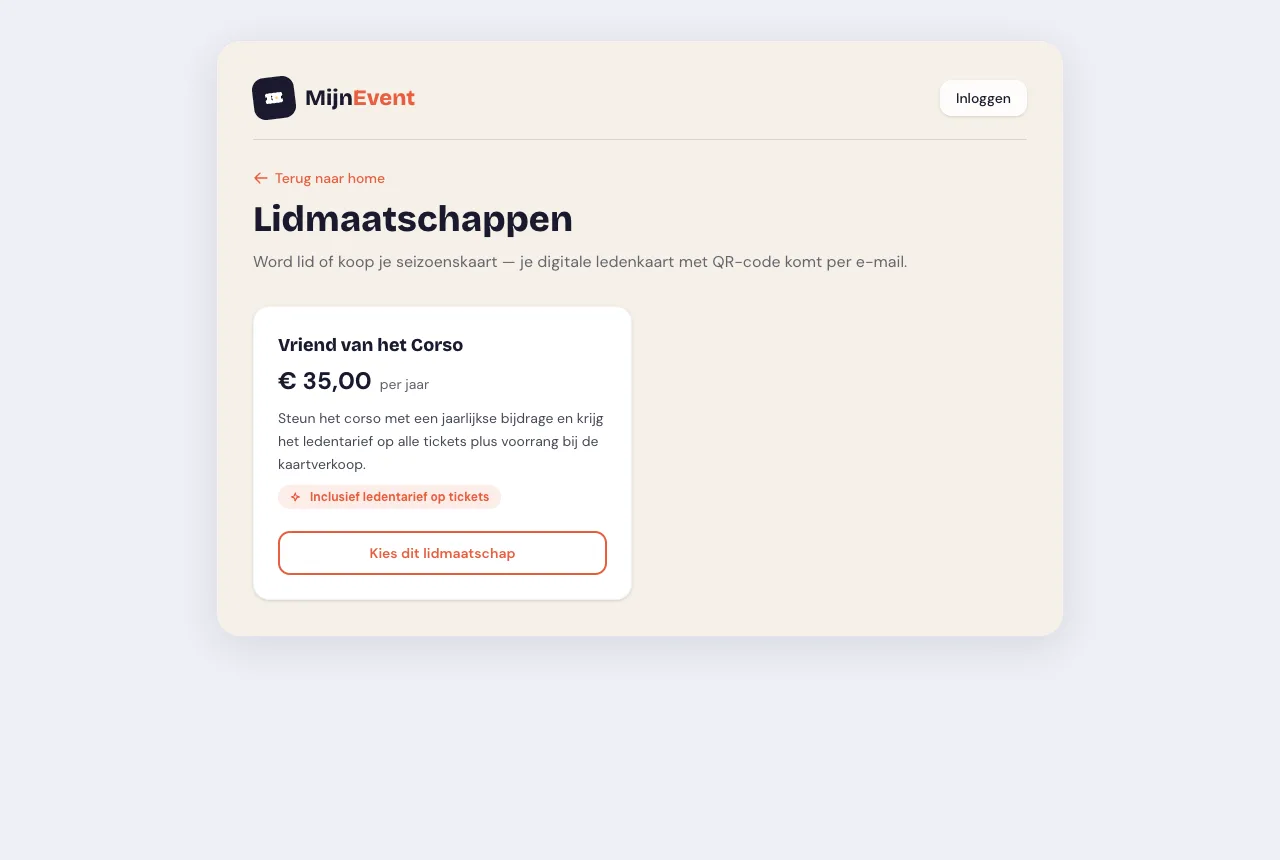 The sign-up page at /lidmaatschap: all tiers side by side, each with its own price and period.
The digital membership card: QR plus member number
After payment the member receives a digital membership card by email, with a QR code and their own member number (LID-00001, for instance). That card is more than a confirmation — it is a working proof of access.
Unlike a ticket, the membership card is repeatedly scannable: for as long as the membership is valid, the member can have it scanned again at every club night, home game or activity. Your scanner checks live whether the membership is still active and gives green or red immediately. That is access control for members without handing out separate tickets.
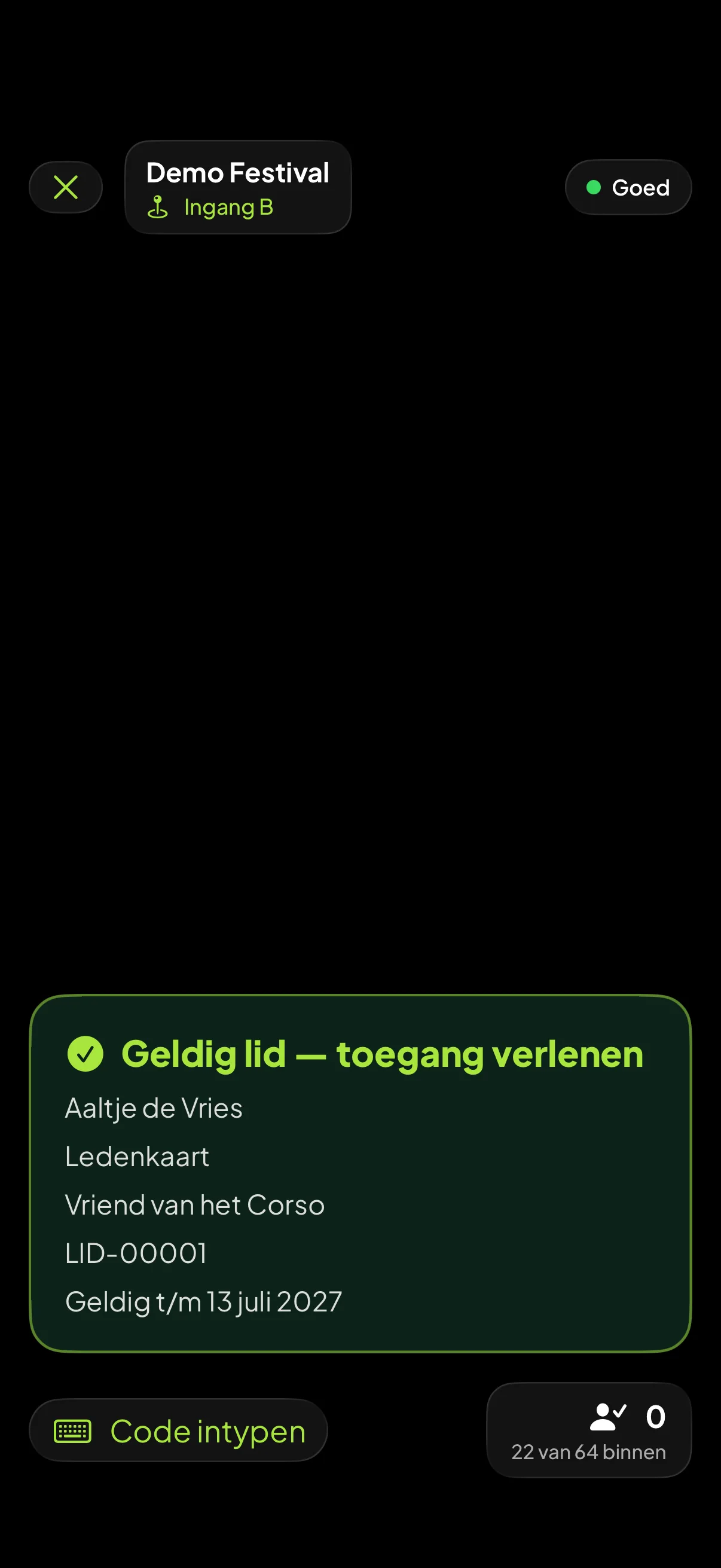 The scanner at the door: a valid membership turns green and the volunteer lets them in.
Rather not dig through an inbox at the entrance? The membership card also goes in Apple Wallet and Google Wallet.
The member rate applied automatically on ticket sales
Do you sell tickets for events with a separate member rate? Then the member has nothing to prove. While ordering they fill in their card number, the system verifies that the membership is valid and charges the member rate automatically. No discount codes going round that end up forwarded to non-members — the membership itself is the key.
Automatic renewal and direct debit
A membership that has to be collected by hand every year is half a system. So you switch Renews automatically on per tier. From then on a new member gives a mandate with their first payment — through Mollie, into the club's own account. Every following period the fee is collected automatically; no more payment requests to send round, no more bank statements to tick off.
Collection is no guarantee: an account can be empty, a mandate can be withdrawn. If the debit fails, the member automatically receives a payment request by email. Once they pay it, the mandate is good again and the next period runs by itself. If something stays outstanding, you see it in the fee overview (below).
Before the member pays, the sign-up page already states in plain words what renews, on what term and how to cancel. No small print afterwards, no surprise at the first debit.
Cancelling: by the member, under Dutch renewal law
The Netherlands has a law on silently renewing subscriptions and memberships, the Wet van Dam, codified in article 6:236 sub j of the Dutch Civil Code. It applies to Dutch consumers and it comes down to this: after the first renewal a membership must be cancellable monthly with at most one month's notice. That is not something an organiser can negotiate away — the clause is on the statutory blacklist and is voidable. The Dutch consumer authority ACM summarises it on Abonnement opzeggen (in Dutch). You may make that period shorter; you set it per tier under Notice period after renewal. Longer than a month is something the system will not let you configure, even if you wanted to.
Members cancel themselves, through a signed link in their own email. No account, no login screen, no phone call to the membership secretary on a Tuesday evening. Whatever has already been paid for the remaining period is calculated pro rata.
Want to walk through renewal, the mandate and the notice period in detail? That is in Automatic membership renewal: collecting fees within Dutch renewal law.
Fees: what is coming in and what is coming up
At the top of the Members tab sits the fee overview. In one glance you see:
- Running per month — the amount you currently collect in fees each month, with the yearly figure below it;
- Collected this year — what has actually come in this calendar year;
- Next 30 days — how many collections are queued and for what total;
- Leaving — who has cancelled, and how much monthly fee goes with them;
- the split per tier, plus a line with outstanding collections and members in arrears.
This is deliberately a snapshot, not a revenue forecast: it counts the members you have now and the collections queued now. Just enough to know whether your treasurer needs to steer, and to walk into a committee meeting with a number instead of a feeling.
The dashboard: member list and tiers
The dashboard keeps track of the rest:
- creating and editing tiers, including automatic renewal and notice period;
- the member list with status, member number and period per member, and a marker showing which memberships renew automatically;
- cancelling at the end of the period — the member keeps their rights until the end date, after which the membership stops cleanly.
Getting started
Whether you are a sports club with season passes, a cultural association with supporters or a community centre with yearly members: the module replaces the loose lists with one working system. Have a look at the module page for all the details — the module can be activated on request through MijnEvent. No account yet? Register your organisation and put your member administration online today.


