# Selling merchandise with pickup at your event: how the web shop module works — MijnEvent

  [Home](https://mijnevent.nl/en) / [Blog for event organizers](https://mijnevent.nl/en/blog) / Selling merchandise with pickup at your event: how the web shop module works   modules merchandise 

# Selling merchandise with pickup at your event: how the web shop module works

Sell shirts, hoodies and other merchandise in advance through your own web shop at /shop. Visitors pay with iDEAL | Wero, receive a collection pass with a QR code and pick their order up at the event — with no risk of overselling.

 [Jasper Koers](https://mijnevent.nl/en/author/jasper-koers) · 16 May 2026 · 4 min read 

       In short

- With the Merchandise &amp; web shop module you sell shirts, hoodies and other items in advance through your own web shop at /shop; visitors pick their order up at the event.
- You work with variants (size, colour) and track stock per variant; overselling is impossible because stock is reserved at checkout and only deducted once a payment succeeds.
- Payments run through your own Mollie account with iDEAL | Wero; MijnEvent charges a flat platform fee per order — not per item.
- After payment the visitor receives a collection pass with a QR code; the scanner recognises repeat use and then shows that the order has already been collected.

  A merchandise stall at your event is fun, but also a gamble. How many shirts do you order? Which sizes? And what do you do with the boxes left over? With the **Merchandise &amp; web shop** module you turn it around: visitors order and pay in advance in your own web shop, and pick their order up at the event. You know exactly what has been sold beforehand — and at the stall your crew only scans a QR code.

The module can be [activated on request through MijnEvent](/en/modules/merchandise) and runs entirely inside your own ticket shop.

# Your own web shop at /shop

As soon as the module is active, your subdomain gets a web shop at `/shop`. Your products sit there in the same house style as the rest of your ticket shop: a **product photo per item**, a description, the price and a clear buy button. Visitors never have to go anywhere else — the web shop feels like a natural extension of your event page. And do you have a band site or a club website of your own? Embed the web shop there as a **widget** (two lines of code, snippet in your dashboard under Integrations).

# Variants and stock per size

Merchandise is rarely a single product. A festival shirt comes in sizes S through XXL, and perhaps in two colours too. That is why the module works with **variants**: per product you record the combinations (size, colour) and give each variant its own stock. So you see at a glance that size L is nearly gone while size S is still plentiful.
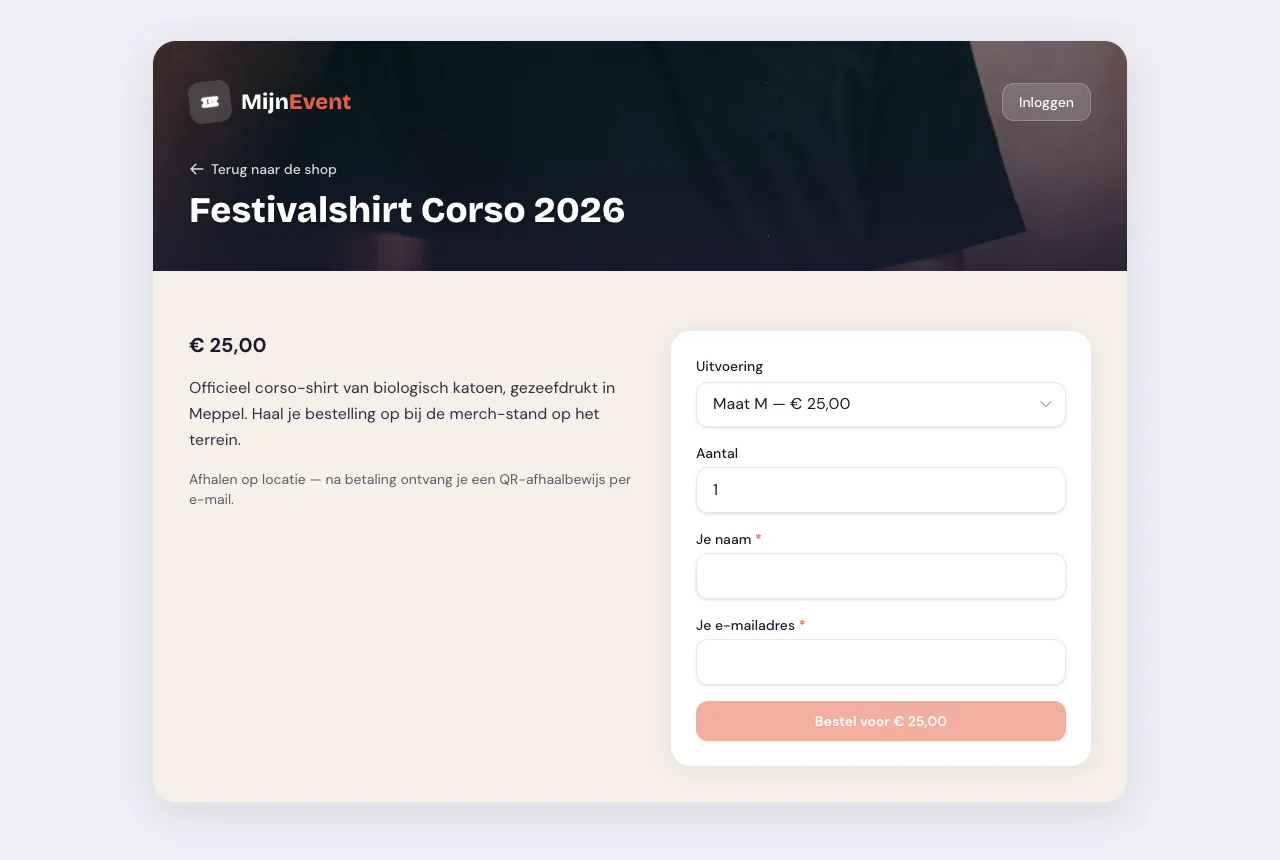
![The product page with variant selection and a live total](https://regify-mijnevent.s3.eu-central-1.amazonaws.com/blog/screenshots/shop-product.webp)*The product page in the web shop: the visitor picks a variant and sees the total update straight away.*

# Overselling is impossible

The biggest risk with selling in advance is a double sale: two visitors checking out the last shirt in size M at the same moment. The module rules that out. The moment a visitor checks out, the stock is **reserved**; only once the payment comes in is it deducted for good. If the payment fails or the buyer drops out, the reservation is automatically released again, so you never sell more than you have.

# Paying through your own Mollie account

Just like your ticket sales, payment runs through **your own Mollie account**: iDEAL | Wero and the other payment methods you have enabled at Mollie. The proceeds land directly with you. MijnEvent charges a **flat platform fee per order** — not per item. Whether someone buys a single shirt or a shirt, a hoodie and a cap at once: the fee stays the same.

# Collection with a QR pass

After payment the visitor receives a **collection pass with a QR code** by email. At the event your crew scans that QR code at the merchandise stall, sees what is in the order and hands everything over. Does someone try to use the pass a second time? The scanner spots it straight away and shows a clear message: **already collected**. No discussions at the stall, no orders handed out twice.

# Overview in your dashboard

In your dashboard you find everything you need to run the web shop:

- Creating and editing **products**, and taking them out of sale (temporarily);
- Tracking **variants and stock** per product;
- A **collection overview** that follows every order through three statuses: ordered, ready and collected.

That way you know exactly, on the day itself, how many orders still need preparing and who is still coming by.

# Deliberately pickup only

The module is deliberately focused on **collection on site**. That keeps things simple: no shipping costs, no parcels, no returns hassle — the order changes hands at the event. Shipping to a home address is not part of it, and it stays that way: that belongs to a web shop with a warehouse and a returns flow, not to merchandise you collect at your event anyway.

# Getting started

Want to sell merchandise in advance for your next event? Have a look at the [module page](/en/modules/merchandise) for all the details. The module can be activated on request through MijnEvent — get in touch and your web shop is online quickly. No MijnEvent account yet? [Register your organisation](/registreer) and combine ticket sales and merchandise in one place.

   Frequently asked questions

## Frequently asked questions

## Can I sell more merchandise than I have in stock?

 No. Stock is reserved at checkout and only deducted for good once a payment succeeds. If the payment fails or the buyer drops out, the reservation is automatically released again, so you never sell more than you have.

## How does the visitor pay and what does it cost me?

 Payments run through your own Mollie account with iDEAL | Wero and the other methods you have enabled; the proceeds land directly with you. MijnEvent charges a flat platform fee per order, not per item.

## How does collection at the event work?

 After payment the visitor receives a collection pass with a QR code by email. Your crew scans it at the merchandise stall, sees what is in the order and hands everything over; if someone tries to use the pass a second time, the scanner shows that it has already been collected.

  [    Back to blog ](https://mijnevent.nl/en/blog) 

  MijnEvent

## Read more

 [ ![](https://regify-mijnevent.s3.eu-central-1.amazonaws.com/blog/covers/automatic-membership-renewal-dutch-law.webp) memberships 

 Jasper Koers · 27 July 2026 · 6 min read

## Automatic membership renewal: collecting fees within Dutch renewal law

Automatic renewal saves your club a pile of chasing work, but the law has rules about cancelling. Here is how renewal works in MijnEvent, and how to keep it clean.

 ](https://mijnevent.nl/en/blog/automatic-membership-renewal-dutch-law) [ ![](https://regify-mijnevent.s3.eu-central-1.amazonaws.com/blog/covers/ontruimingsverslag-evenement-bewijsstuk.webp) safety 

 MijnEvent · 27 July 2026 · 5 min read

## The evacuation record: why the day after your event matters for the next permit

An evacuation — real or drilled — is only finished once it is on paper. What belongs in an evacuation record, why the municipality asks for it, and how to make the record write itself instead of reconstructing it afterwards?

 ](https://mijnevent.nl/en/blog/evacuation-record-event-evidence) [ ![](https://regify-mijnevent.s3.eu-central-1.amazonaws.com/blog/covers/knmi-weeralerts-veiligheidsplan.webp) safety 

 MijnEvent · 27 July 2026 · 3 min read

## Weather monitoring in your safety plan: how KNMI warnings land in your alerts and logbook automatically

Almost every safety-plan format has a 'weather monitoring' section — and almost nobody fills it in concretely. The Safety &amp; Permit module pulls the KNMI warning code for your event location every hour and turns it into a demonstrable process.

 ](https://mijnevent.nl/en/blog/knmi-weather-alerts-event-safety-plan) 

   MijnEvent

## Ready to get started?

Create a free account and sell your first tickets today.

 [Start free](https://mijnevent.nl/registreer) [Pricing](https://mijnevent.nl/en/pricing)

