# Sponsors on your tickets: give your partners a spot on the ticket PDF — MijnEvent

  [Home](https://mijnevent.nl/en) / [Blog for event organizers](https://mijnevent.nl/en/blog) / Sponsors on your tickets: give your partners a spot on the ticket PDF   tickets ticketing sponsoren events 

# Sponsors on your tickets: give your partners a spot on the ticket PDF

Put your event sponsors at the bottom of the ticket PDF, under the heading 'Made possible by'. You add sponsors with a logo once, switch the display on per event, and their logo travels with every ticket.

 [Jasper Koers](https://mijnevent.nl/en/author/jasper-koers) · 30 March 2026 · 3 min read 

       In short

- Show your event sponsors at the bottom of the ticket PDF under a 'Made possible by' heading.
- Add sponsors (name, logo, link) once for the whole organisation and enable the display per event.
- A maximum of four logos per ticket; they are embedded in the PDF so they always travel with it.
- Sponsors only appear when the PDF attachment is enabled for that event.

  A sponsor helps pay for your event and wants something in return: visibility. A banner along the field is nice, but there's one spot everyone genuinely looks at — the ticket itself. On MijnEvent you give your event sponsors a fixed place at the bottom of the **ticket PDF**, under the heading *"Made possible by"*. Their logo travels along in every attachment, from the confirmation email to the screen at the entrance.

*Note: the screenshot below shows the Dutch interface — the flow is identical in every language.*

# Add sponsors with a logo

In the sponsor admin (**Dashboard → Sponsors**) you create a sponsor: a **name**, a **logo** and an optional **link** to their website. Sponsors are organisation-wide — you set them up once and use them on as many events as you like, without re-entering them each time.

Each sponsor has two toggles: **active** (is the sponsor on at all) and **show on the ticket PDF**. That way a sponsor who only belongs on your website stays off the tickets easily. If a sponsor has no logo (yet), the display neatly falls back to the name as text — you never end up with a gap.

# Switch it on per event

Not every event wants the same sponsors on the ticket. That's why the **"Show sponsors on the ticket PDF"** button lives in each event's ticket settings separately (it's on by default). Your big festival proudly shows your main sponsors; a small private event leaves them off with a single tick.

One condition: sponsors only appear if you also have the **PDF attachment** switched on ("Send the tickets as a PDF attachment"). Logical — no PDF, no place for logos. If the PDF is off, the sponsor button greys out automatically.

# How it appears on the ticket

At the bottom of every ticket PDF a tidy row appears: first the heading **"Made possible by"**, then the logos of your sponsors in the order you set. To keep it clean and readable, the ticket shows at most four — enough for your main partners, without turning into an advertising flyer.

The logos are **embedded in the PDF** (as data URIs), so they always travel along — even when the PDF is produced by our cloud renderer or opened by a strict mail client. No broken images, no external requests.
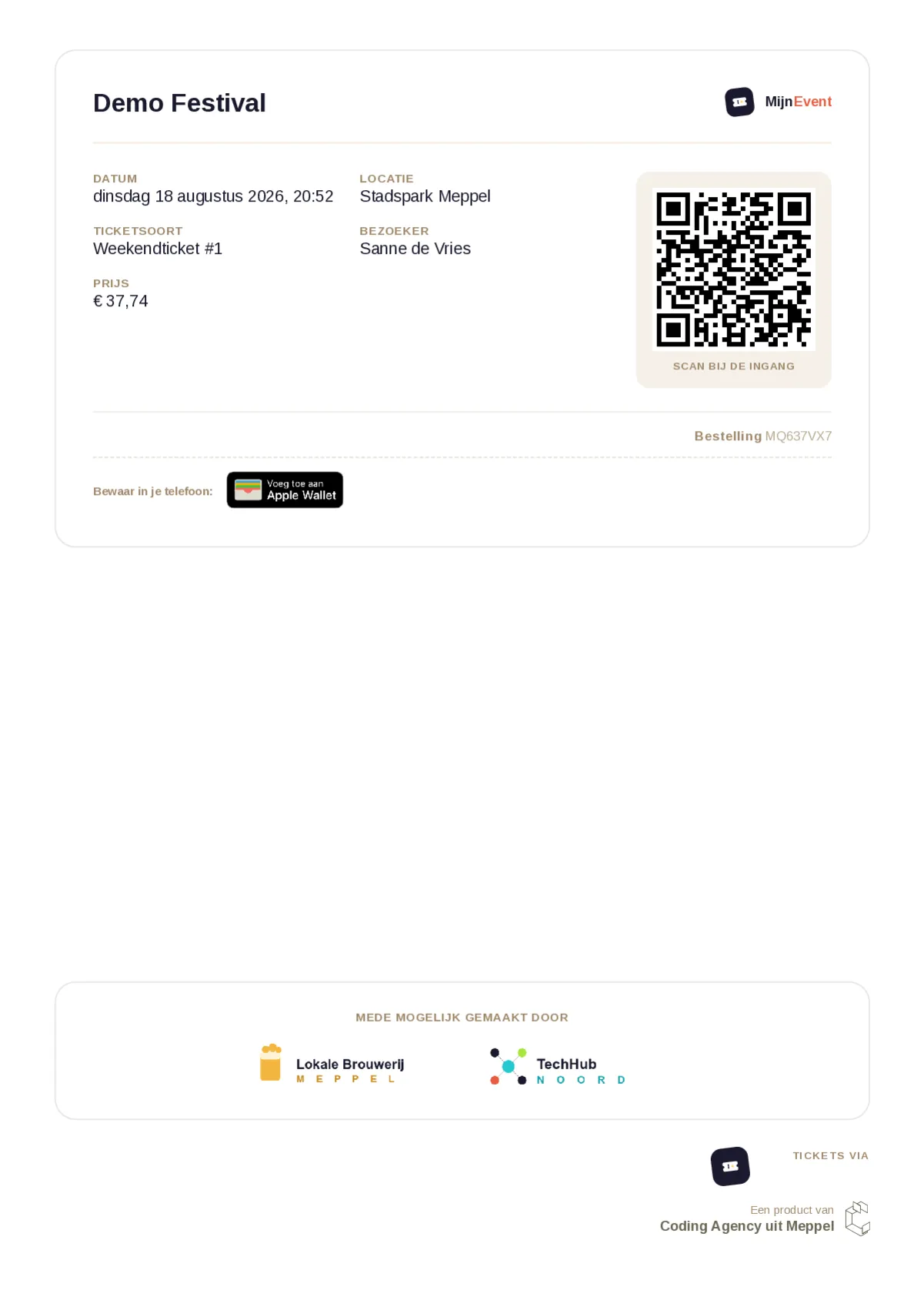
![A ticket PDF with sponsor logos under 'Made possible by'](https://regify-mijnevent.s3.eu-central-1.amazonaws.com/blog/inline/ticket-pdf-sponsoren-v2.webp)*The sponsor bar at the bottom of the ticket: heading, logos, and a link for whoever opens it digitally.*

# On the city card too

If you work with the city-card module, you already know this pattern: there, [the merchant pages give your sponsors and own branding](/en/blog/city-card-page-own-branding-and-sponsors) a place on the public page. Ticket sponsors are its sibling, but on the proof the visitor takes home.

# How to switch it on

1. Go to **Dashboard → Sponsors** and add a name, logo and (optionally) a link per sponsor.
2. On the sponsor, switch **"show on the ticket PDF"** on and make sure it's **active**.
3. Open your event, go to the ticket settings and check that both the **PDF attachment** and **"Show sponsors on the ticket PDF"** are on.
4. Send or download a test ticket to check the sponsor bar.

The ticket PDF does more than just carry sponsors, by the way: every order automatically gets a [branded PDF proof](/en/blog/pdf-proof-with-every-order). Curious what else is possible? Browse the [module overview](/en/modules).

   Frequently asked questions

## Frequently asked questions

## Where do sponsors appear on the ticket?

 At the bottom of the ticket PDF, under a 'Made possible by' heading, with the logos in the order you set. The ticket shows at most four.

## Do I need to re-enter sponsors for every event?

 No. You add sponsors with a name, logo and optional link once for the whole organisation via Dashboard → Sponsors, then switch the display on or off per event.

## Why don't my sponsors show on the ticket?

 Sponsors only appear when the PDF attachment is enabled for that event. If the PDF is off, the sponsor button greys out and no logos are added to the ticket.

  [    Back to blog ](https://mijnevent.nl/en/blog) 

  MijnEvent

## Read more

 [ ![](https://regify-mijnevent.s3.eu-central-1.amazonaws.com/blog/covers/automatic-membership-renewal-dutch-law.webp) memberships 

 Jasper Koers · 27 July 2026 · 6 min read

## Automatic membership renewal: collecting fees within Dutch renewal law

Automatic renewal saves your club a pile of chasing work, but the law has rules about cancelling. Here is how renewal works in MijnEvent, and how to keep it clean.

 ](https://mijnevent.nl/en/blog/automatic-membership-renewal-dutch-law) [ ![](https://regify-mijnevent.s3.eu-central-1.amazonaws.com/blog/covers/ontruimingsverslag-evenement-bewijsstuk.webp) safety 

 MijnEvent · 27 July 2026 · 5 min read

## The evacuation record: why the day after your event matters for the next permit

An evacuation — real or drilled — is only finished once it is on paper. What belongs in an evacuation record, why the municipality asks for it, and how to make the record write itself instead of reconstructing it afterwards?

 ](https://mijnevent.nl/en/blog/evacuation-record-event-evidence) [ ![](https://regify-mijnevent.s3.eu-central-1.amazonaws.com/blog/covers/knmi-weeralerts-veiligheidsplan.webp) safety 

 MijnEvent · 27 July 2026 · 3 min read

## Weather monitoring in your safety plan: how KNMI warnings land in your alerts and logbook automatically

Almost every safety-plan format has a 'weather monitoring' section — and almost nobody fills it in concretely. The Safety &amp; Permit module pulls the KNMI warning code for your event location every hour and turns it into a demonstrable process.

 ](https://mijnevent.nl/en/blog/knmi-weather-alerts-event-safety-plan) 

   MijnEvent

## Ready to get started?

Create a free account and sell your first tickets today.

 [Start free](https://mijnevent.nl/registreer) [Pricing](https://mijnevent.nl/en/pricing)


