# Your city card page in your own look: header photo, logo and sponsors — MijnEvent

  [Home](https://mijnevent.nl/en) / [Blog for event organizers](https://mijnevent.nl/en/blog) / Your city card page in your own look: header photo, logo and sponsors   modules stadsbonnen 

# Your city card page in your own look: header photo, logo and sponsors

Upload a header photo and logo for your city card programme and the public purchase and balance pages carry your branding right away. Also new: a sponsor block — "Made possible by", with name, logo and link, in the order you choose.

 [Jasper Koers](https://mijnevent.nl/en/author/jasper-koers) · 8 May 2026 · 4 min read 

  ![](https://regify-mijnevent.s3.eu-central-1.amazonaws.com/blog/covers/stadspas-pagina-eigen-branding-en-sponsoren.webp)  Photo: [Nikolai Kolosov](https://unsplash.com/@nikolaikolosov?utm_source=MijnEvent&utm_medium=referral) / [Unsplash](https://unsplash.com/?utm_source=MijnEvent&utm_medium=referral)    In short

- You can give the public city card purchase and balance pages your own look by uploading a header photo and logo per programme (PNG, JPG or WebP, up to 4 MB per file).
- A new Sponsors tab shows partners under a 'Made possible by' section, with a required name plus an optional logo and link, in an order you choose yourself.
- The branding applies to both public pages at once — the purchase page and the balance page — and without uploads the page falls back to the neat default look, so nothing breaks.
- The sponsor block is WCAG-accessible: links open in a new window with a screen-reader hint, and the section is hidden entirely when there are no sponsors.

  A city card carries the name of your own town centre, not that of a nationwide gift voucher. But the page where residents buy that card and check their balance used to look the same for every programme. That has changed: **you now give the public city card pages your own look**, with a header photo and logo per programme plus a sponsor block for the local partners who help carry the card. All part of the [Gift cards &amp; city cards](/en/modules/city-cards) module.

*Note: the screenshot below shows the Dutch interface — the flow is identical in every language.*

# Header photo and logo: upload and done

In the dashboard (City card → Overview) you'll find a new card called **"Header photo &amp; logo"**. Upload a photo of your own town centre — the shopping street, the market square, the harbour — and your logo (PNG, JPG or WebP, up to 4 MB per file). From that moment the public page opens with **your photo as the hero, with your logo on top**.

That applies to both public pages at once: the **purchase page** where residents order a card, and the **balance page** where card holders check their credit and [top up](/en/blog/top-up-your-city-card). Replacing or removing is always possible from the same card in the dashboard, and without uploads the page simply falls back to the neat default look — nothing breaks.
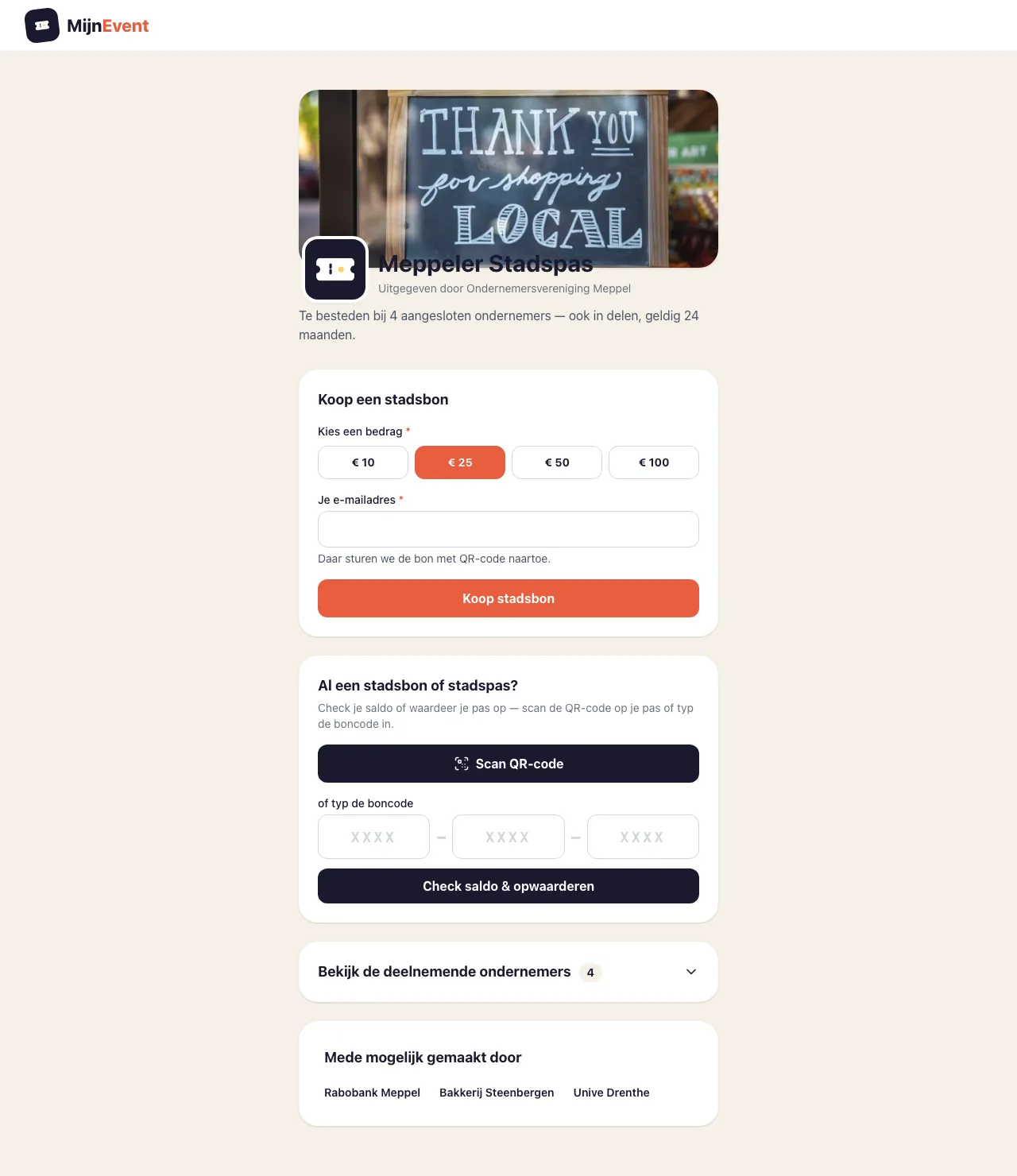
![The public city card page with its own header photo, logo, shops and sponsor section](https://regify-mijnevent.s3.eu-central-1.amazonaws.com/blog/inline/stadspas-branding-sponsoren.webp)*The public page in your own branding: header photo with logo at the top, the participating shops in the middle and the sponsors at the bottom.*

# "Made possible by": your sponsors in view

Many city cards exist thanks to local partners: the business fund that pays for the launch, the bank sponsoring the campaign, the municipality that hands out cards to volunteers. Those partners deserve a spot on the page — and now they have one.

The city card dashboard has a new **Sponsors** tab. Per sponsor you enter a **name** (required), and optionally a **logo** and a **link** to their own website. You **choose the order yourself**, so the main sponsor simply comes first.

At the bottom of the public purchase and balance pages, a section titled **"Made possible by"** then lists all sponsors. If a sponsor has a link, it opens in a new window — with a proper hint for screen readers, because this block is WCAG-accessible like the rest. No sponsors (yet)? Then the section simply isn't shown; there's never an empty block on your page.

# Recognition sells

Why this matters: for many residents, the city card page is the first (and often only) touchpoint with the programme. A page that opens with a photo of their own town centre and the familiar logo of the card feels like something from *here* — not like a generic order form. Together with the shop overview the balance page already showed, a visitor sees at a glance: this is our card, these are our shops, and these are the partners making it possible.

For the sponsors themselves, that last part is no small thing. A visible mention on the page where the whole town checks its balance is something concrete to give back for their contribution — and it makes next year's conversation about funding the programme a lot easier.

# How to set it up

1. Go to **Dashboard → City card**, tab **Overview**, and upload your photo and logo under **"Header photo &amp; logo"**.
2. Open the **Sponsors** tab and click **"Add sponsor"**: enter the name, add a logo and link if you like, pick the order.
3. Check your public city card page — the hero and the sponsor section are live right away.

No city card of your own yet? Read how to [issue a city voucher as a municipality, BID or retailers' association](/en/blog/city-voucher-for-your-town). And if you want to go one step beyond your own look — your own domain name and no MijnEvent references at all? That's possible too: read about the [white-label city card on your own domain](/en/blog/white-label-city-card-own-domain).

   Frequently asked questions

## Frequently asked questions

## Where do I upload the header photo and logo for my city card page?

 In the dashboard under City card, on the Overview tab, in the 'Header photo &amp; logo' card. Uploads accept PNG, JPG or WebP up to 4 MB per file and apply to both the purchase and balance pages.

## How do I add sponsors to the city card page?

 Open the Sponsors tab, click 'Add sponsor' and enter a name (required), optionally a logo and a link, and set the order. They then appear under 'Made possible by' at the bottom of the public pages.

## What happens if I don't add any sponsors?

 The 'Made possible by' section simply isn't shown, so there's never an empty block on your page.

  [    Back to blog ](https://mijnevent.nl/en/blog) 

  MijnEvent

## Read more

 [ ![](https://regify-mijnevent.s3.eu-central-1.amazonaws.com/blog/covers/automatic-membership-renewal-dutch-law.webp) memberships 

 Jasper Koers · 27 July 2026 · 6 min read

## Automatic membership renewal: collecting fees within Dutch renewal law

Automatic renewal saves your club a pile of chasing work, but the law has rules about cancelling. Here is how renewal works in MijnEvent, and how to keep it clean.

 ](https://mijnevent.nl/en/blog/automatic-membership-renewal-dutch-law) [ ![](https://regify-mijnevent.s3.eu-central-1.amazonaws.com/blog/covers/ontruimingsverslag-evenement-bewijsstuk.webp) safety 

 MijnEvent · 27 July 2026 · 5 min read

## The evacuation record: why the day after your event matters for the next permit

An evacuation — real or drilled — is only finished once it is on paper. What belongs in an evacuation record, why the municipality asks for it, and how to make the record write itself instead of reconstructing it afterwards?

 ](https://mijnevent.nl/en/blog/evacuation-record-event-evidence) [ ![](https://regify-mijnevent.s3.eu-central-1.amazonaws.com/blog/covers/knmi-weeralerts-veiligheidsplan.webp) safety 

 MijnEvent · 27 July 2026 · 3 min read

## Weather monitoring in your safety plan: how KNMI warnings land in your alerts and logbook automatically

Almost every safety-plan format has a 'weather monitoring' section — and almost nobody fills it in concretely. The Safety &amp; Permit module pulls the KNMI warning code for your event location every hour and turns it into a demonstrable process.

 ](https://mijnevent.nl/en/blog/knmi-weather-alerts-event-safety-plan) 

   MijnEvent

## Ready to get started?

Create a free account and sell your first tickets today.

 [Start free](https://mijnevent.nl/registreer) [Pricing](https://mijnevent.nl/en/pricing)


