Early bird pricing is the oldest trick in the events business, and it still works: whoever books early pays less, and you get certainty about attendance and cash flow sooner. But in most ticketing systems it is an administrative chore. Not anymore.
The problem: the ticket does not change, only the price
Here is how it used to go. You have 1,000 tickets. You create an "Early Bird" ticket type with 80 seats at € 22.50 and a "Regular" type with 920 seats at € 25.00. The promotion ends on 20 August. And then the manual work begins:
- deactivate the early bird, otherwise it stays on sale;
- check how many actually sold — 20 out of 80;
- work out that 60 tickets are left over;
- add those 60 to "Regular", so you still sell 1,000 tickets in total.
Forget that step and you sell 60 tickets too few. Miscount and you oversell. All of this while nothing about the ticket itself changed: same access, same spot, same night. Only the price was different for a while.
The fix: price periods on one ticket type
Every ticket type in the dashboard now has a Price periods block. You give a period a name you choose yourself, a start and end date and a discount or fixed price:
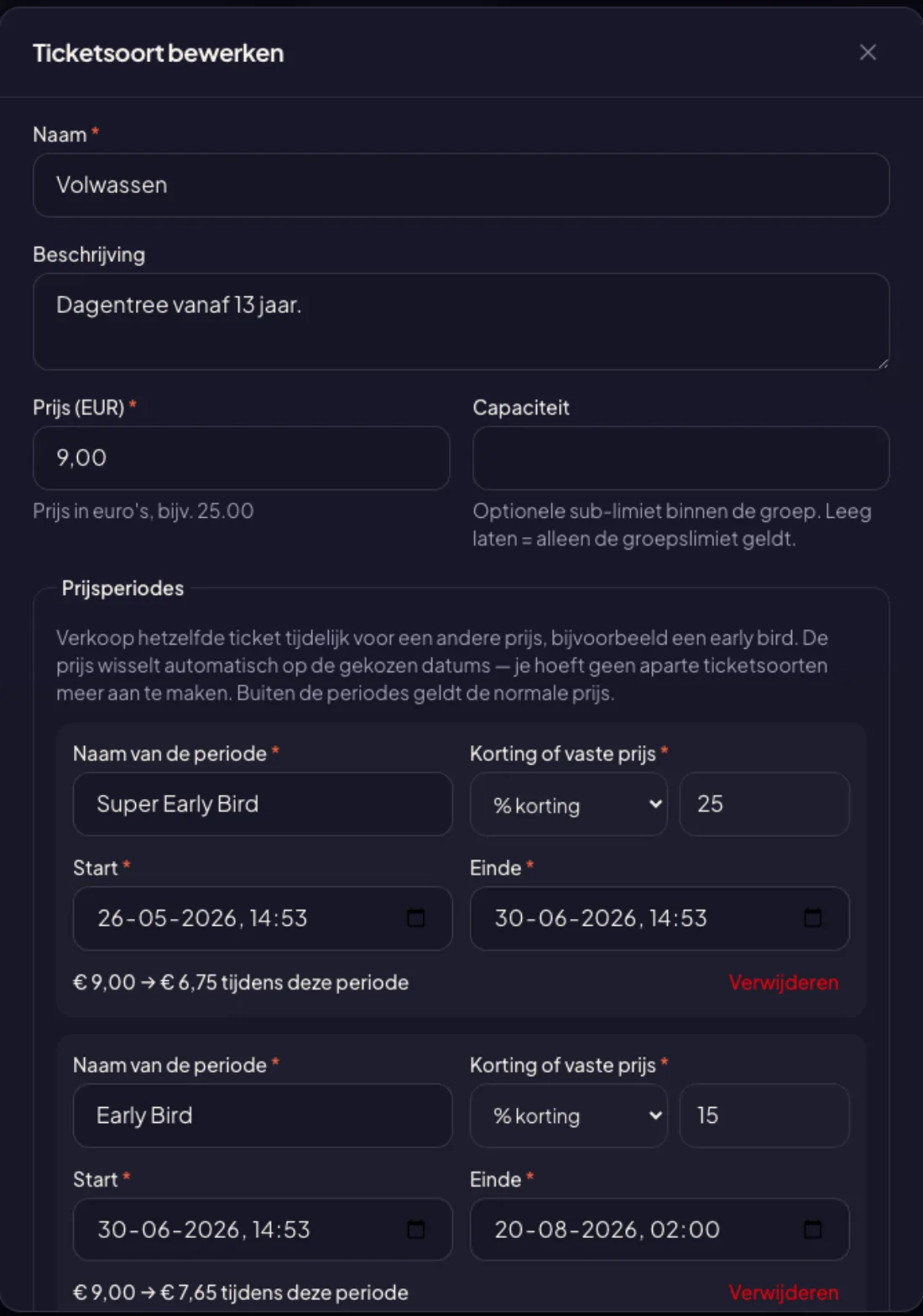 Two periods under the same ticket type. Below each one you immediately see what the visitor will pay.
You can pick a percentage (25% off the base price) or a fixed price (during this period the ticket costs € 18.00). Each row shows the result right away: € 9.00 → € 6.75 during this period. No mental arithmetic to check whether your discount lands on a tidy amount.
Chaining is fine: super early bird until mid-June, early bird until 20 August, regular price after that. Overlapping is not allowed — it would be unclear which price applies — and you get a clear message if it happens.
And then it runs itself
This is the entire point: once it is set up, you do nothing. At midnight on the end date the promotion stops and the next price takes over. No ticket type to deactivate, no numbers to move, no alarm on your phone.
The dashboard list shows at a glance which promotion is running: a badge on the ticket type and the promotional price with the regular one struck through beside it.
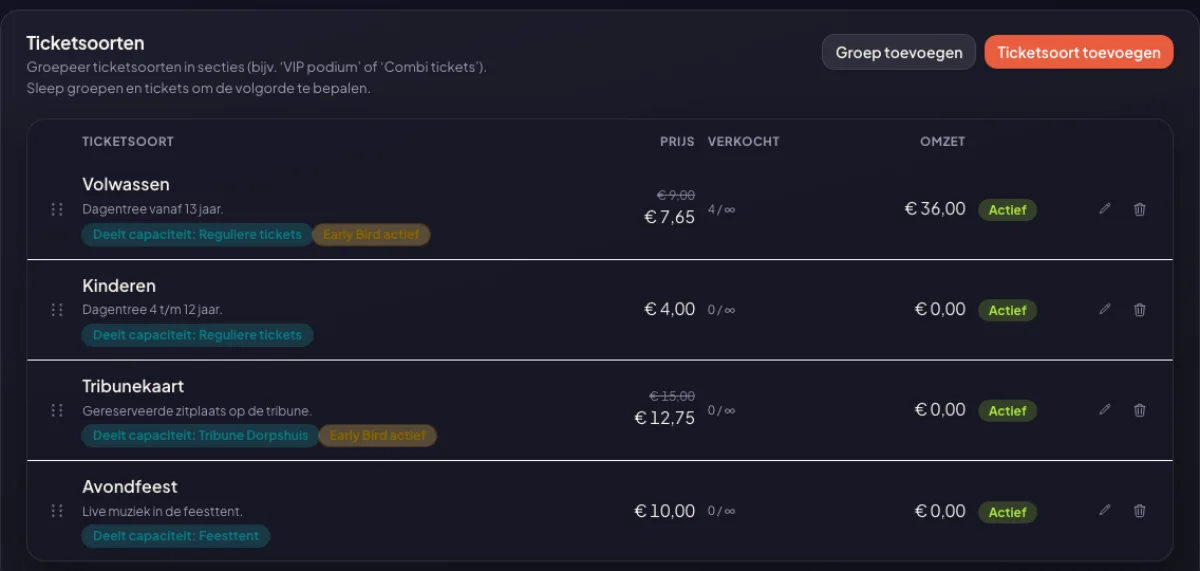 Two ticket types in the promotion, two at the regular price — visible straight from the list.
What the visitor sees
Your event page makes the promotion visible too, because a discount nobody notices earns you nothing. The ticket type shows your promotion name as a label, the old price struck through next to the new one, and the deadline — including what the ticket will cost afterwards:
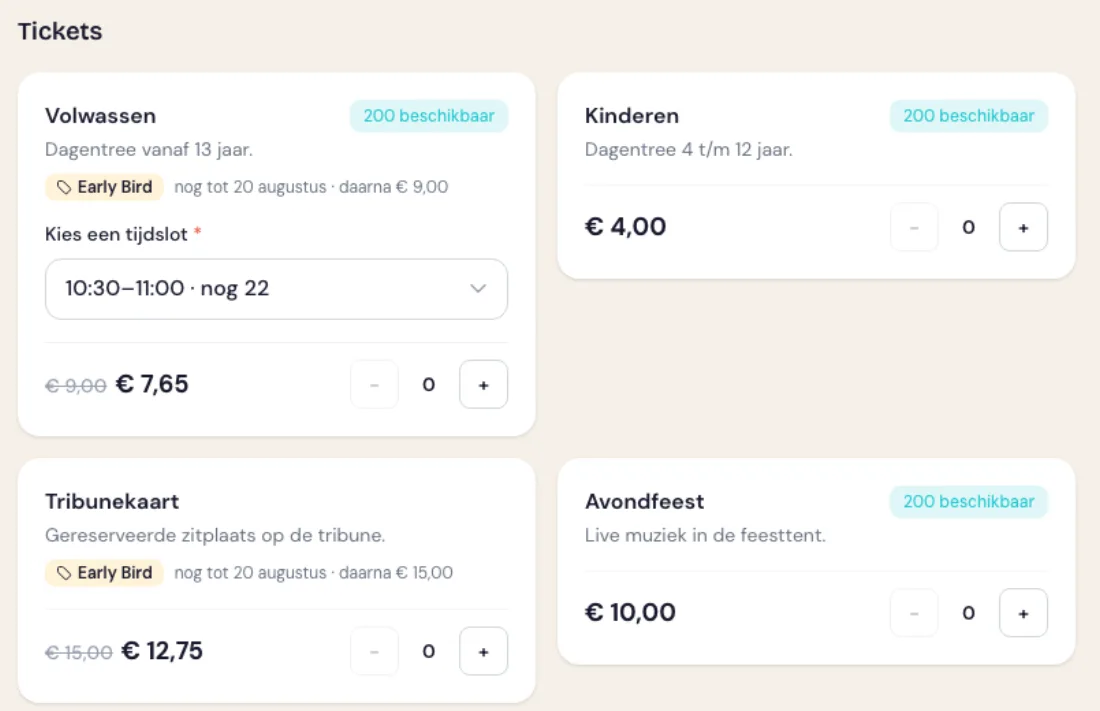 "Until 20 August · then € 9.00" — the visitor knows exactly where they stand.
That last line does more work than you would think. A visitor who knows the ticket gets more expensive next week is far less likely to postpone the decision. And because you pick the name yourself, it fits your event: "Early Riser", "Neighbourhood rate", "Members presale" — whatever you like.
Everyone who cannot see the layout gets it read out as well: screen readers receive the full sentence "regular price € 9.00, now € 7.65 during Early Bird, valid until 20 August" instead of two loose amounts. Accessibility is not an afterthought here.
The fine print that is already handled
- Your capacity stays one pool. That is the core of it: no separate stock levels to keep track of.
- An order in progress keeps its price. The price is locked in when the order is created. If the period ends while someone is paying, their amount does not change.
- The order records which promotion applied. Even if you rename or delete the period later, the old order still says it was a "Super Early Bird" — useful for your bookkeeping and your statistics.
- Discount codes stack. A discount code is calculated over the price that applies at that moment.
- Free stays fee-free. Set a period to 100% off and the ticket is free during that window — and MijnEvent never charges a platform fee on free tickets.
Common in running, rare in ticketing
A curious detail: sign up for a marathon and a fee that rises per period is entirely normal. Endurance-sport registration platforms — Atleta, for one — have had it for years: several rates on a single registration that hand over to each other automatically once a date passes.
In ticketing it never became common practice, for reasons nobody can quite explain. We checked 37 platforms: the entire Dutch self-service segment solves early bird with a separate ticket type and its own stock. Where it is possible, it usually hides inside a discount campaign or a pricing formula, or sits behind an enterprise plan. We felt the organiser of a village festival has just as much right to it as an arena — so with us it lives on the ticket type itself, in every plan.
When should you use this?
A ladder of two or three periods works best for events that sell far in advance: festivals, parades, multi-day conferences. For a smaller event with a short sales window one early bird is usually enough — for instance the first two weeks after the announcement, when attention is highest anyway.
It works in reverse too: set a period to a fixed price higher than your base price and you have a last-minute surcharge for the final week. Same control, opposite direction.
An early bird is only one of the levers you have; see 12 promotion channels that actually work for where it sits among the rest.
No event set up yet? Start with creating your first event — price periods are included in every plan, pay as you go included.


